En este tutorial vamos a hablar del bwbar que es un programa escrito en C mentenido por kernel.org. Bien el programa puede ver por la web el consumo de banda de tu maquina o servidor.
Primero necesitamos tener apache. o php instalados. en el caso de que quieran instalar.
Cualquier cosa sobre apache y php pueden mirar este post mio >>>>>>>> <<<<<<<<<
Va a necesitar de la biblioteca de png. entonces vamos a instalar.
Vamos a instalar la biblioteca de gcc para compilar el programa.
Vamos a compilar el bwbar.
Entramos al directorio /usr/src
Vamos a bajar le código mas reciente de este sitio .
En la consola
Siguiente parte. Primero necesitamos saber las interfaces de red de la maquina.
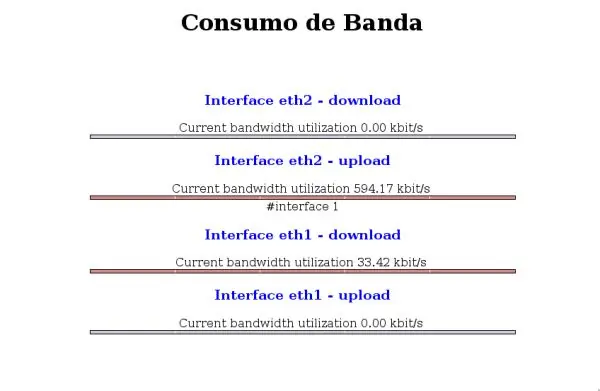
Entonces vamos a crear el archivo en php que va a ser usado para visualizar el consumo de ancho de banda.
En este caso vamos a crear en el directorio de apache /var/www/bwbar
Crear el directório
Entrar en el directorio
Crear el archivo vacio
Editando el archivo creado
Vamos a colocar este contenido. Se puede modificar el contenido de acuerdo a las condiciones de interface.
Bien para iniciar el programa.
Acordándose que se pueden cambiar la interface de red y los nombres de archivos de acuerdo al escenario de cada uno.
Comandos del bwbar
Primero necesitamos tener apache. o php instalados. en el caso de que quieran instalar.
# apt-get install apache2 libapache2-mod-php4
Cualquier cosa sobre apache y php pueden mirar este post mio >>>>>>>> <<<<<<<<<
Va a necesitar de la biblioteca de png. entonces vamos a instalar.
# apt-get install libpngwriter0c2 libpngwriter0-dev libpng12-dev libpng12-0 libpng3
Vamos a instalar la biblioteca de gcc para compilar el programa.
# apt-get install gcc
Vamos a compilar el bwbar.
Entramos al directorio /usr/src
# cd /etc/src
Vamos a bajar le código mas reciente de este sitio .
En la consola
# /usr/src# wget http://www.kernel.org/pub/software/web/bwbar/bwbar-1.2.3.tar.gz

# tar -xzvf bwbar-1.2.3.tar.gz

# cd bwbar-1.2.3

# gcc -c bwbar.c

# make

# cp bwbar /usr/sbin
Siguiente parte. Primero necesitamos saber las interfaces de red de la maquina.
# ifconfig

~# ifconfig

eth1 Encapsulamento do Link: Ethernet direccion de HW 00:19:5B:FC:D3:96

inet end.: 192.xx.xx.xx Bcast:192.xx.xx.xx Masc:255.255.0.0

direccion inet6: fe80::219:5bff:fefc:d396/64 alcance:Link

UP BROADCASTRUNNING MULTICAST MTU:1500 Métrica:1

RX packets:12310558 errors:0 dropped:0 overruns:0 frame:0

TX packets:4714 errors:0 dropped:0 overruns:0 carrier:0

colisiones:0 txqueuelen:1000

RX bytes:1303431423 (1.2 GiB) TX bytes:199104 (194.4 KiB)

IRQ:177 direccion de E/S:0×9400


eth2 Encapsulamento do Link: Ethernet direccion de HW 00:19:5B:84:9D:8C

inet end.: 200.xx.xx.xx Bcast:200.xx.xx.xx Masc:255.255.255.0

endereço inet6: fe80::219:5bff:fe84:9d8c/64 Escopo:Link

UP BROADCASTRUNNING MULTICAST MTU:1500 Métrica:1

RX packets:6382805 errors:0 dropped:0 overruns:0 frame:0

TX packets:18752659 errors:0 dropped:0 overruns:0 carrier:0

colisiones:0 txqueuelen:1000

RX bytes:1953141592 (1.8 GiB) TX bytes:1277461012 (1.1 GiB)

IRQ:169 direccion de E/S:0×9000
Entonces vamos a crear el archivo en php que va a ser usado para visualizar el consumo de ancho de banda.
En este caso vamos a crear en el directorio de apache /var/www/bwbar
Crear el directório
# mkdir /var/www/bwbar
Entrar en el directorio
#cd /var/www/bwbar
Crear el archivo vacio
# touch index.php
Editando el archivo creado
# nano index.php
Vamos a colocar este contenido. Se puede modificar el contenido de acuerdo a las condiciones de interface.
<html>
<head>
<title>Consumo de Banda</title>
<meta http-equiv='refresh' content='2; URL=http://seu_IP/bwbar/index.php'>
</head>
<body>
<div align="center">
<font color=blue><h3>Interface eth2 ? download</h3></font>
<?
readfile("ubar_eth2_in.txt");
?>
<br>
<img src="ubar_eth2_in.png" border=?0″><br>
</div>
<div align="center">
<font color=blue><h3>Interface eth2 - upload</h3></font>
<?
readfile("ubar_eth2_out.txt");
?>
<br>
<img src="ubar_eth2_out.png" border="0"><br>
</div>
Bien para iniciar el programa.
cd /var/www/bwbar
bwbar -i eth2 1 -k -f ubar_eth2_in.txt -p ubar_eth2_in.png -t 1 &

bwbar -o eth2 1 -k -f ubar_eth2_out.txt -p ubar_eth2_out.png -t 1 &
Acordándose que se pueden cambiar la interface de red y los nombres de archivos de acuerdo al escenario de cada uno.
Comandos del bwbar
    Options: (defaults in parenthesis)

    –input -i Measure input bandwidth

    –output -o Measure output bandwidth (default)

    –text-file <file> -f The name of the text output file (ubar.txt)

    –png-file <file> -p The name of the graphical bar file (ubar.png)

    –interval <seconds> -t The poll interval in seconds (15)

    –width <pixels> -x Width of the graphical bar (600)

    –height <pixels> -y Height of the graphical bar (4)

    –border <pixels> -b Border width of the graphical bar (1)

    –kbps -k Bandwidth is measured in kbit/s

    –Mbps -M Bandwidth is measured in Mbit/s (default)

    –Gbps -G Bandwidth is measured in Gbit/s

    –help -h Display this text