Las dependencias necesarias con Conky + Lua + Cairo, dependiendo de la distro es su instalacion, solo busquen el paquete full de conky y ahi viene con lua y cairo.
El archivo .conkyrc se instala en /home/tu_usuario y se crea una carpeta oculta llamada .boxconky en su home, (/home/tu_usuario/.boxconky) en donde se guarda los archivos rings.lua y box.lua asi como el logo de su distro.
Aqui unas imagenes:
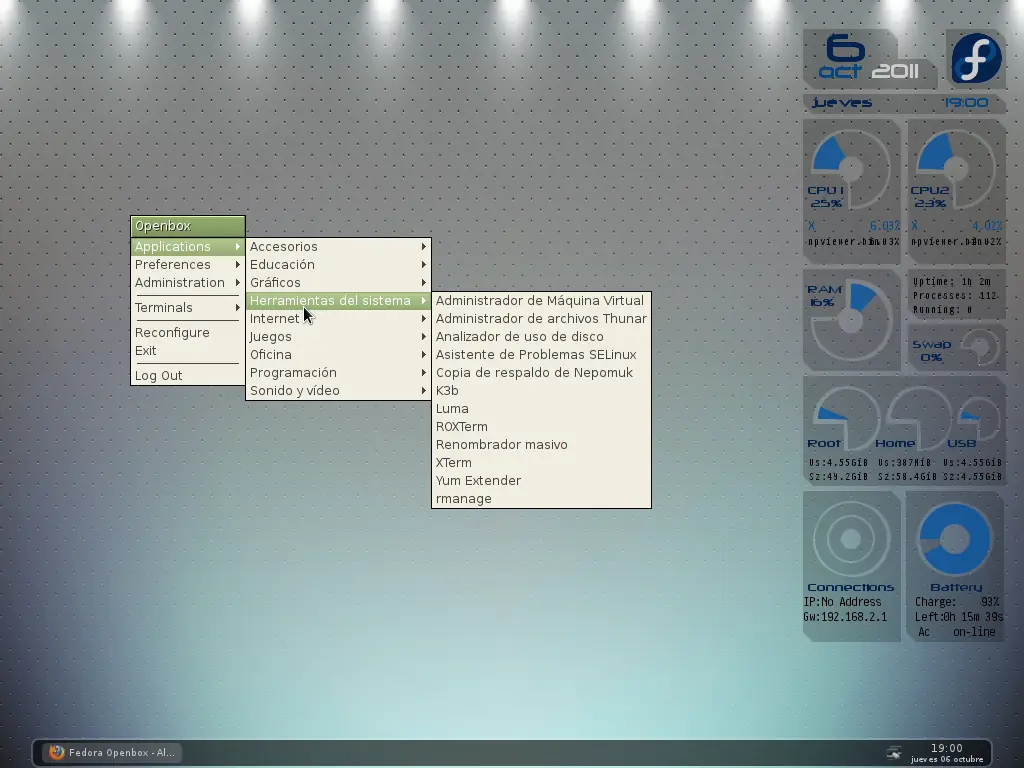
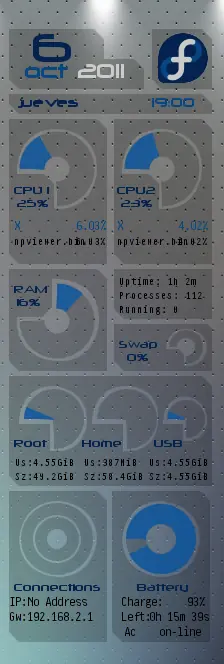
Aqui los archivos:
.conkyrc
# Conky settings #
background no
update_interval 1
cpu_avg_samples 2
net_avg_samples 2
override_utf8_locale yes
double_buffer yes
no_buffers yes
text_buffer_size 2048
#imlib_cache_size 0
temperature_unit fahrenheit
# Window specifications #
own_window yes
own_window_type override
own_window_transparent yes
own_window_hints undecorate,sticky,skip_taskbar,skip_pager,below
border_inner_margin 0
border_outer_margin 0
minimum_size 218 220
maximum_width 220
maximum_height 400
alignment tr
gap_x 10
gap_y 20
# Graphics settings #
draw_shades no
draw_outline no
draw_borders no
draw_graph_borders no
# Text settings #
use_xft yes
override_utf8_locale yes
xftfont Neuropolitical:size=8
xftalpha 0
uppercase no
temperature_unit celsius
default_color FFFFFF
color0 FFFFFF
color1 062b61
color2 000000
color3 DE3D00
color4 dcde1c
color5 0a57a4
# Lua Load #
lua_load /home/tu_usuario/.boxconky/rings.lua
lua_load /home/tu_usuario/.boxconky/box.lua
lua_draw_hook_pre clock_rings
lua_draw_hook_post main_box
TEXT
${voffset 5}${offset 15}${font Neuropolitical:size=36}${color1}${time %e}
${goto 25}${font Neuropolitical:size=18}${color5}${voffset -30}${time %b}${color FFFFFF}${offset 10}${time %Y}
${font Neuropolitical:size=12}${color1}${voffset 5}${goto 20}${time %A}${goto 153}${color5}${time %H}:${time %M}
${font Neuropolitical:size=9}${color1}${voffset 55}${goto 15}CPU 1${goto 118}CPU2
${goto 18}${cpu cpu0}%${goto 122}${cpu cpu1}%
${image ~/.boxconky/logo.png -p 158,13 -s 50x50}
${voffset -18}${goto 15}${font Pragmata:size=9}${color5}${top name 1}${goto 65}${top cpu 1}%${goto 118}${top name 1}${goto 167}${top cpu 2}%
${goto 15}${font Pragmata:size=8}${color2}${top name 2}${goto 65}${top cpu 1}%${goto 118}${top name 2}${goto 167}${top cpu 2}%
#${goto 15}${font Pragmata:size=8}${color1}${top name 3}${goto 65}${top cpu 1}%${goto 118}${top name 3}${goto 167}${top cpu 2}%
${voffset -2}${goto 120}${color2}${font Pragmata:size=8}Uptime: ${uptime_short}
${goto 120}${color2}${font Pragmata:size=8}Processes: ${processes}
${goto 120}${color2}${font Pragmata:size=8}Running: ${running_processes}
${voffset -48}${goto 15}${color1}${font Neuropolitical:size=9}RAM
${goto 18}${memperc}%
${voffset -40}${goto 120}${voffset 56}Swap
${goto 128}${swapperc}%
${goto 15}${voffset 60}${color1}Root${goto 83}Home${goto 155}USB
${voffset 5}${offset 15}${font Pragmata:size=8,weight:normal${alignr}}${color2}Us:${fs_used /}${goto 85}Us:${fs_used /home}${goto 150}Us:${fs_used /mnt/usb}
${voffset 0}${offset 15}${font Pragmata:size=8,weight:normal${alignr}}${color2}Sz:${fs_size /}${goto 85}Sz:${fs_size /home}${goto 150}Sz:${fs_used /mnt/usb}
${voffset 83}${goto 15}${color1}${font Neuropolitical:size=9}Connections${goto 138}Battery
${goto 10}${color2}${font Pragmata:size=9}IP:${addr wlan0}${goto 122}Charge:${goto 188}${battery_percent BAT0}%
${goto 10}${color2}${font Pragmata:size=9}Gw:${gw_ip}${goto 122}Left:${goto 150}${battery_time BAT0}
${goto 125}Ac${goto 160}${acpiacadapter}
box.lua
--[[BOX WIDGET v1.1 by Wlourf 27/01/2011
This widget can drawn some boxes, even circles in your conky window
http://u-scripts.blogspot.com/2011/01/box-widget.html)
Inspired by Background by londonali1010 (2009), thanks ;-)
The parameters (all optionals) are :
x - x coordinate of top-left corner of the box, default = 0 = (top-left corner of conky window)
y - y coordinate of top-left corner of the box, default = 0 = (top-left corner of conky window)
w - width of the box, default = width of the conky window
h - height of the box, default = height of the conky window
corners - corners is a table for the four corners in this order : top-left, top-right,bottom-right, bottom-left
each corner is defined in a table with a shape and a radius, available shapes are : "curve","circle","line"
example for the same shapes for all corners:
{ {"circle",10} }
example for first corner different from the three others
{ {"circle",10}, {"circle",5} }
example for top corners differents from bottom corners
{ {"circle",10}, {"circle",10}, {"line",0} }
default = { {"line",0} } i.e=no corner
operator - set the compositing operator (needs in the conkyrc : own_window_argb_visual yes)
see http://cairographics.org/operators/
available operators are :
"clear","source","over","in","out","atop","dest","dest_over","dest_in","dest_out","dest_atop","xor","add","saturate"
default = "over"
border - if border>0, the script draws only the border, like a frame, default=0
dash - if border>0 and dash>0, the border is draw with dashes, default=0
skew_x - skew box around x axis, default = 0
skew_y - skew box around y axis, default = 0
scale_x - rescale the x axis, default=1, useful for drawing elipses ...
scale_y - rescale the x axis, default=1
angle - angle of rotation of the box in degrees, default = 0
i.e. a horizontal graph
rot_x - x point of rotation's axis, default = 0,
relative to top-left corner of the box, (not the conky window)
rot_y - y point of rotation's axis, default = 0
relative to top-left corner of the box, (not the conky window)
draw_me - if set to false, box is not drawn (default = true or 1)
it can be used with a conky string, if the string returns 1, the box is drawn :
example : "${if_empty ${wireless_essid wlan0}}${else}1$endif",
linear_gradient - table with the coordinates of two points to define a linear gradient,
points are relative to top-left corner of the box, (not the conky window)
{x1,y1,x2,y2}
radial_gradient - table with the coordinates of two circle to define a radial gradient,
points are relative to top-left corner of the box, (not the conky window)
{x1,y1,r1,x2,y2,r2} (r=radius)
colour - table of colours, default = plain white
this table contains one or more tables with format {P,C,A}
P=position of gradient (0 = start of the gradient, 1= end of the gradient)
C=hexadecimal colour
A=alpha (opacity) of color (0=invisible,1=opacity 100%)
Examples :
for a plain color
for a gradient with two colours {x=80,y=150,w=20,h=20,
radial_gradient={20,20,0,20,20,20},
colour=,
or -with this one, gradient will start in the middle
for a gradient with three colours
and so on ...
To call this script in Conky, use (assuming you have saved this script to ~/scripts/):
lua_load ~/scripts/box.lua
lua_draw_hook_pre main_box
And leave one line blank or not after TEXT
Changelog:
+ v1.0 -- Original release (19.12.2010)
+ v1.1 -- Adding parameters: operator, dash, angle, skew_x, skew_y, draw_me
corners are described in a table
-- This program is free software; you can redistribute it and/or modify
-- it under the terms of the GNU General Public License as published by
-- the Free Software Foundation version 3 (GPLv3)
--
-- This program is distributed in the hope that it will be useful,
-- but WITHOUT ANY WARRANTY; without even the implied warranty of
-- MERCHANTABILITY or FITNESS FOR A PARTICULAR PURPOSE. See the
-- GNU General Public License for more details.
--
-- You should have received a copy of the GNU General Public License
-- along with this program; if not, write to the Free Software
-- Foundation, Inc., 51 Franklin Street, Fifth Floor, Boston,
-- MA 02110-1301, USA.
]]
require 'cairo'
function conky_main_box()
if conky_window==nil then return end
---------------------- PARAMETERS BEGIN HERE
local boxes_settings={
--FIRST COLUMN
--Name corners
{x=10, y=10,w=95,h=30,
colour={ {1,0x000000,0.2} },
corners={ {"",0}, {"line",10}, {"",0}, {"line",0} },
operator=yes,
},
{x=10, y=40,w=135,h=30,
colour={ {1,0x000000,0.2} },
corners={ {"",0}, {"line",10}, {"line",0}, {"line",10} },
operator=yes,
},
--Logo corners
{x=153, y=10,w=60,h=60,
colour={ {1,0x000000,0.2} },
corners={ {"",0}, {"line",10}, {"",0}, {"line",10} },
operator=yes,
},
--Date corners
{x=10, y=75,w=203,h=20,
colour={ {1,0x000000,0.2} },
corners={ {"",0}, {"line",10}, {"",0}, {"line",10} },
operator=yes,
},
--CPU1's corners
{x=10, y=100,w=98,h=10,
colour={ {1,0x000000,0.2} },
corners={ {"line",0}, {"line",10}, {"",0}, {"",0} },
operator=yes,
},
{x=10, y=190,w=98,h=55,
colour={ {1,0x000000,0.2} },
corners={ {"",0}, {"",0}, {"",0}, {"line",10} },
operator=yes,
},
{x=10, y=155,w=45,h=35,
colour={ {1,0x000000,0.2} },
corners={ {"",0}, {"line",10}, {"",0}, {"",0} },
operator=yes,
},
{x=10, y=110,w=8,h=45,
colour={ {1,0x000000,0.2} },
corners={ {"",0}, {"",0}, {"",0}, {"",0} },
operator=yes,
},
{x=98, y=110,w=10,h=80,
colour={ {1,0x000000,0.2} },
corners={ {"",0}, {"",0}, {"",0}, {"",0} },
operator=yes,
},
{x=98, y=190,w=1,h=1,
colour={ {1,0x000000,0.2} },
corners={ {"curve",-40}, {"",0}, {"",0}, {"",0} },
operator=yes,
},
{x=98, y=109,w=1,h=1,
colour={ {1,0x000000,0.2} },
corners={ {"",0}, {"",0}, {"",0}, {"curve",-40} },
operator=yes,
},
{x=17, y=109,w=1,h=1,
colour={ {1,0x000000,0.2} },
corners={ {"",0}, {"",0}, {"curve",-40}, {"",0} },
operator=yes,
},
--CPU2's corners
{x=115, y=155,w=45,h=35,
colour={ {1,0x000000,0.2} },
corners={ {"",0}, {"line",10}, {"",0}, {"",0} },
operator=yes,
},
{x=115, y=110,w=8,h=45,
colour={ {1,0x000000,0.2} },
corners={ {"",0}, {"line",0}, {"",0}, {"",0} },
operator=yes,
},
{x=115, y=100,w=98,h=10,
colour={ {1,0x000000,0.2} },
corners={ {"",0}, {"line",10}, {"",0}, {"",0} },
operator=yes,
},
{x=203, y=110,w=10,h=80,
colour={ {1,0x000000,0.2} },
corners={ {"",0}, {"",0}, {"",0}, {"",0} },
operator=yes,
},
{x=203, y=190,w=1,h=1,
colour={ {1,0x000000,0.2} },
corners={ {"curve",-40}, {"",0}, {"",0}, {"",0} },
operator=yes,
},
{x=122, y=109,w=1,h=1,
colour={ {1,0x000000,0.2} },
corners={ {"",0}, {"",0}, {"curve",-40}, {"",0} },
operator=yes,
},
{x=203, y=109,w=1,h=1,
colour={ {1,0x000000,0.2} },
corners={ {"",0}, {"",0}, {"",0}, {"curve",-40} },
operator=yes,
},
{x=115, y=190,w=98,h=55,
colour={ {1,0x000000,0.2} },
corners={ {"",0}, {"",0}, {"",0}, {"line",10} },
operator=yes,
},
--Process corners
{x=115, y=250,w=98,h=50,
colour={ {1,0x000000,0.2} },
corners={ {"",0}, {"",0}, {"",0}, {"line",10} },
operator=yes,
},
--Mem corners
{x=10, y=250,w=98,h=10,
colour={ {1,0x000000,0.2} },
corners={ {"",0}, {"line",10}, {"",0}, {"line",0} },
operator=yes,
},
{x=10, y=260,w=8,h=82,
colour={ {1,0x000000,0.2} },
corners={ {"",0}, {"line",0}, {"",0}, {"line",0} },
operator=yes,
},
{x=100, y=260,w=8,h=82,
colour={ {1,0x000000,0.2} },
corners={ {"",0}, {"line",0}, {"",0}, {"line",0} },
operator=yes,
},
{x=10, y=342,w=98,h=10,
colour={ {1,0x000000,0.2} },
corners={ {"",0}, {"line",0}, {"",0}, {"line",10} },
operator=yes,
},
{x=100, y=259,w=1,h=1,
colour={ {1,0x000000,0.2} },
corners={ {"",0}, {"line",0}, {"curve",0}, {"curve",-40} },
operator=yes,
},
{x=100, y=342,w=1,h=1,
colour={ {1,0x000000,0.2} },
corners={ {"curve",-40}, {"line",0}, {"curve",0}, {"curve",0} },
operator=yes,
},
{x=17, y=342,w=1,h=1,
colour={ {1,0x000000,0.2} },
corners={ {"curve",0}, {"curve",-40}, {"curve",0}, {"curve",0} },
operator=yes,
},
{x=18, y=260,w=35,h=38,
colour={ {1,0x000000,0.2} },
corners={ {"curve",0}, {"line",0}, {"line",10}, {"curve",0} },
operator=yes,
},
--Swap corners
{x=115, y=305,w=98,h=5,
colour={ {1,0x000000,0.2} },
corners={ {"",0}, {"line",5}, {"",0}, {"line",0} },
operator=yes,
},
{x=208, y=310,w=5,h=42,
colour={ {1,0x000000,0.2} },
corners={ {"",0}, {"",0}, {"",0}, {"line",0} },
operator=yes,
},
{x=167, y=330,w=18,h=22,
colour={ {1,0x000000,0.2} },
corners={ {"",0}, {"line",5}, {"",0}, {"line",0} },
operator=yes,
},
{x=115, y=310,w=52,h=42,
colour={ {1,0x000000,0.2} },
corners={ {"",0}, {"",0}, {"",0}, {"line",10} },
operator=yes,
},
{x=185, y=347,w=23,h=5,
colour={ {1,0x000000,0.2} },
corners={ {"",0}, {"",0}, {"",0}, {"line",0} },
operator=yes,
},
{x=208, y=347,w=1,h=1,
colour={ {1,0x000000,0.2} },
corners={ {"curve",-20}, {"",0}, {"",0}, {"line",0} },
operator=yes,
},
{x=208, y=309,w=1,h=1,
colour={ {1,0x000000,0.2} },
corners={ {"",0}, {"",0}, {"",0}, {"curve",-20} },
operator=yes,
},
{x=166, y=309,w=1,h=1,
colour={ {1,0x000000,0.2} },
corners={ {"curve",0}, {"",0}, {"curve",-20}, {"line",0} },
operator=yes,
},
--Storage corners
{x=10, y=357,w=203,h=10,
colour={ {1,0x000000,0.2} },
corners={ {"curve",0}, {"line",10}, {"",0}, {"line",0} },
operator=yes,
},
{x=10, y=432,w=203,h=35,
colour={ {1,0x000000,0.2} },
corners={ {"line",0}, {"line",0}, {"",0}, {"line",10} },
operator=yes,
},
{x=10, y=367,w=10,h=65,
colour={ {1,0x000000,0.2} },
corners={ {"curve",0}, {"line",0}, {"",0}, {"line",0} },
operator=yes,
},
{x=88, y=367,w=5,h=65,
colour={ {1,0x000000,0.2} },
corners={ {"curve",0}, {"line",0}, {"",0}, {"line",0} },
operator=yes,
},
{x=159, y=367,w=5,h=65,
colour={ {1,0x000000,0.2} },
corners={ {"curve",0}, {"line",0}, {"",0}, {"line",0} },
operator=yes,
},
{x=208, y=367,w=5,h=65,
colour={ {1,0x000000,0.2} },
corners={ {"curve",0}, {"line",0}, {"",0}, {"line",0} },
operator=yes,
},
{x=19, y=366,w=1,h=1,
colour={ {1,0x000000,0.2} },
corners={ {"curve",0}, {"curve",0}, {"curve",-35}, {"line",0} },
operator=yes,
},
{x=88, y=366,w=1,h=1,
colour={ {1,0x000000,0.2} },
corners={ {"curve",0}, {"curve",0}, {"curve",0}, {"curve",-35} },
operator=yes,
},
{x=92, y=366,w=1,h=1,
colour={ {1,0x000000,0.2} },
corners={ {"curve",0}, {"curve",0}, {"curve",-35}, {"line",0} },
operator=yes,
},
{x=88, y=432,w=1,h=1,
colour={ {1,0x000000,0.2} },
corners={ {"curve",-30}, {"line",0}, {"curve",0}, {"line",0} },
operator=yes,
},
{x=20, y=405,w=31,h=27,
colour={ {1,0x000000,0.2} },
corners={ {"curve",0}, {"line",0}, {"curve",0}, {"line",0} },
operator=yes,
},
{x=159, y=366,w=1,h=1,
colour={ {1,0x000000,0.2} },
corners={ {"curve",0}, {"curve",0}, {"curve",0}, {"curve",-30} },
operator=yes,
},
{x=164, y=367,w=44,h=10,
colour={ {1,0x000000,0.2} },
corners={ {"line",0}, {"line",0}, {"",0}, {"line",0} },
operator=yes,
},
{x=93, y=405,w=31,h=27,
colour={ {1,0x000000,0.2} },
corners={ {"curve",0}, {"line",0}, {"curve",0}, {"line",0} },
operator=yes,
},
{x=159, y=432,w=1,h=1,
colour={ {1,0x000000,0.2} },
corners={ {"curve",-30}, {"line",0}, {"curve",0}, {"line",0} },
operator=yes,
},
{x=164, y=422,w=44,h=10,
colour={ {1,0x000000,0.2} },
corners={ {"line",0}, {"line",0}, {"",0}, {"line",0} },
operator=yes,
},
{x=164, y=405,w=20,h=17,
colour={ {1,0x000000,0.2} },
corners={ {"line",0}, {"line",0}, {"",0}, {"line",0} },
operator=yes,
},
{x=163, y=376,w=1,h=1,
colour={ {1,0x000000,0.2} },
corners={ {"line",0}, {"line",0}, {"curve",-25}, {"line",0} },
operator=yes,
},
{x=208, y=376,w=1,h=1,
colour={ {1,0x000000,0.2} },
corners={ {"line",0}, {"line",0}, {"curve",0}, {"curve",-25} },
operator=yes,
},
{x=208, y=422,w=1,h=1,
colour={ {1,0x000000,0.2} },
corners={ {"curve",-20}, {"line",0}, {"curve",0}, {"line",0} },
operator=yes,
},
--Net corners
{x=10, y=472,w=98,h=10,
colour={ {1,0x000000,0.2} },
corners={ {"curve",0}, {"line",10}, {"curve",0}, {"line",0} },
operator=yes,
},
{x=10, y=482,w=10,h=76,
colour={ {1,0x000000,0.2} },
corners={ {"curve",0}, {"line",0}, {"curve",0}, {"line",0} },
operator=yes,
},
{x=98, y=482,w=10,h=76,
colour={ {1,0x000000,0.2} },
corners={ {"curve",0}, {"line",0}, {"curve",0}, {"line",0} },
operator=yes,
},
{x=10, y=558,w=98,h=65,
colour={ {1,0x000000,0.2} },
corners={ {"curve",0}, {"line",0}, {"curve",0}, {"line",10} },
operator=yes,
},
{x=19, y=481,w=1,h=1,
colour={ {1,0x000000,0.2} },
corners={ {"curve",0}, {"line",0}, {"curve",-40}, {"line",0} },
operator=yes,
},
{x=98, y=481,w=1,h=1,
colour={ {1,0x000000,0.2} },
corners={ {"curve",0}, {"line",0}, {"curve",0}, {"curve",-40} },
operator=yes,
},
{x=98, y=558,w=1,h=1,
colour={ {1,0x000000,0.2} },
corners={ {"curve",-40}, {"line",0}, {"curve",0}, {"line",0} },
operator=yes,
},
{x=19, y=558,w=1,h=1,
colour={ {1,0x000000,0.2} },
corners={ {"curve",0}, {"curve",-40}, {"curve",0}, {"line",0} },
operator=yes,
},
--Bat corners
{x=113, y=472,w=98,h=10,
colour={ {1,0x000000,0.2} },
corners={ {"curve",0}, {"line",10}, {"curve",0}, {"line",0} },
operator=yes,
},
{x=113, y=482,w=10,h=76,
colour={ {1,0x000000,0.2} },
corners={ {"curve",0}, {"line",0}, {"curve",0}, {"line",0} },
operator=yes,
},
{x=201, y=482,w=10,h=76,
colour={ {1,0x000000,0.2} },
corners={ {"curve",0}, {"line",0}, {"curve",0}, {"line",0} },
operator=yes,
},
{x=113, y=558,w=98,h=65,
colour={ {1,0x000000,0.2} },
corners={ {"curve",0}, {"line",0}, {"curve",0}, {"line",10} },
operator=yes,
},
{x=122, y=481,w=1,h=1,
colour={ {1,0x000000,0.2} },
corners={ {"curve",0}, {"line",0}, {"curve",-40}, {"line",0} },
operator=yes,
},
{x=201, y=481,w=1,h=1,
colour={ {1,0x000000,0.2} },
corners={ {"curve",0}, {"line",0}, {"curve",0}, {"curve",-40} },
operator=yes,
},
{x=201, y=558,w=1,h=1,
colour={ {1,0x000000,0.2} },
corners={ {"curve",-40}, {"line",0}, {"curve",0}, {"line",0} },
operator=yes,
},
{x=122, y=558,w=1,h=1,
colour={ {1,0x000000,0.2} },
corners={ {"curve",0}, {"curve",-40}, {"curve",0}, {"line",0} },
operator=yes,
},
--Ip corners
--{x=10, y=603,w=203,h=3,
--colour={ {1,0x000000,0.2} },
--corners={ {"curve",0}, {"curve",0}, {"curve",0}, {"line",0} },
--operator=yes,
--},
--corners
-- {x=10, y=310,w=200,h=60,
--the missing corners are repeated
-- corners={ {"",0}, {"circle",30},}
-- },
--border
-- {x=10, y=210,w=200,h=60,
--the missing corners are repeated
-- corners={ {"",0}, {"circle",30}, {"",0}, {"circle",30}},
-- border= 3
-- },
}
---------------------------- PARAMETERS END HERE
local cs=cairo_xlib_surface_create(conky_window.display, conky_window.drawable, conky_window.visual, conky_window.width, conky_window.height)
local cr=cairo_create(cs)
if tonumber(conky_parse("$updates")<5 then return end
for i in pairs(boxes_settings) do
draw_box (cr,boxes_settings)
end
cairo_destroy(cr)
cairo_surface_destroy(cs)
end
function draw_box(cr,t)
if t.draw_me == true then t.draw_me = nil end
if t.draw_me ~= nil and conky_parse(tostring(t.draw_me)) ~= "1" then return end
local table_corners={"circle","curve","line"}
local t_operators={
clear = CAIRO_OPERATOR_CLEAR,
source = CAIRO_OPERATOR_SOURCE,
over = CAIRO_OPERATOR_OVER,
["in"] = CAIRO_OPERATOR_IN,
out = CAIRO_OPERATOR_OUT,
atop = CAIRO_OPERATOR_ATOP,
dest = CAIRO_OPERATOR_DEST,
dest_over = CAIRO_OPERATOR_DEST_OVER,
dest_in = CAIRO_OPERATOR_DEST_IN,
dest_out = CAIRO_OPERATOR_DEST_OUT,
dest_atop = CAIRO_OPERATOR_DEST_ATOP,
xor = CAIRO_OPERATOR_XOR,
add = CAIRO_OPERATOR_ADD,
saturate = CAIRO_OPERATOR_SATURATE,
}
function rgba_to_r_g_b_a(tc)
--tc={position,colour,alpha}
local colour = tc[2]
local alpha = tc[3]
return ((colour / 0x10000) % 0x100) / 255., ((colour / 0x100) % 0x100) / 255., (colour % 0x100) / 255., alpha
end
function table.copy(t)
local t2 = {}
for k,v in pairs(t) do
t2[k] = {v[1],v[2]}
end
return t2
end
function draw_corner(num,t)
local shape=t[1]
local radius=t[2]
local x,y = t[3],t[4]
if shape=="line" then
if num == 1 then cairo_line_to(cr,radius,0)
elseif num == 2 then cairo_line_to(cr,x,radius)
elseif num == 3 then cairo_line_to(cr,x-radius,y)
elseif num == 4 then cairo_line_to(cr,0,y-radius)
end
end
if shape=="circle" then
local PI = math.pi
if num == 1 then cairo_arc(cr,radius,radius,radius,-PI,-PI/2)
elseif num == 2 then cairo_arc(cr,x-radius,y+radius,radius,-PI/2,0)
elseif num == 3 then cairo_arc(cr,x-radius,y-radius,radius,0,PI/2)
elseif num == 4 then cairo_arc(cr,radius,y-radius,radius,PI/2,-PI)
end
end
if shape=="curve" then
if num == 1 then cairo_curve_to(cr,0,radius ,0,0 ,radius,0)
elseif num == 2 then cairo_curve_to(cr,x-radius,0, x,y, x,radius)
elseif num == 3 then cairo_curve_to(cr,x,y-radius, x,y, x-radius,y)
elseif num == 4 then cairo_curve_to(cr,radius,y, x,y, 0,y-radius)
end
end
end
--check values and set default values
if t.x == nil then t.x = 0 end
if t.y == nil then t.y = 0 end
if t.w == nil then t.w = conky_window.width end
if t.h == nil then t.h = conky_window.height end
if t.radius == nil then t.radius = 0 end
if t.border == nil then t.border = 0 end
if t.colour==nil then t.colour= end
if t.linear_gradient ~= nil then
if #t.linear_gradient ~= 4 then
t.linear_gradient = {t.x,t.y,t.width,t.height}
end
end
if t.angle==nil then t.angle = 0 end
if t.skew_x == nil then t.skew_x=0 end
if t.skew_y == nil then t.skew_y=0 end
if t.scale_x==nil then t.scale_x=1 end
if t.scale_y==nil then t.scale_y=1 end
if t.rot_x == nil then t.rot_x=0 end
if t.rot_y == nil then t.rot_y=0 end
if t.operator == nil then t.operator = "over" end
if (t_operators[t.operator]) == nil then
print ("wrong operator :",t.operator)
t.operator = "over"
end
if t.radial_gradient ~= nil then
if #t.radial_gradient ~= 6 then
t.radial_gradient = {t.x,t.y,0, t.x,t.y, t.width}
end
end
for i=1, #t.colour do
if #t.colour~=3 then
print ("error in color table"
t.colour={1,0xFFFFFF,1}
end
end
if t.corners == nil then t.corners={ {"line",0} } end
local t_corners = {}
local t_corners = table.copy(t.corners)
--don't use t_corners=t.corners otherwise t.corners is altered
--complete the t_corners table if needed
for i=#t_corners+1,4 do
t_corners=t_corners[#t_corners]
local flag=false
for j,v in pairs(table_corners) do flag=flag or (t_corners[1]==v) end
if not flag then print ("error in corners table :",t_corners[1]);t_corners[1]="curve" end
end
--this way :
-- t_corners[1][4]=x
-- t_corners[2][3]=y
--doesn't work
t_corners[1]={t_corners[1][1],t_corners[1][2],0,0}
t_corners[2]={t_corners[2][1],t_corners[2][2],t.w,0}
t_corners[3]={t_corners[3][1],t_corners[3][2],t.w,t.h}
t_corners[4]={t_corners[4][1],t_corners[4][2],0,t.h}
t.no_gradient = (t.linear_gradient == nil ) and (t.radial_gradient == nil )
cairo_save(cr)
cairo_translate(cr, t.x, t.y)
if t.rot_x~=0 or t.rot_y~=0 or t.angle~=0 then
cairo_translate(cr,t.rot_x,t.rot_y)
cairo_rotate(cr,t.angle*math.pi/180)
cairo_translate(cr,-t.rot_x,-t.rot_y)
end
if t.scale_x~=1 or t.scale_y~=1 or t.skew_x~=0 or t.skew_y~=0 then
local matrix0 = cairo_matrix_t:create()
tolua.takeownership(matrix0)
cairo_matrix_init (matrix0, t.scale_x,math.pi*t.skew_y/180 , math.pi*t.skew_x/180 ,t.scale_y,0,0)
cairo_transform(cr,matrix0)
end
local tc=t_corners
cairo_move_to(cr,tc[1][2],0)
cairo_line_to(cr,t.w-tc[2][2],0)
draw_corner(2,tc[2])
cairo_line_to(cr,t.w,t.h-tc[3][2])
draw_corner(3,tc[3])
cairo_line_to(cr,tc[4][2],t.h)
draw_corner(4,tc[4])
cairo_line_to(cr,0,tc[1][2])
draw_corner(1,tc[1])
if t.no_gradient then
cairo_set_source_rgba(cr,rgba_to_r_g_b_a(t.colour[1]))
else
if t.linear_gradient ~= nil then
pat = cairo_pattern_create_linear (t.linear_gradient[1],t.linear_gradient[2],t.linear_gradient[3],t.linear_gradient[4])
elseif t.radial_gradient ~= nil then
pat = cairo_pattern_create_radial (t.radial_gradient[1],t.radial_gradient[2],t.radial_gradient[3],
t.radial_gradient[4],t.radial_gradient[5],t.radial_gradient[6])
end
for i=1, #t.colour do
cairo_pattern_add_color_stop_rgba (pat, t.colour[1], rgba_to_r_g_b_a(t.colour))
end
cairo_set_source (cr, pat)
cairo_pattern_destroy(pat)
end
cairo_set_operator(cr,t_operators[t.operator])
if t.border>0 then
cairo_close_path(cr)
if t.dash ~= nil then cairo_set_dash(cr, t.dash, 1, 0.0) end
cairo_set_line_width(cr,t.border)
cairo_stroke(cr)
else
cairo_fill(cr)
end
cairo_restore(cr)
end


rings.lua
--[[Clock Rings by Linux Mint (2011) reEdited by despot77
This script draws percentage meters as rings, and also draws clock hands if you want! It is fully customisable; all options are described in the script. This script is based off a combination of my clock.lua script and my rings.lua script.
IMPORTANT: if you are using the 'cpu' function, it will cause a segmentation fault if it tries to draw a ring straight away. The if statement on line 145 uses a delay to make sure that this doesn't happen. It calculates the length of the delay by the number of updates since Conky started. Generally, a value of 5s is long enough, so if you update Conky every 1s, use update_num>5 in that if statement (the default). If you only update Conky every 2s, you should change it to update_num>3; conversely if you update Conky every 0.5s, you should use update_num>10. ALSO, if you change your Conky, is it best to use "killall conky; conky" to update it, otherwise the update_num will not be reset and you will get an error.
To call this script in Conky, use the following (assuming that you save this script to ~/scripts/rings.lua):
lua_load ~/scripts/clock_rings.lua
lua_draw_hook_pre clock_rings
Changelog:
+ v1.0 -- Original release (30.09.2009)
v1.1p -- Jpope edit londonali1010 (05.10.2009)
*v Mint-lua -- reEdit despot77 (18.02.2011)
]]
settings_table = {
{
name='cpu',
arg='cpu1',
max=100,
bg_colour=0x000000,
bg_alpha=0.2,
fg_colour=0x0a57a4,
fg_alpha=0.8,
x=58, y=150,
radius=25,
thickness=25,
start_angle=-90,
end_angle=180
},
{
name='cpu',
arg='cpu2',
max=100,
bg_colour=0x000000,
bg_alpha=0.2,
fg_colour=0x0a57a4,
fg_alpha=0.8,
x=163, y=150,
radius=25,
thickness=25,
start_angle=-90,
end_angle=180
},
--[[ {
name='cpu',
arg='cpu3',
max=100,
bg_colour=0x000000,
bg_alpha=0.2,
fg_colour=0x0a57a4,
fg_alpha=0.8,
x=290, y=40,
radius=15,
thickness=15,
start_angle=-90,
end_angle=180
},
{
name='cpu',
arg='cpu4',
max=100,
bg_colour=0x000000,
bg_alpha=0.2,
fg_colour=0x0a57a4,
fg_alpha=0.8,
x=350, y=40,
radius=15,
thickness=15,
start_angle=-90,
end_angle=180
},]]
--[[ {
name='cpu',
arg='cpu4',
max=100,
bg_colour=0xffffff,
bg_alpha=0.2,
fg_colour=0x92DE00,
fg_alpha=0.8,
x=40, y=252,
radius=25,
thickness=25,
start_angle=-90,
end_angle=180
},
{
name='cpu',
arg='cpu5',
max=100,
bg_colour=0xffffff,
bg_alpha=0.2,
fg_colour=0x92DE00,
fg_alpha=0.8,
x=163, y=252,
radius=25,
thickness=25,
start_angle=-90,
end_angle=180
},
{
name='cpu',
arg='cpu6',
max=100,
bg_colour=0xffffff,
bg_alpha=0.2,
fg_colour=0x92DE00,
fg_alpha=0.8,
x=40, y=330,
radius=25,
thickness=25,
start_angle=-90,
end_angle=180
},
{
name='cpu',
arg='cpu7',
max=100,
bg_colour=0xffffff,
bg_alpha=0.2,
fg_colour=0x92DE00,
fg_alpha=0.8,
x=163, y=330,
radius=25,
thickness=25,
start_angle=-90,
end_angle=180
},
]] {
name='memperc',
arg='',
max=100,
bg_colour=0x000000,
bg_alpha=0.2,
fg_colour=0x0a57a4,
fg_alpha=0.8,
x=58, y=302,
radius=25,
thickness=25,
start_angle=0,
end_angle=270
},
{
name='swapperc',
arg='',
max=100,
bg_colour=0x000000,
bg_alpha=0.2,
fg_colour=0x0a57a4,
fg_alpha=0.8,
x=187, y=328,
radius=13,
thickness=8,
start_angle=-90,
end_angle=180
},
{
name='fs_used_perc',
arg='/',
max=100,
bg_colour=0x000000,
bg_alpha=0.2,
fg_colour=0x0a57a4,
fg_alpha=0.8,
x=55, y=400,
radius=15,
thickness=30,
start_angle=-90,
end_angle=180
},
{
name='fs_used_perc',
arg='/home',
max=100,
bg_colour=0x000000,
bg_alpha=0.2,
fg_colour=0x0a57a4,
fg_alpha=0.8,
x=128, y=400,
radius=15,
thickness=30,
start_angle=-90,
end_angle=180
},
{
name='fs_used_perc',
arg='/mnt/usb',
max=100,
bg_colour=0x000000,
bg_alpha=0.2,
fg_colour=0x0a57a4,
fg_alpha=0.8,
x=187, y=400,
radius=10,
thickness=18,
start_angle=-90,
end_angle=180
},
{
name='upspeedf',
arg='wlan0',
max=210,
bg_colour=0x000000,
bg_alpha=0.2,
fg_colour=0x0a57a4,
fg_alpha=0.8,
x=58, y=520,
radius=30,
thickness=12,
start_angle=-90,
end_angle=270
},
{
name='downspeedf',
arg='wlan0',
max=100,
bg_colour=0x000000,
bg_alpha=0.2,
fg_colour=0xa40509,
fg_alpha=0.8,
x=58, y=520,
radius=16,
thickness=12,
start_angle=-90,
end_angle=270
},
{
name='battery_percent',
arg='BAT0',
max=100,
bg_colour=0x000000,
bg_alpha=0.2,
fg_colour=0x0a57a4,
fg_alpha=0.8,
x=162, y=520,
radius=25,
thickness=20,
start_angle=-90,
end_angle=270
},
}
-- Use these settings to define the origin and extent of your clock.
clock_r=65
-- "clock_x" and "clock_y" are the coordinates of the centre of the clock, in pixels, from the top left of the Conky window.
clock_x=100
clock_y=150
show_seconds=true
require 'cairo'
function rgb_to_r_g_b(colour,alpha)
return ((colour / 0x10000) % 0x100) / 255., ((colour / 0x100) % 0x100) / 255., (colour % 0x100) / 255., alpha
end
function draw_ring(cr,t,pt)
local w,h=conky_window.width,conky_window.height
local xc,yc,ring_r,ring_w,sa,ea=pt['x'],pt['y'],pt['radius'],pt['thickness'],pt['start_angle'],pt['end_angle']
local bgc, bga, fgc, fga=pt['bg_colour'], pt['bg_alpha'], pt['fg_colour'], pt['fg_alpha']
local angle_0=sa*(2*math.pi/360)-math.pi/2
local angle_f=ea*(2*math.pi/360)-math.pi/2
local t_arc=t*(angle_f-angle_0)
-- Draw background ring
cairo_arc(cr,xc,yc,ring_r,angle_0,angle_f)
cairo_set_source_rgba(cr,rgb_to_r_g_b(bgc,bga))
cairo_set_line_width(cr,ring_w)
cairo_stroke(cr)
-- Draw indicator ring
cairo_arc(cr,xc,yc,ring_r,angle_0,angle_0+t_arc)
cairo_set_source_rgba(cr,rgb_to_r_g_b(fgc,fga))
cairo_stroke(cr)
end
function draw_clock_hands(cr,xc,yc)
local secs,mins,hours,secs_arc,mins_arc,hours_arc
local xh,yh,xm,ym,xs,ys
secs=os.date("%S"
mins=os.date("%M"
hours=os.date("%I"
secs_arc=(2*math.pi/60)*secs
mins_arc=(2*math.pi/60)*mins+secs_arc/60
hours_arc=(2*math.pi/12)*hours+mins_arc/12
end
function conky_clock_rings()
local function setup_rings(cr,pt)
local str=''
local value=0
str=string.format('${%s %s}',pt['name'],pt['arg'])
str=conky_parse(str)
value=tonumber(str)
pct=value/pt['max']
draw_ring(cr,pct,pt)
end
-- Check that Conky has been running for at least 5s
if conky_window==nil then return end
local cs=cairo_xlib_surface_create(conky_window.display,conky_window.drawable,conky_window.visual, conky_window.width,conky_window.height)
local cr=cairo_create(cs)
local updates=conky_parse('${updates}')
update_num=tonumber(updates)
if update_num>5 then
for i in pairs(settings_table) do
setup_rings(cr,settings_table)
end
end
draw_clock_hands(cr,clock_x,clock_y)
end
El diseño es personal, basado en otros archivos para hacer los rings y los boxes, en los archivos esta el reconocimiento a sus creadores.
Espero les guste y cualquier comentario o duda con gusto les puedo ayudar.