avantix
Usuario (México)
MPD es un reproductor de musica desde la consola muy versatil, tanto que tiene su propio servidor de streaming con el cual podermos transmitir lo que escuchamos via internet. El hardware necesario es minimo, lo he tenido trabajando con una pentium II a 333 MHz y 256 en RAM y disco duro de 8 GB, sin teclado, mouse y monitor. La instalación del sistema operativo es Debian Wheezy netinstall, en una instalacion mínima, solo el sistema base. La instalación en si es muy sencilla, pero vamos a utilizar aptitude para corregir cualquier falta de paquetes necesaria. Como requisitos es necesario tener instalado alsa o pulseaudio para el audio, lame y vorbis-tools para poder reproducir mp3 y ogg. En mi caso solo lo hago con alsa: # apt-get install alsa-base alsa-oss alsa-source apmd alsa-utils linux-sound-base xapm # apt-get install lame vorbis-tools Reiniciamos alsa para que tome la configuracion: # /usr/sbin/alsa reload Instalamos MPD: # apt-get install mpd y vamos a crear las carpetas de configuracion de mpd: $ mkdir /home/mi_usuario/.mpd $ mkdir /home/mi_usuario/.mpd /playlist Y les recomiendo que creen una carpeta en donde tengan la musica que quieren que se reproduzca pro mpd, en este caso creamos esta carpeta asi: $ mkdir /home/mi_usuario/musica Y vamos a editar nuestro fichero de configuracion de mpd. # nano /etc/mpd.conf Y vamos a cambiar las siguientes lineas y dejarlas de esta manera, favor de sustituir mi_usuario por el suyo: music_directory"/home/mi_usuario/musica" playlist_directory"/home/mi_usuario/.mpd/playlist" db_file"/home/mi_usuario/.mpd/tag_cache" log_file"/home/mi_usuario/.mpd/mpd.log" pid_file"/home/mi_usuario/.mpd/pid" state_file"/home/mi_usuario/.mpd/state" sticker_file "/home/mi_usuario/.mpd/sticker.sql" user"mi_usuario" Si queremos dejar solamente nuestro reproductor de uso local, en la siguiente linea la dejamos como viene: bind_to_address"localhost" si queremos transmitir nuestra musica cambiamos localhost por nuestra direccion ip local: bind_to_address"mi_direccion_ip" Descomentamos la linea del puerto, (quitamos el signo de numero) port"6600" Ahora la configuracion de salida por Alsa: # An example of an ALSA output: # audio_output { type"alsa" name"My ALSA Device" device"hw:0,0"# optional format"44100:16:2"# optional mixer_device"default"# optional mixer_control"PCM"# optional mixer_index"0"# optional } # La dejamos tal cual. Y si queremos transmitir por internet, la configuracion del servidor httpd seria esta: # An example of a httpd output (built-in HTTP streaming server): # audio_output { type"httpd" name"Debiancast" encoder"lame"# optional, vorbis or lame port"8000" #quality"5.0"# do not define if bitrate is defined bitrate"128"# do not define if quality is defined format"44100:16:1" } De aqui lo importante, name es el nombre que le queremos dar a nuestro server de stream, y el encoder podemos usar vorbis si queremos reproducir ogg (por default)o lame si queremos reproducir mp3. Y listo! Ya terminamos la configuracion de mpd. Ahora a crear la lista de reproduccion esta la podemos configurar con Sonata, esto lo podemos hacer desde nuestro propio equipo o desde otro equipo en la red en caso de que nuestro servidor no tenga interfaz grafica. Con un click derecho del mouse debajo de la barra de reproduccion aparece el submenu, entramos a preferencias y creamos un perfil, ahora llenamos la informacion: Nombre: nombre_del_servidor Servidor: direccion_ip Puerto: 6600 Contraseña: Directorio de Musica: (aqui siempre lo hace por defecto, segun la configuracion del mpd) Nos conectamos y listo! Ya estamos transmitiendo nuesta lista de reproducción por internet. Para poder escucharla podemos usar el winamp o el audacious, en agregar, seleccionamos URL o dirección IP y la ponemos de este modo: http://direccion_ip:8000 Esto significa que se esta transmitiendo desde la direccion ip del servidor por el puerto 8000. Para poder escucharlo desde fuera de nuestra red local, tenemos que mapear el puerto en nuestro router, es decir redireccionar las llamadas al puerto 8000 a la direccion ip de nuestro servidor en el mismo puerto (8000). Y ademas tenemos que configurar un cliente de DNS dinamico como no-ip, creamos un host en no-ip e instalamos el cliente en nuestro servidor y con eso es suficiente. Hasta aqui llega esta pequeña guia, varias personas de Taringa! Me habian preguntado como hacerlo, les pido una disculpa por no tenerlo antes, la verdad he tenido mucho trabajo. Saludos a todos y cualquier duda, comentario o mejora por favor posteenla!!!
Si no sabemos como escoger el mirror del cual descargar o nos causa algo de flojera, o simplemente queremos saber cual mirror es el que nos ofrece el mejor desempeño con respecto a nuestra ubicacion geografica, tenemos una herramienta llamada: Pacman Mirrorlist Generator en la siguiente direccion. http://www.archlinux.org/mirrorlist/ En donde hay una lista de los paises que tienen mirrors, asi que escogemos el mas cercano a nosotros, escogemos el protocolo de transferencia (http o ftp), la version de ip que deseamos usar (IPv4 o IPv6), y muy importante debemos seleccionar la casilla de Use mirror status para que tenga el mejor desempeño. Yo estoy en México, asi que escogo United States y genero mi lista, aqui el ejemplo: ## ## Arch Linux repository mirrorlist ## Sorted by mirror score from mirror status page ## Generated on 2012-03-19 ## Score: 0.8, United States #Server = http://mirrors.us.kernel.org/archlinux/$repo/os/$arch ## Score: 0.8, United States #Server = http://mirror.ece.vt.edu/archlinux/$repo/os/$arch ## Score: 1.2, United States #Server = http://archlinux.surlyjake.com/archlinux/$repo/os/$arch ## Score: 1.2, United States #Server = http://mirror.mocker.org/archlinux/$repo/os/$arch ## Score: 1.2, United States #Server = http://cake.lib.fit.edu/archlinux/$repo/os/$arch Espero les sirva!
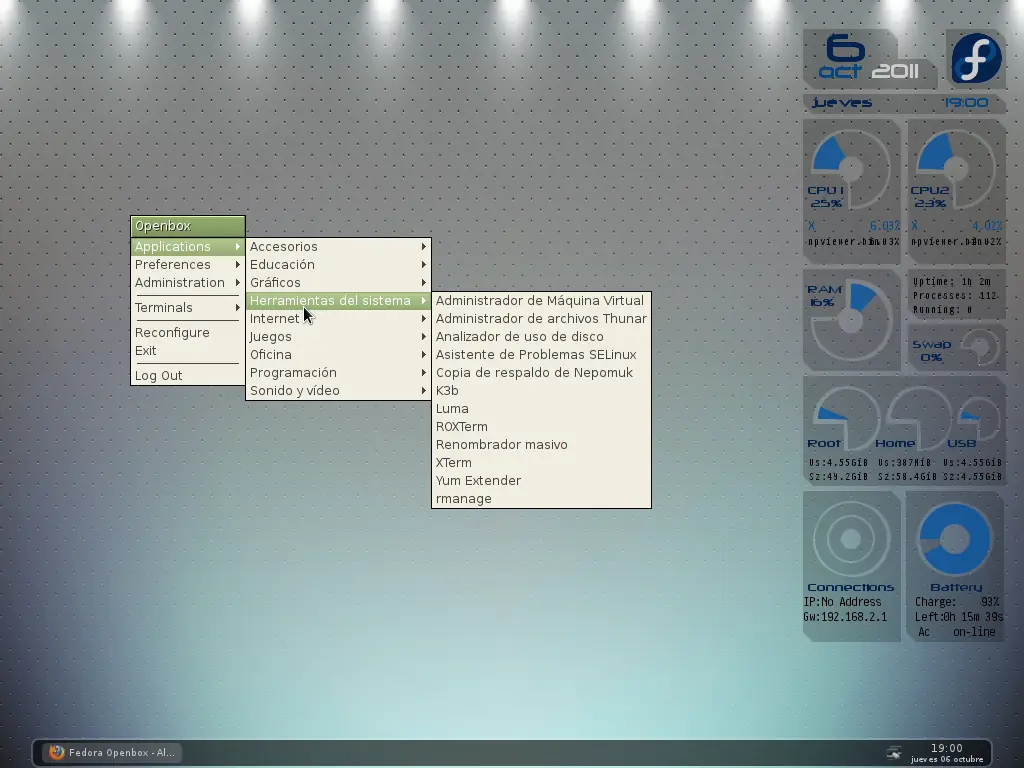
Este es mi primer post en esta comunidad y quiero que sea algo especial, asi que les traigo mi Box Conky. Las dependencias necesarias con Conky + Lua + Cairo, dependiendo de la distro es su instalacion, solo busquen el paquete full de conky y ahi viene con lua y cairo. El archivo .conkyrc se instala en /home/tu_usuario y se crea una carpeta oculta llamada .boxconky en su home, (/home/tu_usuario/.boxconky) en donde se guarda los archivos rings.lua y box.lua asi como el logo de su distro. Aqui unas imagenes: Aqui los archivos: .conkyrc # Conky settings # background no update_interval 1 cpu_avg_samples 2 net_avg_samples 2 override_utf8_locale yes double_buffer yes no_buffers yes text_buffer_size 2048 #imlib_cache_size 0 temperature_unit fahrenheit # Window specifications # own_window yes own_window_type override own_window_transparent yes own_window_hints undecorate,sticky,skip_taskbar,skip_pager,below border_inner_margin 0 border_outer_margin 0 minimum_size 218 220 maximum_width 220 maximum_height 400 alignment tr gap_x 10 gap_y 20 # Graphics settings # draw_shades no draw_outline no draw_borders no draw_graph_borders no # Text settings # use_xft yes override_utf8_locale yes xftfont Neuropolitical:size=8 xftalpha 0 uppercase no temperature_unit celsius default_color FFFFFF color0 FFFFFF color1 062b61 color2 000000 color3 DE3D00 color4 dcde1c color5 0a57a4 # Lua Load # lua_load /home/tu_usuario/.boxconky/rings.lua lua_load /home/tu_usuario/.boxconky/box.lua lua_draw_hook_pre clock_rings lua_draw_hook_post main_box TEXT ${voffset 5}${offset 15}${font Neuropolitical:size=36}${color1}${time %e} ${goto 25}${font Neuropolitical:size=18}${color5}${voffset -30}${time %b}${color FFFFFF}${offset 10}${time %Y} ${font Neuropolitical:size=12}${color1}${voffset 5}${goto 20}${time %A}${goto 153}${color5}${time %H}:${time %M} ${font Neuropolitical:size=9}${color1}${voffset 55}${goto 15}CPU 1${goto 118}CPU2 ${goto 18}${cpu cpu0}%${goto 122}${cpu cpu1}% ${image ~/.boxconky/logo.png -p 158,13 -s 50x50} ${voffset -18}${goto 15}${font Pragmata:size=9}${color5}${top name 1}${goto 65}${top cpu 1}%${goto 118}${top name 1}${goto 167}${top cpu 2}% ${goto 15}${font Pragmata:size=8}${color2}${top name 2}${goto 65}${top cpu 1}%${goto 118}${top name 2}${goto 167}${top cpu 2}% #${goto 15}${font Pragmata:size=8}${color1}${top name 3}${goto 65}${top cpu 1}%${goto 118}${top name 3}${goto 167}${top cpu 2}% ${voffset -2}${goto 120}${color2}${font Pragmata:size=8}Uptime: ${uptime_short} ${goto 120}${color2}${font Pragmata:size=8}Processes: ${processes} ${goto 120}${color2}${font Pragmata:size=8}Running: ${running_processes} ${voffset -48}${goto 15}${color1}${font Neuropolitical:size=9}RAM ${goto 18}${memperc}% ${voffset -40}${goto 120}${voffset 56}Swap ${goto 128}${swapperc}% ${goto 15}${voffset 60}${color1}Root${goto 83}Home${goto 155}USB ${voffset 5}${offset 15}${font Pragmata:size=8,weight:normal${alignr}}${color2}Us:${fs_used /}${goto 85}Us:${fs_used /home}${goto 150}Us:${fs_used /mnt/usb} ${voffset 0}${offset 15}${font Pragmata:size=8,weight:normal${alignr}}${color2}Sz:${fs_size /}${goto 85}Sz:${fs_size /home}${goto 150}Sz:${fs_used /mnt/usb} ${voffset 83}${goto 15}${color1}${font Neuropolitical:size=9}Connections${goto 138}Battery ${goto 10}${color2}${font Pragmata:size=9}IP:${addr wlan0}${goto 122}Charge:${goto 188}${battery_percent BAT0}% ${goto 10}${color2}${font Pragmata:size=9}Gw:${gw_ip}${goto 122}Left:${goto 150}${battery_time BAT0} ${goto 125}Ac${goto 160}${acpiacadapter} box.lua --[[BOX WIDGET v1.1 by Wlourf 27/01/2011 This widget can drawn some boxes, even circles in your conky window http://u-scripts.blogspot.com/2011/01/box-widget.html) Inspired by Background by londonali1010 (2009), thanks ;-) The parameters (all optionals) are : x - x coordinate of top-left corner of the box, default = 0 = (top-left corner of conky window) y - y coordinate of top-left corner of the box, default = 0 = (top-left corner of conky window) w - width of the box, default = width of the conky window h - height of the box, default = height of the conky window corners - corners is a table for the four corners in this order : top-left, top-right,bottom-right, bottom-left each corner is defined in a table with a shape and a radius, available shapes are : "curve","circle","line" example for the same shapes for all corners: { {"circle",10} } example for first corner different from the three others { {"circle",10}, {"circle",5} } example for top corners differents from bottom corners { {"circle",10}, {"circle",10}, {"line",0} } default = { {"line",0} } i.e=no corner operator - set the compositing operator (needs in the conkyrc : own_window_argb_visual yes) see http://cairographics.org/operators/ available operators are : "clear","source","over","in","out","atop","dest","dest_over","dest_in","dest_out","dest_atop","xor","add","saturate" default = "over" border - if border>0, the script draws only the border, like a frame, default=0 dash - if border>0 and dash>0, the border is draw with dashes, default=0 skew_x - skew box around x axis, default = 0 skew_y - skew box around y axis, default = 0 scale_x - rescale the x axis, default=1, useful for drawing elipses ... scale_y - rescale the x axis, default=1 angle - angle of rotation of the box in degrees, default = 0 i.e. a horizontal graph rot_x - x point of rotation's axis, default = 0, relative to top-left corner of the box, (not the conky window) rot_y - y point of rotation's axis, default = 0 relative to top-left corner of the box, (not the conky window) draw_me - if set to false, box is not drawn (default = true or 1) it can be used with a conky string, if the string returns 1, the box is drawn : example : "${if_empty ${wireless_essid wlan0}}${else}1$endif", linear_gradient - table with the coordinates of two points to define a linear gradient, points are relative to top-left corner of the box, (not the conky window) {x1,y1,x2,y2} radial_gradient - table with the coordinates of two circle to define a radial gradient, points are relative to top-left corner of the box, (not the conky window) {x1,y1,r1,x2,y2,r2} (r=radius) colour - table of colours, default = plain white {{1,0xFFFFFF,0.5}} this table contains one or more tables with format {P,C,A} P=position of gradient (0 = start of the gradient, 1= end of the gradient) C=hexadecimal colour A=alpha (opacity) of color (0=invisible,1=opacity 100%) Examples : for a plain color {{1,0x00FF00,0.5}} for a gradient with two colours {{0,0x00FF00,0.5},{1,0x000033,1}} {x=80,y=150,w=20,h=20, radial_gradient={20,20,0,20,20,20}, colour={{0.5,0xFFFFFF,1},{1,0x000000,0}}, or {{0.5,0x00FF00,1},{1,0x000033,1}} -with this one, gradient will start in the middle for a gradient with three colours {{0,0x00FF00,0.5},{0.5,0x000033,1},{1,0x440033,1}} and so on ... To call this script in Conky, use (assuming you have saved this script to ~/scripts/): lua_load ~/scripts/box.lua lua_draw_hook_pre main_box And leave one line blank or not after TEXT Changelog: + v1.0 -- Original release (19.12.2010) + v1.1 -- Adding parameters: operator, dash, angle, skew_x, skew_y, draw_me corners are described in a table -- This program is free software; you can redistribute it and/or modify -- it under the terms of the GNU General Public License as published by -- the Free Software Foundation version 3 (GPLv3) -- -- This program is distributed in the hope that it will be useful, -- but WITHOUT ANY WARRANTY; without even the implied warranty of -- MERCHANTABILITY or FITNESS FOR A PARTICULAR PURPOSE. See the -- GNU General Public License for more details. -- -- You should have received a copy of the GNU General Public License -- along with this program; if not, write to the Free Software -- Foundation, Inc., 51 Franklin Street, Fifth Floor, Boston, -- MA 02110-1301, USA. ]] require 'cairo' function conky_main_box() if conky_window==nil then return end ---------------------- PARAMETERS BEGIN HERE local boxes_settings={ --FIRST COLUMN --Name corners {x=10, y=10,w=95,h=30, colour={ {1,0x000000,0.2} }, corners={ {"",0}, {"line",10}, {"",0}, {"line",0} }, operator=yes, }, {x=10, y=40,w=135,h=30, colour={ {1,0x000000,0.2} }, corners={ {"",0}, {"line",10}, {"line",0}, {"line",10} }, operator=yes, }, --Logo corners {x=153, y=10,w=60,h=60, colour={ {1,0x000000,0.2} }, corners={ {"",0}, {"line",10}, {"",0}, {"line",10} }, operator=yes, }, --Date corners {x=10, y=75,w=203,h=20, colour={ {1,0x000000,0.2} }, corners={ {"",0}, {"line",10}, {"",0}, {"line",10} }, operator=yes, }, --CPU1's corners {x=10, y=100,w=98,h=10, colour={ {1,0x000000,0.2} }, corners={ {"line",0}, {"line",10}, {"",0}, {"",0} }, operator=yes, }, {x=10, y=190,w=98,h=55, colour={ {1,0x000000,0.2} }, corners={ {"",0}, {"",0}, {"",0}, {"line",10} }, operator=yes, }, {x=10, y=155,w=45,h=35, colour={ {1,0x000000,0.2} }, corners={ {"",0}, {"line",10}, {"",0}, {"",0} }, operator=yes, }, {x=10, y=110,w=8,h=45, colour={ {1,0x000000,0.2} }, corners={ {"",0}, {"",0}, {"",0}, {"",0} }, operator=yes, }, {x=98, y=110,w=10,h=80, colour={ {1,0x000000,0.2} }, corners={ {"",0}, {"",0}, {"",0}, {"",0} }, operator=yes, }, {x=98, y=190,w=1,h=1, colour={ {1,0x000000,0.2} }, corners={ {"curve",-40}, {"",0}, {"",0}, {"",0} }, operator=yes, }, {x=98, y=109,w=1,h=1, colour={ {1,0x000000,0.2} }, corners={ {"",0}, {"",0}, {"",0}, {"curve",-40} }, operator=yes, }, {x=17, y=109,w=1,h=1, colour={ {1,0x000000,0.2} }, corners={ {"",0}, {"",0}, {"curve",-40}, {"",0} }, operator=yes, }, --CPU2's corners {x=115, y=155,w=45,h=35, colour={ {1,0x000000,0.2} }, corners={ {"",0}, {"line",10}, {"",0}, {"",0} }, operator=yes, }, {x=115, y=110,w=8,h=45, colour={ {1,0x000000,0.2} }, corners={ {"",0}, {"line",0}, {"",0}, {"",0} }, operator=yes, }, {x=115, y=100,w=98,h=10, colour={ {1,0x000000,0.2} }, corners={ {"",0}, {"line",10}, {"",0}, {"",0} }, operator=yes, }, {x=203, y=110,w=10,h=80, colour={ {1,0x000000,0.2} }, corners={ {"",0}, {"",0}, {"",0}, {"",0} }, operator=yes, }, {x=203, y=190,w=1,h=1, colour={ {1,0x000000,0.2} }, corners={ {"curve",-40}, {"",0}, {"",0}, {"",0} }, operator=yes, }, {x=122, y=109,w=1,h=1, colour={ {1,0x000000,0.2} }, corners={ {"",0}, {"",0}, {"curve",-40}, {"",0} }, operator=yes, }, {x=203, y=109,w=1,h=1, colour={ {1,0x000000,0.2} }, corners={ {"",0}, {"",0}, {"",0}, {"curve",-40} }, operator=yes, }, {x=115, y=190,w=98,h=55, colour={ {1,0x000000,0.2} }, corners={ {"",0}, {"",0}, {"",0}, {"line",10} }, operator=yes, }, --Process corners {x=115, y=250,w=98,h=50, colour={ {1,0x000000,0.2} }, corners={ {"",0}, {"",0}, {"",0}, {"line",10} }, operator=yes, }, --Mem corners {x=10, y=250,w=98,h=10, colour={ {1,0x000000,0.2} }, corners={ {"",0}, {"line",10}, {"",0}, {"line",0} }, operator=yes, }, {x=10, y=260,w=8,h=82, colour={ {1,0x000000,0.2} }, corners={ {"",0}, {"line",0}, {"",0}, {"line",0} }, operator=yes, }, {x=100, y=260,w=8,h=82, colour={ {1,0x000000,0.2} }, corners={ {"",0}, {"line",0}, {"",0}, {"line",0} }, operator=yes, }, {x=10, y=342,w=98,h=10, colour={ {1,0x000000,0.2} }, corners={ {"",0}, {"line",0}, {"",0}, {"line",10} }, operator=yes, }, {x=100, y=259,w=1,h=1, colour={ {1,0x000000,0.2} }, corners={ {"",0}, {"line",0}, {"curve",0}, {"curve",-40} }, operator=yes, }, {x=100, y=342,w=1,h=1, colour={ {1,0x000000,0.2} }, corners={ {"curve",-40}, {"line",0}, {"curve",0}, {"curve",0} }, operator=yes, }, {x=17, y=342,w=1,h=1, colour={ {1,0x000000,0.2} }, corners={ {"curve",0}, {"curve",-40}, {"curve",0}, {"curve",0} }, operator=yes, }, {x=18, y=260,w=35,h=38, colour={ {1,0x000000,0.2} }, corners={ {"curve",0}, {"line",0}, {"line",10}, {"curve",0} }, operator=yes, }, --Swap corners {x=115, y=305,w=98,h=5, colour={ {1,0x000000,0.2} }, corners={ {"",0}, {"line",5}, {"",0}, {"line",0} }, operator=yes, }, {x=208, y=310,w=5,h=42, colour={ {1,0x000000,0.2} }, corners={ {"",0}, {"",0}, {"",0}, {"line",0} }, operator=yes, }, {x=167, y=330,w=18,h=22, colour={ {1,0x000000,0.2} }, corners={ {"",0}, {"line",5}, {"",0}, {"line",0} }, operator=yes, }, {x=115, y=310,w=52,h=42, colour={ {1,0x000000,0.2} }, corners={ {"",0}, {"",0}, {"",0}, {"line",10} }, operator=yes, }, {x=185, y=347,w=23,h=5, colour={ {1,0x000000,0.2} }, corners={ {"",0}, {"",0}, {"",0}, {"line",0} }, operator=yes, }, {x=208, y=347,w=1,h=1, colour={ {1,0x000000,0.2} }, corners={ {"curve",-20}, {"",0}, {"",0}, {"line",0} }, operator=yes, }, {x=208, y=309,w=1,h=1, colour={ {1,0x000000,0.2} }, corners={ {"",0}, {"",0}, {"",0}, {"curve",-20} }, operator=yes, }, {x=166, y=309,w=1,h=1, colour={ {1,0x000000,0.2} }, corners={ {"curve",0}, {"",0}, {"curve",-20}, {"line",0} }, operator=yes, }, --Storage corners {x=10, y=357,w=203,h=10, colour={ {1,0x000000,0.2} }, corners={ {"curve",0}, {"line",10}, {"",0}, {"line",0} }, operator=yes, }, {x=10, y=432,w=203,h=35, colour={ {1,0x000000,0.2} }, corners={ {"line",0}, {"line",0}, {"",0}, {"line",10} }, operator=yes, }, {x=10, y=367,w=10,h=65, colour={ {1,0x000000,0.2} }, corners={ {"curve",0}, {"line",0}, {"",0}, {"line",0} }, operator=yes, }, {x=88, y=367,w=5,h=65, colour={ {1,0x000000,0.2} }, corners={ {"curve",0}, {"line",0}, {"",0}, {"line",0} }, operator=yes, }, {x=159, y=367,w=5,h=65, colour={ {1,0x000000,0.2} }, corners={ {"curve",0}, {"line",0}, {"",0}, {"line",0} }, operator=yes, }, {x=208, y=367,w=5,h=65, colour={ {1,0x000000,0.2} }, corners={ {"curve",0}, {"line",0}, {"",0}, {"line",0} }, operator=yes, }, {x=19, y=366,w=1,h=1, colour={ {1,0x000000,0.2} }, corners={ {"curve",0}, {"curve",0}, {"curve",-35}, {"line",0} }, operator=yes, }, {x=88, y=366,w=1,h=1, colour={ {1,0x000000,0.2} }, corners={ {"curve",0}, {"curve",0}, {"curve",0}, {"curve",-35} }, operator=yes, }, {x=92, y=366,w=1,h=1, colour={ {1,0x000000,0.2} }, corners={ {"curve",0}, {"curve",0}, {"curve",-35}, {"line",0} }, operator=yes, }, {x=88, y=432,w=1,h=1, colour={ {1,0x000000,0.2} }, corners={ {"curve",-30}, {"line",0}, {"curve",0}, {"line",0} }, operator=yes, }, {x=20, y=405,w=31,h=27, colour={ {1,0x000000,0.2} }, corners={ {"curve",0}, {"line",0}, {"curve",0}, {"line",0} }, operator=yes, }, {x=159, y=366,w=1,h=1, colour={ {1,0x000000,0.2} }, corners={ {"curve",0}, {"curve",0}, {"curve",0}, {"curve",-30} }, operator=yes, }, {x=164, y=367,w=44,h=10, colour={ {1,0x000000,0.2} }, corners={ {"line",0}, {"line",0}, {"",0}, {"line",0} }, operator=yes, }, {x=93, y=405,w=31,h=27, colour={ {1,0x000000,0.2} }, corners={ {"curve",0}, {"line",0}, {"curve",0}, {"line",0} }, operator=yes, }, {x=159, y=432,w=1,h=1, colour={ {1,0x000000,0.2} }, corners={ {"curve",-30}, {"line",0}, {"curve",0}, {"line",0} }, operator=yes, }, {x=164, y=422,w=44,h=10, colour={ {1,0x000000,0.2} }, corners={ {"line",0}, {"line",0}, {"",0}, {"line",0} }, operator=yes, }, {x=164, y=405,w=20,h=17, colour={ {1,0x000000,0.2} }, corners={ {"line",0}, {"line",0}, {"",0}, {"line",0} }, operator=yes, }, {x=163, y=376,w=1,h=1, colour={ {1,0x000000,0.2} }, corners={ {"line",0}, {"line",0}, {"curve",-25}, {"line",0} }, operator=yes, }, {x=208, y=376,w=1,h=1, colour={ {1,0x000000,0.2} }, corners={ {"line",0}, {"line",0}, {"curve",0}, {"curve",-25} }, operator=yes, }, {x=208, y=422,w=1,h=1, colour={ {1,0x000000,0.2} }, corners={ {"curve",-20}, {"line",0}, {"curve",0}, {"line",0} }, operator=yes, }, --Net corners {x=10, y=472,w=98,h=10, colour={ {1,0x000000,0.2} }, corners={ {"curve",0}, {"line",10}, {"curve",0}, {"line",0} }, operator=yes, }, {x=10, y=482,w=10,h=76, colour={ {1,0x000000,0.2} }, corners={ {"curve",0}, {"line",0}, {"curve",0}, {"line",0} }, operator=yes, }, {x=98, y=482,w=10,h=76, colour={ {1,0x000000,0.2} }, corners={ {"curve",0}, {"line",0}, {"curve",0}, {"line",0} }, operator=yes, }, {x=10, y=558,w=98,h=65, colour={ {1,0x000000,0.2} }, corners={ {"curve",0}, {"line",0}, {"curve",0}, {"line",10} }, operator=yes, }, {x=19, y=481,w=1,h=1, colour={ {1,0x000000,0.2} }, corners={ {"curve",0}, {"line",0}, {"curve",-40}, {"line",0} }, operator=yes, }, {x=98, y=481,w=1,h=1, colour={ {1,0x000000,0.2} }, corners={ {"curve",0}, {"line",0}, {"curve",0}, {"curve",-40} }, operator=yes, }, {x=98, y=558,w=1,h=1, colour={ {1,0x000000,0.2} }, corners={ {"curve",-40}, {"line",0}, {"curve",0}, {"line",0} }, operator=yes, }, {x=19, y=558,w=1,h=1, colour={ {1,0x000000,0.2} }, corners={ {"curve",0}, {"curve",-40}, {"curve",0}, {"line",0} }, operator=yes, }, --Bat corners {x=113, y=472,w=98,h=10, colour={ {1,0x000000,0.2} }, corners={ {"curve",0}, {"line",10}, {"curve",0}, {"line",0} }, operator=yes, }, {x=113, y=482,w=10,h=76, colour={ {1,0x000000,0.2} }, corners={ {"curve",0}, {"line",0}, {"curve",0}, {"line",0} }, operator=yes, }, {x=201, y=482,w=10,h=76, colour={ {1,0x000000,0.2} }, corners={ {"curve",0}, {"line",0}, {"curve",0}, {"line",0} }, operator=yes, }, {x=113, y=558,w=98,h=65, colour={ {1,0x000000,0.2} }, corners={ {"curve",0}, {"line",0}, {"curve",0}, {"line",10} }, operator=yes, }, {x=122, y=481,w=1,h=1, colour={ {1,0x000000,0.2} }, corners={ {"curve",0}, {"line",0}, {"curve",-40}, {"line",0} }, operator=yes, }, {x=201, y=481,w=1,h=1, colour={ {1,0x000000,0.2} }, corners={ {"curve",0}, {"line",0}, {"curve",0}, {"curve",-40} }, operator=yes, }, {x=201, y=558,w=1,h=1, colour={ {1,0x000000,0.2} }, corners={ {"curve",-40}, {"line",0}, {"curve",0}, {"line",0} }, operator=yes, }, {x=122, y=558,w=1,h=1, colour={ {1,0x000000,0.2} }, corners={ {"curve",0}, {"curve",-40}, {"curve",0}, {"line",0} }, operator=yes, }, --Ip corners --{x=10, y=603,w=203,h=3, --colour={ {1,0x000000,0.2} }, --corners={ {"curve",0}, {"curve",0}, {"curve",0}, {"line",0} }, --operator=yes, --}, --corners -- {x=10, y=310,w=200,h=60, --the missing corners are repeated -- corners={ {"",0}, {"circle",30},} -- }, --border -- {x=10, y=210,w=200,h=60, --the missing corners are repeated -- corners={ {"",0}, {"circle",30}, {"",0}, {"circle",30}}, -- border= 3 -- }, } ---------------------------- PARAMETERS END HERE local cs=cairo_xlib_surface_create(conky_window.display, conky_window.drawable, conky_window.visual, conky_window.width, conky_window.height) local cr=cairo_create(cs) if tonumber(conky_parse("$updates")<5 then return end for i in pairs(boxes_settings) do draw_box (cr,boxes_settings) end cairo_destroy(cr) cairo_surface_destroy(cs) end function draw_box(cr,t) if t.draw_me == true then t.draw_me = nil end if t.draw_me ~= nil and conky_parse(tostring(t.draw_me)) ~= "1" then return end local table_corners={"circle","curve","line"} local t_operators={ clear = CAIRO_OPERATOR_CLEAR, source = CAIRO_OPERATOR_SOURCE, over = CAIRO_OPERATOR_OVER, ["in"] = CAIRO_OPERATOR_IN, out = CAIRO_OPERATOR_OUT, atop = CAIRO_OPERATOR_ATOP, dest = CAIRO_OPERATOR_DEST, dest_over = CAIRO_OPERATOR_DEST_OVER, dest_in = CAIRO_OPERATOR_DEST_IN, dest_out = CAIRO_OPERATOR_DEST_OUT, dest_atop = CAIRO_OPERATOR_DEST_ATOP, xor = CAIRO_OPERATOR_XOR, add = CAIRO_OPERATOR_ADD, saturate = CAIRO_OPERATOR_SATURATE, } function rgba_to_r_g_b_a(tc) --tc={position,colour,alpha} local colour = tc[2] local alpha = tc[3] return ((colour / 0x10000) % 0x100) / 255., ((colour / 0x100) % 0x100) / 255., (colour % 0x100) / 255., alpha end function table.copy(t) local t2 = {} for k,v in pairs(t) do t2 = {v[1],v[2]} end return t2 end function draw_corner(num,t) local shape=t[1] local radius=t[2] local x,y = t[3],t[4] if shape=="line" then if num == 1 then cairo_line_to(cr,radius,0) elseif num == 2 then cairo_line_to(cr,x,radius) elseif num == 3 then cairo_line_to(cr,x-radius,y) elseif num == 4 then cairo_line_to(cr,0,y-radius) end end if shape=="circle" then local PI = math.pi if num == 1 then cairo_arc(cr,radius,radius,radius,-PI,-PI/2) elseif num == 2 then cairo_arc(cr,x-radius,y+radius,radius,-PI/2,0) elseif num == 3 then cairo_arc(cr,x-radius,y-radius,radius,0,PI/2) elseif num == 4 then cairo_arc(cr,radius,y-radius,radius,PI/2,-PI) end end if shape=="curve" then if num == 1 then cairo_curve_to(cr,0,radius ,0,0 ,radius,0) elseif num == 2 then cairo_curve_to(cr,x-radius,0, x,y, x,radius) elseif num == 3 then cairo_curve_to(cr,x,y-radius, x,y, x-radius,y) elseif num == 4 then cairo_curve_to(cr,radius,y, x,y, 0,y-radius) end end end --check values and set default values if t.x == nil then t.x = 0 end if t.y == nil then t.y = 0 end if t.w == nil then t.w = conky_window.width end if t.h == nil then t.h = conky_window.height end if t.radius == nil then t.radius = 0 end if t.border == nil then t.border = 0 end if t.colour==nil then t.colour={{1,0xFFFFFF,0.5}} end if t.linear_gradient ~= nil then if #t.linear_gradient ~= 4 then t.linear_gradient = {t.x,t.y,t.width,t.height} end end if t.angle==nil then t.angle = 0 end if t.skew_x == nil then t.skew_x=0 end if t.skew_y == nil then t.skew_y=0 end if t.scale_x==nil then t.scale_x=1 end if t.scale_y==nil then t.scale_y=1 end if t.rot_x == nil then t.rot_x=0 end if t.rot_y == nil then t.rot_y=0 end if t.operator == nil then t.operator = "over" end if (t_operators[t.operator]) == nil then print ("wrong operator :",t.operator) t.operator = "over" end if t.radial_gradient ~= nil then if #t.radial_gradient ~= 6 then t.radial_gradient = {t.x,t.y,0, t.x,t.y, t.width} end end for i=1, #t.colour do if #t.colour~=3 then print ("error in color table" t.colour={1,0xFFFFFF,1} end end if t.corners == nil then t.corners={ {"line",0} } end local t_corners = {} local t_corners = table.copy(t.corners) --don't use t_corners=t.corners otherwise t.corners is altered --complete the t_corners table if needed for i=#t_corners+1,4 do t_corners=t_corners[#t_corners] local flag=false for j,v in pairs(table_corners) do flag=flag or (t_corners[1]==v) end if not flag then print ("error in corners table :",t_corners[1]);t_corners[1]="curve" end end --this way : -- t_corners[1][4]=x -- t_corners[2][3]=y --doesn't work t_corners[1]={t_corners[1][1],t_corners[1][2],0,0} t_corners[2]={t_corners[2][1],t_corners[2][2],t.w,0} t_corners[3]={t_corners[3][1],t_corners[3][2],t.w,t.h} t_corners[4]={t_corners[4][1],t_corners[4][2],0,t.h} t.no_gradient = (t.linear_gradient == nil ) and (t.radial_gradient == nil ) cairo_save(cr) cairo_translate(cr, t.x, t.y) if t.rot_x~=0 or t.rot_y~=0 or t.angle~=0 then cairo_translate(cr,t.rot_x,t.rot_y) cairo_rotate(cr,t.angle*math.pi/180) cairo_translate(cr,-t.rot_x,-t.rot_y) end if t.scale_x~=1 or t.scale_y~=1 or t.skew_x~=0 or t.skew_y~=0 then local matrix0 = cairo_matrix_t:create() tolua.takeownership(matrix0) cairo_matrix_init (matrix0, t.scale_x,math.pi*t.skew_y/180 , math.pi*t.skew_x/180 ,t.scale_y,0,0) cairo_transform(cr,matrix0) end local tc=t_corners cairo_move_to(cr,tc[1][2],0) cairo_line_to(cr,t.w-tc[2][2],0) draw_corner(2,tc[2]) cairo_line_to(cr,t.w,t.h-tc[3][2]) draw_corner(3,tc[3]) cairo_line_to(cr,tc[4][2],t.h) draw_corner(4,tc[4]) cairo_line_to(cr,0,tc[1][2]) draw_corner(1,tc[1]) if t.no_gradient then cairo_set_source_rgba(cr,rgba_to_r_g_b_a(t.colour[1])) else if t.linear_gradient ~= nil then pat = cairo_pattern_create_linear (t.linear_gradient[1],t.linear_gradient[2],t.linear_gradient[3],t.linear_gradient[4]) elseif t.radial_gradient ~= nil then pat = cairo_pattern_create_radial (t.radial_gradient[1],t.radial_gradient[2],t.radial_gradient[3], t.radial_gradient[4],t.radial_gradient[5],t.radial_gradient[6]) end for i=1, #t.colour do cairo_pattern_add_color_stop_rgba (pat, t.colour[1], rgba_to_r_g_b_a(t.colour)) end cairo_set_source (cr, pat) cairo_pattern_destroy(pat) end cairo_set_operator(cr,t_operators[t.operator]) if t.border>0 then cairo_close_path(cr) if t.dash ~= nil then cairo_set_dash(cr, t.dash, 1, 0.0) end cairo_set_line_width(cr,t.border) cairo_stroke(cr) else cairo_fill(cr) end cairo_restore(cr) end rings.lua --[[Clock Rings by Linux Mint (2011) reEdited by despot77 This script draws percentage meters as rings, and also draws clock hands if you want! It is fully customisable; all options are described in the script. This script is based off a combination of my clock.lua script and my rings.lua script. IMPORTANT: if you are using the 'cpu' function, it will cause a segmentation fault if it tries to draw a ring straight away. The if statement on line 145 uses a delay to make sure that this doesn't happen. It calculates the length of the delay by the number of updates since Conky started. Generally, a value of 5s is long enough, so if you update Conky every 1s, use update_num>5 in that if statement (the default). If you only update Conky every 2s, you should change it to update_num>3; conversely if you update Conky every 0.5s, you should use update_num>10. ALSO, if you change your Conky, is it best to use "killall conky; conky" to update it, otherwise the update_num will not be reset and you will get an error. To call this script in Conky, use the following (assuming that you save this script to ~/scripts/rings.lua): lua_load ~/scripts/clock_rings.lua lua_draw_hook_pre clock_rings Changelog: + v1.0 -- Original release (30.09.2009) v1.1p -- Jpope edit londonali1010 (05.10.2009) *v Mint-lua -- reEdit despot77 (18.02.2011) ]] settings_table = { { name='cpu', arg='cpu1', max=100, bg_colour=0x000000, bg_alpha=0.2, fg_colour=0x0a57a4, fg_alpha=0.8, x=58, y=150, radius=25, thickness=25, start_angle=-90, end_angle=180 }, { name='cpu', arg='cpu2', max=100, bg_colour=0x000000, bg_alpha=0.2, fg_colour=0x0a57a4, fg_alpha=0.8, x=163, y=150, radius=25, thickness=25, start_angle=-90, end_angle=180 }, --[[ { name='cpu', arg='cpu3', max=100, bg_colour=0x000000, bg_alpha=0.2, fg_colour=0x0a57a4, fg_alpha=0.8, x=290, y=40, radius=15, thickness=15, start_angle=-90, end_angle=180 }, { name='cpu', arg='cpu4', max=100, bg_colour=0x000000, bg_alpha=0.2, fg_colour=0x0a57a4, fg_alpha=0.8, x=350, y=40, radius=15, thickness=15, start_angle=-90, end_angle=180 },]] --[[ { name='cpu', arg='cpu4', max=100, bg_colour=0xffffff, bg_alpha=0.2, fg_colour=0x92DE00, fg_alpha=0.8, x=40, y=252, radius=25, thickness=25, start_angle=-90, end_angle=180 }, { name='cpu', arg='cpu5', max=100, bg_colour=0xffffff, bg_alpha=0.2, fg_colour=0x92DE00, fg_alpha=0.8, x=163, y=252, radius=25, thickness=25, start_angle=-90, end_angle=180 }, { name='cpu', arg='cpu6', max=100, bg_colour=0xffffff, bg_alpha=0.2, fg_colour=0x92DE00, fg_alpha=0.8, x=40, y=330, radius=25, thickness=25, start_angle=-90, end_angle=180 }, { name='cpu', arg='cpu7', max=100, bg_colour=0xffffff, bg_alpha=0.2, fg_colour=0x92DE00, fg_alpha=0.8, x=163, y=330, radius=25, thickness=25, start_angle=-90, end_angle=180 }, ]] { name='memperc', arg='', max=100, bg_colour=0x000000, bg_alpha=0.2, fg_colour=0x0a57a4, fg_alpha=0.8, x=58, y=302, radius=25, thickness=25, start_angle=0, end_angle=270 }, { name='swapperc', arg='', max=100, bg_colour=0x000000, bg_alpha=0.2, fg_colour=0x0a57a4, fg_alpha=0.8, x=187, y=328, radius=13, thickness=8, start_angle=-90, end_angle=180 }, { name='fs_used_perc', arg='/', max=100, bg_colour=0x000000, bg_alpha=0.2, fg_colour=0x0a57a4, fg_alpha=0.8, x=55, y=400, radius=15, thickness=30, start_angle=-90, end_angle=180 }, { name='fs_used_perc', arg='/home', max=100, bg_colour=0x000000, bg_alpha=0.2, fg_colour=0x0a57a4, fg_alpha=0.8, x=128, y=400, radius=15, thickness=30, start_angle=-90, end_angle=180 }, { name='fs_used_perc', arg='/mnt/usb', max=100, bg_colour=0x000000, bg_alpha=0.2, fg_colour=0x0a57a4, fg_alpha=0.8, x=187, y=400, radius=10, thickness=18, start_angle=-90, end_angle=180 }, { name='upspeedf', arg='wlan0', max=210, bg_colour=0x000000, bg_alpha=0.2, fg_colour=0x0a57a4, fg_alpha=0.8, x=58, y=520, radius=30, thickness=12, start_angle=-90, end_angle=270 }, { name='downspeedf', arg='wlan0', max=100, bg_colour=0x000000, bg_alpha=0.2, fg_colour=0xa40509, fg_alpha=0.8, x=58, y=520, radius=16, thickness=12, start_angle=-90, end_angle=270 }, { name='battery_percent', arg='BAT0', max=100, bg_colour=0x000000, bg_alpha=0.2, fg_colour=0x0a57a4, fg_alpha=0.8, x=162, y=520, radius=25, thickness=20, start_angle=-90, end_angle=270 }, } -- Use these settings to define the origin and extent of your clock. clock_r=65 -- "clock_x" and "clock_y" are the coordinates of the centre of the clock, in pixels, from the top left of the Conky window. clock_x=100 clock_y=150 show_seconds=true require 'cairo' function rgb_to_r_g_b(colour,alpha) return ((colour / 0x10000) % 0x100) / 255., ((colour / 0x100) % 0x100) / 255., (colour % 0x100) / 255., alpha end function draw_ring(cr,t,pt) local w,h=conky_window.width,conky_window.height local xc,yc,ring_r,ring_w,sa,ea=pt['x'],pt['y'],pt['radius'],pt['thickness'],pt['start_angle'],pt['end_angle'] local bgc, bga, fgc, fga=pt['bg_colour'], pt['bg_alpha'], pt['fg_colour'], pt['fg_alpha'] local angle_0=sa*(2*math.pi/360)-math.pi/2 local angle_f=ea*(2*math.pi/360)-math.pi/2 local t_arc=t*(angle_f-angle_0) -- Draw background ring cairo_arc(cr,xc,yc,ring_r,angle_0,angle_f) cairo_set_source_rgba(cr,rgb_to_r_g_b(bgc,bga)) cairo_set_line_width(cr,ring_w) cairo_stroke(cr) -- Draw indicator ring cairo_arc(cr,xc,yc,ring_r,angle_0,angle_0+t_arc) cairo_set_source_rgba(cr,rgb_to_r_g_b(fgc,fga)) cairo_stroke(cr) end function draw_clock_hands(cr,xc,yc) local secs,mins,hours,secs_arc,mins_arc,hours_arc local xh,yh,xm,ym,xs,ys secs=os.date("%S" mins=os.date("%M" hours=os.date("%I" secs_arc=(2*math.pi/60)*secs mins_arc=(2*math.pi/60)*mins+secs_arc/60 hours_arc=(2*math.pi/12)*hours+mins_arc/12 end function conky_clock_rings() local function setup_rings(cr,pt) local str='' local value=0 str=string.format('${%s %s}',pt['name'],pt['arg']) str=conky_parse(str) value=tonumber(str) pct=value/pt['max'] draw_ring(cr,pct,pt) end -- Check that Conky has been running for at least 5s if conky_window==nil then return end local cs=cairo_xlib_surface_create(conky_window.display,conky_window.drawable,conky_window.visual, conky_window.width,conky_window.height) local cr=cairo_create(cs) local updates=conky_parse('${updates}') update_num=tonumber(updates) if update_num>5 then for i in pairs(settings_table) do setup_rings(cr,settings_table) end end draw_clock_hands(cr,clock_x,clock_y) end El diseño es personal, basado en otros archivos para hacer los rings y los boxes, en los archivos esta el reconocimiento a sus creadores. Espero les guste y cualquier comentario o duda con gusto les puedo ayudar.