
Tutorial HTML | Crear un Menú Animado con jQuery
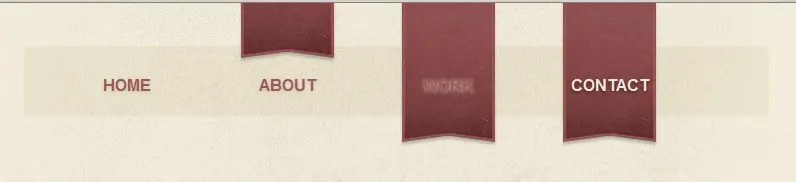
 En este tutorial vamos a construir un menu de navegación, con un efecto de deslizamiento estacionario. Comenzaremos contrullendo el concepto de Photoshop, diseñar los elementos básicos de HTML, todo el estilo en CSS luego unirlo todo con unas pocas líneas de jQuery para crear un diseño semántico.
Script jQuery:
/**
 * @author Alexander Farkas
 * v. 1.21
 */


(function($) {
    if(!document.defaultView || !document.defaultView.getComputedStyle){ // IE6-IE8
        var oldCurCSS = jQuery.curCSS;
        jQuery.curCSS = function(elem, name, force){
            if(name === 'background-position'){
                name = 'backgroundPosition';
            }
            if(name !== 'backgroundPosition' || !elem.currentStyle || elem.currentStyle[ name ]){
                return oldCurCSS.apply(this, arguments);
            }
            var style = elem.style;
            if ( !force && style && style[ name ] ){
                return style[ name ];
            }
            return oldCurCSS(elem, 'backgroundPositionX', force) +' '+ oldCurCSS(elem, 'backgroundPositionY', force);
        };
    }

    var oldAnim = $.fn.animate;
    $.fn.animate = function(prop){
        if('background-position' in prop){
            prop.backgroundPosition = prop['background-position'];
            delete prop['background-position'];
        }
        if('backgroundPosition' in prop){
            prop.backgroundPosition = '('+ prop.backgroundPosition;
        }
        return oldAnim.apply(this, arguments);
    };

    function toArray(strg){
        strg = strg.replace(/left|top/g,'0px');
        strg = strg.replace(/right|bottom/g,'100%');
        strg = strg.replace(/([0-9.]+)(s|)|$)/g,"$1px$2");
        var res = strg.match(/(-?[0-9.]+)(px|%|em|pt)s(-?[0-9.]+)(px|%|em|pt)/);
        return [parseFloat(res[1],10),res[2],parseFloat(res[3],10),res[4]];
    }

    $.fx.step. backgroundPosition = function(fx) {
        if (!fx.bgPosReady) {
            var start = $.curCSS(fx.elem,'backgroundPosition');

            if(!start){//FF2 no inline-style fallback
                start = '0px 0px';
            }

            start = toArray(start);

            fx.start = [start[0],start[2]];

            var end = toArray(fx.options.curAnim.backgroundPosition);
            fx.end = [end[0],end[2]];

            fx.unit = [end[1],end[3]];
            fx.bgPosReady = true;
        }
        //return;
        var nowPosX = [];
        nowPosX[0] = ((fx.end[0] - fx.start[0]) * fx.pos) + fx.start[0] + fx.unit[0];
        nowPosX[1] = ((fx.end[1] - fx.start[1]) * fx.pos) + fx.start[1] + fx.unit[1];
        fx.elem.style.backgroundPosition = nowPosX[0]+' '+nowPosX[1];

    };
})(jQuery);
Si les falla el script, mandenme un mp y les mando el archvio en .txt
Pinceles:
http://wefunction.com/2010/04/42-more-subtle-grunge-brushes

Espero que les haya agradado este pequeño tutorial, no olviden comentar, y cualquier duda pueden mandarme un MP, gracias.