Es un problema usual cuando se tiene un archivo PST viejo. Arrastra errores, por ejemplo que no salen los mensajes de la bandeja de salida. Aparece el mensaje que dice enviando 2 de 8 pero en realidad solo hay 2 mensajes en la bandeja de salida por enviar.
En fin, la solución es la siguiente:
(en Inglés pero son fáciles de seguir)
Bajar MDBVU32.EXE desde Microsoft. Extraer y ejecutar mdbvu32.exe.
Press OK on the first screen
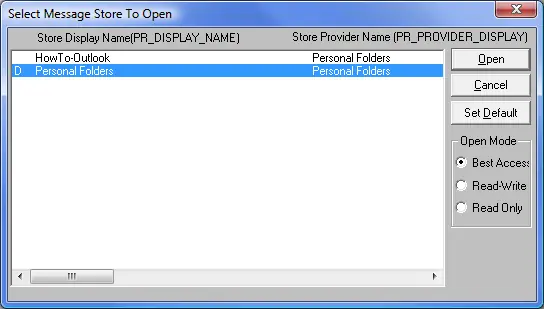
Select MDB-> Open Message Store and select your default pst-file (the one with the D in front of it) and press Open
Select MDB-> Open Root Folder
You’ll find the “Read:” message in the middle pane called “Messages in Folder”
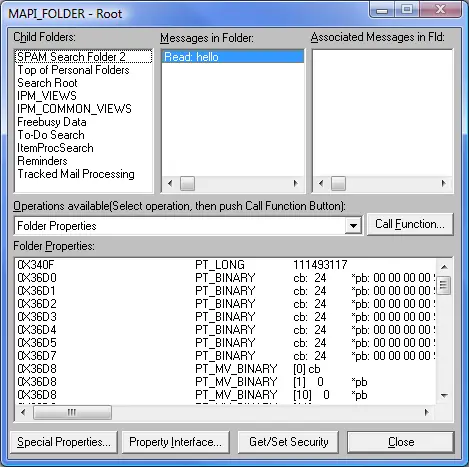
Select the “Read:” message
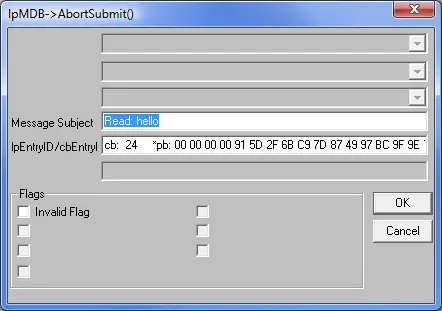
In the Operations available select lpMDB->AbortSubmit() (ON SELECTED MSG)
Press Call Function and then OK
Make sure the message is still selected
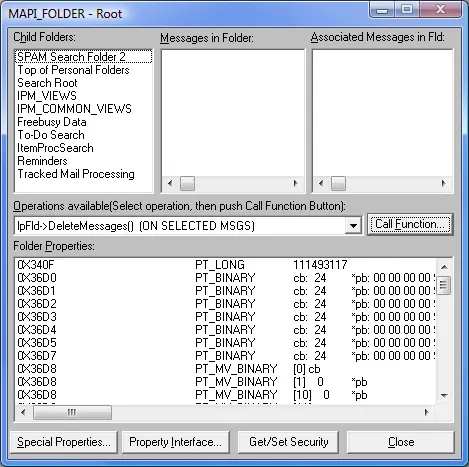
In the Operations available select lpFld->DeleteMessages() (ON SELECTED MSGS)
Press Call Function and then OK
The “Messages in Folder” pane should now be empty
Press Close
Select MDB-> Store Logoff and then OK and then OK again on the information message
Select Session-> Logoff
You can now close the open window called MDB Viewer Test Application
Open Outlook and the notice that the stuck receipt is gone.
En fin, la solución es la siguiente:
(en Inglés pero son fáciles de seguir)
Bajar MDBVU32.EXE desde Microsoft. Extraer y ejecutar mdbvu32.exe.
Press OK on the first screen
Select MDB-> Open Message Store and select your default pst-file (the one with the D in front of it) and press Open
Select MDB-> Open Root Folder
You’ll find the “Read:” message in the middle pane called “Messages in Folder”
Select the “Read:” message
In the Operations available select lpMDB->AbortSubmit() (ON SELECTED MSG)
Press Call Function and then OK
Make sure the message is still selected
In the Operations available select lpFld->DeleteMessages() (ON SELECTED MSGS)
Press Call Function and then OK
The “Messages in Folder” pane should now be empty
Press Close
Select MDB-> Store Logoff and then OK and then OK again on the information message
Select Session-> Logoff
You can now close the open window called MDB Viewer Test Application
Open Outlook and the notice that the stuck receipt is gone.