Google es utilizado por la mayoria de la gente como una forma de encontrar paginas sobre un interez comun, se dice que el usuario regular utiliza google cuando menos 1 vez por semana, el interfaz es bastante comodo, escribes lo que deseas encontrar y das click en buscar, inmediatamente te saldran miles de resultados, pero que tal cuando buscas algo en especial y no lo puedes encontrar? bueno la maquina de busqueda de google es bastante poderosa, "miles" de "secretos" se han publicado sobre los diferentes directivos que puedes usar, trucos, etc, en este manual expondre algunas tecnicas utilizadas por mi y te mostrare con ejemplos como puedes sacar al maximo tu "google-fu", comenzemos.
Lo Basico
Google tiene operadores logicos booleanos AND, NOT y OR asi como operadores aritmeticos, etc pero no nos vamos a adentrar en eso, lo primero que debemos hacer es entrar a preferencias y quitar el filtro SafeSearch, lo ponemos a Sin Filtro como muestra en la sig. figura.
https://www.google.com.mx/preferences
A mi me gusta tambien seleccionar Ingles como idioma por default, segun mi caso en veses busco cadenas en español como "respaldos", "codigo fuente", "privado", "banco", etc ... que alguien fuera de Mexico, Latinoamerica, etc seria muy raro que escribiera "backup", "source code" etc en los nombres de su data (datos); Ademas si busco en español por cosas mas friky casi siempre arroja resultados bastante viejos y obsoletos pues por lo regular son cosas recopiadas de post escritos en ingles u otros idiomas (ya saben google translator y esas cosas que usan muchos taringueros). Entonces si gustas mueves tambien eso como muestra la siguiente figura: Seleccionando Ingles por defaul, yo lo dejare como se ve en Español para este manual.
Puedes si deseas poner mas preferencias, para este manual eso es suficiente,
Teniendo listo nuestro entorno google, comenzamos la diversion!
Notas que debes saber antes de comenzar
Google no diferencia MAYUZCULAS de minusculas, asi que da lo mismo escribir "HACKER" que "hacker" o su version psyco "HaCkEr", todas seran tratadas igual.
Google limita su busqueda a 32 palabras
Sintaxis de la URL: para que completamente entiendas como se usa la syntax del url, la direccion de peticion es www.google.com/search ...donde los valores serian asi: www.google.com/search?variable1=valor1&variable2=valor2
Google usa caracteres especiales para interpretar cosas como espacios, etc, los cara cteres especiales usan el % antes de el, de tal forma que "tu email" quedaria "tu%20email", a lo largo de tu gran carrera de "jaquer" con google o cualquier otro metodo, tendras (llegaras) a utilizar caracteres interpretados hexadecimalmente (te lo prometo!), si deseas saber los valores hexadecimales de los caracteres busca por "ASCII table" en google.
Operadores Avanzados
Estos operadores se utilizan en conjuncion con tu busqueda especifica
intitle, allintitle, inurl, allinurl, filetype, allintext, site, link, inanchor, daterange, cache, info, related, phonebook, rphonebook, bphonebook, author, group, msgid, insubject, stocks, define, y se utilizan escribiendo la palabra inmediatamente seguido por : (dos puntos) y inmediatamente seguido por la cadena a utilizar, por ejemplo la busqueda:
intitle:taringa arrojaria:
intitle, allintitle, inurl, allinurl, filetype, allintext, site, link, inanchor, daterange, cache, info, related, phonebook, rphonebook, bphonebook, author, group, msgid, insubject, stocks, define, y se utilizan escribiendo la palabra inmediatamente seguido por : (dos puntos) y inmediatamente seguido por la cadena a utilizar, por ejemplo la busqueda:
intitle:taringa arrojaria:
intitle:"index of""respaldo"
Cuando pones tu busqueda entre comillas, como se vio en el ejemplo de arriba le dices a google que incluya esa cadena, en este caso "index of" y "respaldo".
allintitle:"index of""respaldo"
Aunque no es facil distinguir la diferencia en estas dos imagenes el allintitle es mas restringido en los resultados pues arroja menos resultados exige que las dos cadenas "index of" y "respaldo" sean incluidas en el titulo de la pagina (intitle), lo mismo sucede con allinurl y inurl respectivamente
info:taringa.net
Directivo info: arroja aspectos sobre el site, por ejemplo si das click en "Encontrar páginas del sitio taringa.net"
Buscando Imagentes
Image of taringa
Aunque bastante aburrida, podrias por ejemplo: "image of shakira"



No dejes que te vean
Por lo regular cuando quieres ser anonimo (no como los "Anonymous", que utilizan DDNS ataques para bajar servidores, y eso es muy lame vaya la redundancia), tu lo que realmente quieres es ser "anonimo" completmente, entonces quieres utilizar algun servidor proxy entonces buscamos por uno:
inurl:"nph-proxy.cgi" "Start browsing"

Buscando version Servidor WEB: intitle:index of "server at"
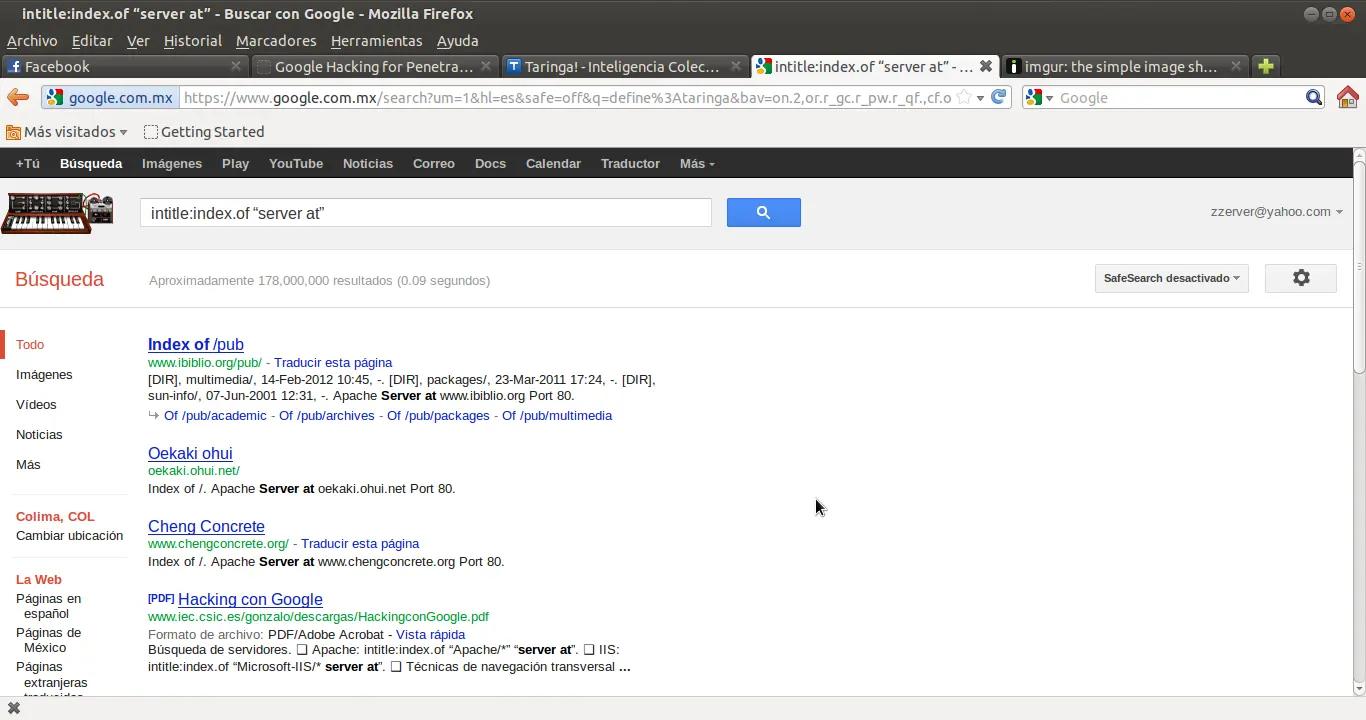
Si deseas saber que version de webserver se usa
Una vez que sabes que version de webserver se usa, podrias ampliar tu busqueda buscando por servidores vulnerables usando webs como packetstorm, cern, etc. aqui algunas busquedas que podrian interezarte:
"AnWeb/1.42h” intitle:index.of
“Apache Tomcat/” intitle:index.of
“Apache-AdvancedExtranetServer/” intitle:index.of
“Apache/df-exts” intitle:index.of
“Apache/” intitle:index.of
“Apache/AmEuro” intitle:index.of
“Apache/Blast” intitle:index.of
“Apache/WWW” intitle:index.of
“Apache/df-exts” intitle:index.of
“CERN httpd 3.0B (VAX VMS)” intitle:index.of
“CompySings/2.0.40” intitle:index.of
“Davepache/2.02.003 (Unix)” intitle:index.of
“DinaHTTPd Server/1.15” intitle:index.of
“HP Apache-based Web “Server/1.3.26” intitle:index.of
“HP Apache-based Web “Server/1.3.27 (Unix) mod_ssl/2.8.11 OpenSSL/0.9.6g”
intitle:index.of
“HP-UX_Apache-based_Web_Server/2.0.43” intitle:index.of
“httpd+ssl/kttd” * server at intitle:index.of
“IBM_HTTP_Server” intitle:index.of
“IBM_HTTP_Server/2.0.42” intitle:index.of
“JRun Web Server” intitle:index.of
“LiteSpeed Web” intitle:index.of
“MCWeb” intitle:index.of
“MaXX/3.1” intitle:index.of
“Microsoft-IIS/* server at” intitle:index.of
“Microsoft-IIS/4.0” intitle:index.of
“Microsoft-IIS/5.0 server at” intitle:index.of
“Microsoft-IIS/6.0” intitle:index.of
“OmniHTTPd/2.10” intitle:index.of
“OpenSA/1.0.4” intitle:index.of
“OpenSSL/0.9.7d” intitle:index.of
“Oracle HTTP Server/1.3.22” intitle:index.of
“Oracle-HTTP-Server/1.3.28” intitle:index.of
“Oracle-HTTP-Server” intitle:index.of
“Oracle HTTP Server Powered by Apache” intitle:index.of
“Patchy/1.3.31” intitle:index.of
“Red Hat Secure/2.0” intitle:index.of
“Red Hat Secure/3.0 server at” intitle:index.of
“Savant/3.1” intitle:index.of
“SEDWebserver *” “server at” intitle:index.of
“SEDWebserver/1.3.26” intitle:index.of
“TcNet httpsrv 1.0.10” intitle:index.of
“WebServer/1.3.26” intitle:index.of
“WebTopia/2.1.1a “ intitle:index.of
“Yaws 1.65” intitle:index.of
“Zeus/4.3” intitle:index.of
“Apache/1.0” intitle:index.of
“Apache/1.1” intitle:index.of
“Apache/1.2” intitle:index.of
“Apache/1.2.0 server at” intitle:index.of
“Apache/1.2.4 server at” intitle:index.of
“Apache/1.2.6 server at” intitle:index.of
“Apache/1.3.0 server at” intitle:index.of
“Apache/1.3.2 server at” intitle:index.of
“Apache/1.3.1 server at” intitle:index.of
“Apache/1.3.1.1 server at” intitle:index.of
“Apache/1.3.3 server at” intitle:index.of
“Apache/1.3.4 server at” intitle:index.of
“Apache/1.3.6 server at” intitle:index.of
“Apache/1.3.9 server at” intitle:index.of
“Apache/1.3.11 server at” intitle:index.of
“Apache/1.3.12 server at” intitle:index.of
“Apache/1.3.14 server at” intitle:index.of
“Apache/1.3.17 server at” intitle:index.of
“Apache/1.3.19 server at” intitle:index.of
“Apache/1.3.20 server at” intitle:index.of
“Apache/1.3.22 server at” intitle:index.of
“Apache/1.3.23 server at” intitle:index.of
“Apache/1.3.24 server at” intitle:index.of
“Apache/1.3.26 server at” intitle:index.of
“Apache/1.3.27 server at” intitle:index.of
“Apache/1.3.27-fil” intitle:index.of
“Apache/1.3.28 server at” intitle:index.of
“Apache/1.3.29 server at” intitle:index.of
“Apache/1.3.31 server at” intitle:index.of
“Apache/1.3.33 server at” intitle:index.of
“Apache/1.3.34 server at” intitle:index.of
“Apache/1.3.35 server at” intitle:index.of
“Apache/2.0 server at” intitle:index.of
“Apache/2.0.32 server at” intitle:index.of
“Apache/2.0.35 server at” intitle:index.of
“Apache/2.0.36 server at” intitle:index.of
“Apache/2.0.39 server at” intitle:index.of
“Apache/2.0.40 server at” intitle:index.of
“Apache/2.0.42 server at” intitle:index.of
“Apache/2.0.43 server at” intitle:index.of
“Apache/2.0.44 server at” intitle:index.of
“Apache/2.0.45 server at” intitle:index.of
“Apache/2.0.46 server at” intitle:index.of
“Apache/2.0.47 server at” intitle:index.of
“Apache/2.0.48 server at” intitle:index.of
“Apache/2.0.49 server at” intitle:index.of
“Apache/2.0.49a server at” intitle:index.of
“Apache/2.0.50 server at” intitle:index.of
“Apache/2.0.51 server at” intitle:index.of
“Apache/2.0.52 server at” intitle:index.of
“Apache/2.0.55 server at” intitle:index.of
“Apache/2.0.59 server at” intitle:index.of
En adicion despues de identificar el servidor httpd que se usa, debemos identificar que sistema operativo usa, entonces utilizariamos algo como esto:
“Apache/1.3.12 (Unix) mod_fastcgi/2.2.12 mod_dyntag/1.0 mod_advert/1.12
mod_czech/3.1.1b2” intitle:index.of
“Apache/1.3.12 (Unix) mod_fastcgi/2.2.4 secured_by_Raven/1.5.0” intitle:index.of
“Apache/1.3.12 (Unix) mod_ssl/2.6.6 OpenSSL/0.9.5a” intitle:index.of
“Apache/1.3.12 Cobalt (Unix) Resin/2.0.5 StoreSense-Bridge/1.3 ApacheJServ/1.1.1
mod_ssl/2.6.4 OpenSSL/0.9.5a mod_auth_pam/1.0a FrontPage/4.0.4.3
mod_perl/1.24” intitle:index.of
“Apache/1.3.14 - PHP4.02 - Iprotect 1.6 CWIE (Unix) mod_fastcgi/2.2.12
PHP/4.0.3pl1” intitle:index.of
“Apache/1.3.14 Ben-SSL/1.41 (Unix) mod_throttle/2.11 mod_perl/1.24_01
PHP/4.0.3pl1 FrontPage/4.0.4.3 rus/PL30.0” intitle:index.of
“Apache/1.3.20 (Win32)” intitle:index.of
Table 3.3 continued
Locating Specific and Esoteric Server Versions
Queries That Locate Specific and Esoteric Server Versions
“Apache/1.3.20 Sun Cobalt (Unix) PHP/4.0.3pl1 mod_auth_pam_external/0.1
FrontPage/4.0.4.3 mod_perl/1.25” intitle:index.of
“Apache/1.3.20 Sun Cobalt (Unix) PHP/4.0.4 mod_auth_pam_external/0.1
FrontPage/4.0.4.3 mod_ssl/2.8.4 OpenSSL/0.9.6b mod_perl/1.25” intitle:index.of
“Apache/1.3.20 Sun Cobalt (Unix) PHP/4.0.6 mod_ssl/2.8.4 OpenSSL/0.9.6
FrontPage/5.0.2.2510 mod_perl/1.26” intitle:index.of
“Apache/1.3.20 Sun Cobalt (Unix) mod_ssl/2.8.4 OpenSSL/0.9.6b PHP/4.0.3pl1
mod_auth_pam_external/0.1 FrontPage/4.0.4.3 mod_perl/1.25” intitle:index.of
“Apache/1.3.20 Sun Cobalt (Unix) mod_ssl/2.8.4 OpenSSL/0.9.6b PHP/4.0.3pl1
mod_fastcgi/2.2.8 mod_auth_pam_external/0.1 mod_perl/1.25” intitle:index.of
“Apache/1.3.20 Sun Cobalt (Unix) mod_ssl/2.8.4 OpenSSL/0.9.6b PHP/4.0.4
mod_auth_pam_external/0.1 mod_perl/1.25” intitle:index.of
“Apache/1.3.20 Sun Cobalt (Unix) mod_ssl/2.8.4 OpenSSL/0.9.6b PHP/4.0.6
mod_auth_pam_external/0.1 FrontPage/4.0.4.3 mod_perl/1.25” intitle:index.of
“Apache/1.3.20 Sun Cobalt (Unix) mod_ssl/2.8.4 OpenSSL/0.9.6b
mod_auth_pam_external/0.1 mod_perl/1.25” intitle:index.of
“Apache/1.3.26 (Unix) Debian GNU/Linux PHP/4.1.2 mod_dtcl” intitle:index.of
“Apache/1.3.26 (Unix) PHP/4.2.2” intitle:index.of
“Apache/1.3.26 (Unix) mod_ssl/2.8.9 OpenSSL/0.9.6b” intitle:index.of
“Apache/1.3.26 (Unix) mod_ssl/2.8.9 OpenSSL/0.9.7” intitle:index.of
“Apache/1.3.26+PH” intitle:index.of
“Apache/1.3.27 (Darwin)” intitle:index.of
“Apache/1.3.27 (Unix) mod_log_bytes/1.2 mod_bwlimited/1.0 PHP/4.3.1
FrontPage/5.0.2.2510 mod_ssl/2.8.12 OpenSSL/0.9.6b” intitle:index.of
“Apache/1.3.27 (Unix) mod_ssl/2.8.11 OpenSSL/0.9.6g FrontPage/5.0.2.2510
mod_gzip/1.3.26 PHP/4.1.2 mod_throttle/3.1.2” intitle:index.of
mod_czech/3.1.1b2” intitle:index.of
“Apache/1.3.12 (Unix) mod_fastcgi/2.2.4 secured_by_Raven/1.5.0” intitle:index.of
“Apache/1.3.12 (Unix) mod_ssl/2.6.6 OpenSSL/0.9.5a” intitle:index.of
“Apache/1.3.12 Cobalt (Unix) Resin/2.0.5 StoreSense-Bridge/1.3 ApacheJServ/1.1.1
mod_ssl/2.6.4 OpenSSL/0.9.5a mod_auth_pam/1.0a FrontPage/4.0.4.3
mod_perl/1.24” intitle:index.of
“Apache/1.3.14 - PHP4.02 - Iprotect 1.6 CWIE (Unix) mod_fastcgi/2.2.12
PHP/4.0.3pl1” intitle:index.of
“Apache/1.3.14 Ben-SSL/1.41 (Unix) mod_throttle/2.11 mod_perl/1.24_01
PHP/4.0.3pl1 FrontPage/4.0.4.3 rus/PL30.0” intitle:index.of
“Apache/1.3.20 (Win32)” intitle:index.of
Table 3.3 continued
Locating Specific and Esoteric Server Versions
Queries That Locate Specific and Esoteric Server Versions
“Apache/1.3.20 Sun Cobalt (Unix) PHP/4.0.3pl1 mod_auth_pam_external/0.1
FrontPage/4.0.4.3 mod_perl/1.25” intitle:index.of
“Apache/1.3.20 Sun Cobalt (Unix) PHP/4.0.4 mod_auth_pam_external/0.1
FrontPage/4.0.4.3 mod_ssl/2.8.4 OpenSSL/0.9.6b mod_perl/1.25” intitle:index.of
“Apache/1.3.20 Sun Cobalt (Unix) PHP/4.0.6 mod_ssl/2.8.4 OpenSSL/0.9.6
FrontPage/5.0.2.2510 mod_perl/1.26” intitle:index.of
“Apache/1.3.20 Sun Cobalt (Unix) mod_ssl/2.8.4 OpenSSL/0.9.6b PHP/4.0.3pl1
mod_auth_pam_external/0.1 FrontPage/4.0.4.3 mod_perl/1.25” intitle:index.of
“Apache/1.3.20 Sun Cobalt (Unix) mod_ssl/2.8.4 OpenSSL/0.9.6b PHP/4.0.3pl1
mod_fastcgi/2.2.8 mod_auth_pam_external/0.1 mod_perl/1.25” intitle:index.of
“Apache/1.3.20 Sun Cobalt (Unix) mod_ssl/2.8.4 OpenSSL/0.9.6b PHP/4.0.4
mod_auth_pam_external/0.1 mod_perl/1.25” intitle:index.of
“Apache/1.3.20 Sun Cobalt (Unix) mod_ssl/2.8.4 OpenSSL/0.9.6b PHP/4.0.6
mod_auth_pam_external/0.1 FrontPage/4.0.4.3 mod_perl/1.25” intitle:index.of
“Apache/1.3.20 Sun Cobalt (Unix) mod_ssl/2.8.4 OpenSSL/0.9.6b
mod_auth_pam_external/0.1 mod_perl/1.25” intitle:index.of
“Apache/1.3.26 (Unix) Debian GNU/Linux PHP/4.1.2 mod_dtcl” intitle:index.of
“Apache/1.3.26 (Unix) PHP/4.2.2” intitle:index.of
“Apache/1.3.26 (Unix) mod_ssl/2.8.9 OpenSSL/0.9.6b” intitle:index.of
“Apache/1.3.26 (Unix) mod_ssl/2.8.9 OpenSSL/0.9.7” intitle:index.of
“Apache/1.3.26+PH” intitle:index.of
“Apache/1.3.27 (Darwin)” intitle:index.of
“Apache/1.3.27 (Unix) mod_log_bytes/1.2 mod_bwlimited/1.0 PHP/4.3.1
FrontPage/5.0.2.2510 mod_ssl/2.8.12 OpenSSL/0.9.6b” intitle:index.of
“Apache/1.3.27 (Unix) mod_ssl/2.8.11 OpenSSL/0.9.6g FrontPage/5.0.2.2510
mod_gzip/1.3.26 PHP/4.1.2 mod_throttle/3.1.2” intitle:index.of
Buscando Musica: -intitle(html|htm|php|asp|php5):"index of""musica"
En ese ejemplo le decimos a google que en el title (titulo) de la pagina con el - que quite todo lo que tenga htm, html, asp, php, etc, normalmente eso son paginas de index y no las queremos y que busque por musica, como resultado nos dara solo index de musica.
intitle:index of "privado"
index.of config.php
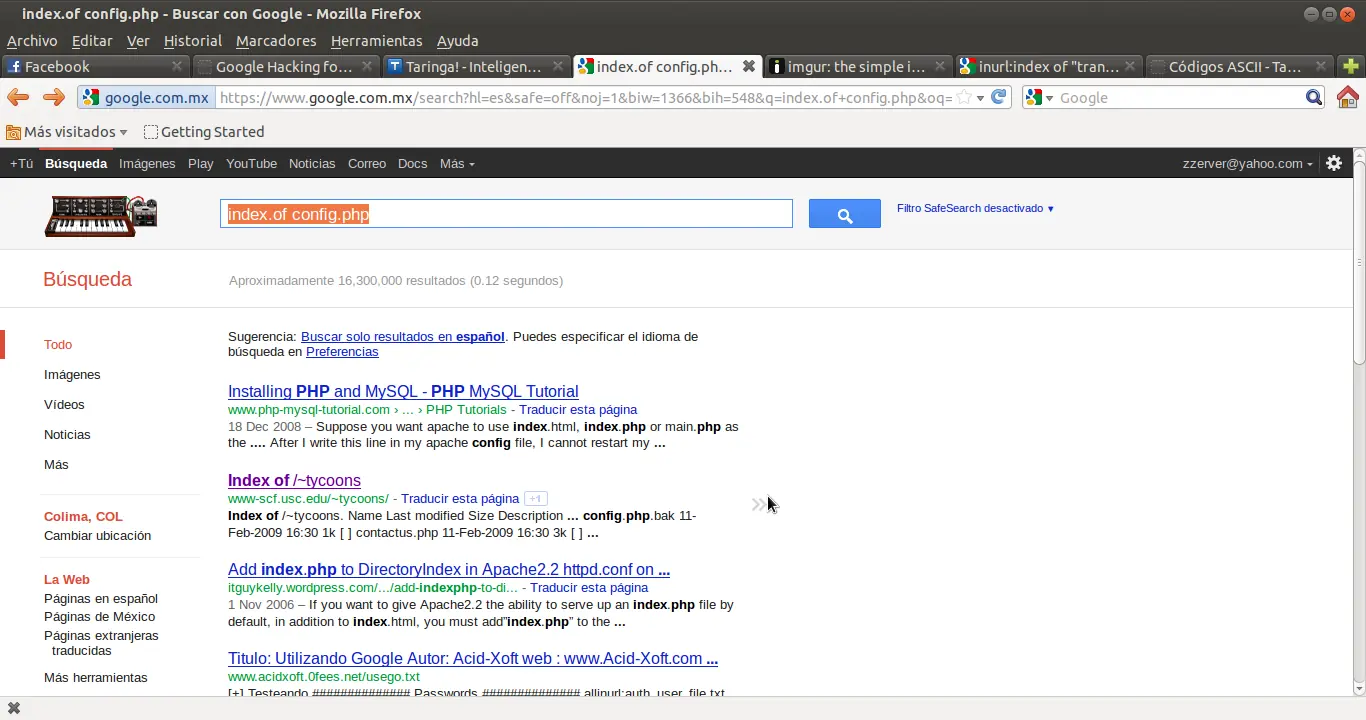
Algunos programas usan config.php para identificar archivos de configuracion, esa informacion es bastante util cuando se hace una prueba de penetracion etica, a continuacion algunas busquedas que te podrian interezar:
Archivos de Configuraciones:
Configuracion PHP: intitle:index.of config.php
Archivo Conf PHP: inurl:config.php dbuname dbpass
CGIIRC: intitle:index.of cgiirc.config
CGIIRG: inurl:cgiirc.config
IPSEC: inurl:ipsec.conf -intitle:manpage
ws_ftp: intitle:index.of ws_ftp.ini
eggdrop: eggdrop filetype:user user
samba: inurl:”smb.conf” intext:”workgroup”
filetype:conf
firewall: filetype:conf inurl:firewall -intitle:cvs
vtunnelD: inurl:vtund.conf intext:pass -cvs
OpenLDAP: file filetype:conf slapd.conf
PHP: inurl:php.ini filetype:ini
FTP: filetype:conf inurl:proftpd.conf -sample
WV: inurl:”wvdial.conf” intext:”password”
OpenLDAP: inurl:”slapd.conf” intext:”credentials” -
manuales: -”Manual Page” -man: -
OpenLDAP: inurl:”slapd.conf” intext:”rootpw” -
WS_FTP: filetype:ini ws_ftp pwd
Configuracion PHP: intitle:index.of config.php
Archivo Conf PHP: inurl:config.php dbuname dbpass
CGIIRC: intitle:index.of cgiirc.config
CGIIRG: inurl:cgiirc.config
IPSEC: inurl:ipsec.conf -intitle:manpage
ws_ftp: intitle:index.of ws_ftp.ini
eggdrop: eggdrop filetype:user user
samba: inurl:”smb.conf” intext:”workgroup”
filetype:conf
firewall: filetype:conf inurl:firewall -intitle:cvs
vtunnelD: inurl:vtund.conf intext:pass -cvs
OpenLDAP: file filetype:conf slapd.conf
PHP: inurl:php.ini filetype:ini
FTP: filetype:conf inurl:proftpd.conf -sample
WV: inurl:”wvdial.conf” intext:”password”
OpenLDAP: inurl:”slapd.conf” intext:”credentials” -
manuales: -”Manual Page” -man: -
OpenLDAP: inurl:”slapd.conf” intext:”rootpw” -
WS_FTP: filetype:ini ws_ftp pwd
Otras mas:
MRTG: filetype:cfg mrtg “target
Prestige router: “Welcome to the Prestige Web-Based Configurator”
GNU Zebra: inurl:zebra.conf intext:password -sample -test -tutorial -download
GNU Zebra inurl:ospfd.conf intext:password -sample -test -tutorial -download
YAST: filetype:cfg ks intext:rootpw -sample -test -howto
Netscape server: allinurl:”.nsconfig” -sample -howto -tutorial
UnrealIRCd: filetype:conf inurl:unrealircd.conf -cvs -gentoo
psyBNC: filetype:conf inurl:psybnc.conf “USER.PASS=”
SSL: inurl:ssl.conf filetype:conf
LILO: inurl:lilo.conf filetype:conf password -
tatercounter2000: -bootpwd -man
MySQL: filetype:cnf my.cnf -cvs -example
oracle client: filetype:ora ora
Mandrake: filetype:cfg auto_inst.cfg
Oekakibss: filetype:conf oekakibbs
LeapFTP client: LeapFTP intitle:”index.of./” sites.inimodified
a .Net Web Application: filetype:config config intext:appSettings configuration file “User ID”
WS_FTP: “index of/” “ws_ftp.ini” “parent directory”
ODBC clients: inurl:odbc.ini ext:ini -cvs
FlashFXP: filetype:ini inurl:flashFXP.ini
Otras mas que encontre en la red
Putty saved session data inurl:”putty.reg”
Icecast configuration file “liveice configuration file” ext:cfg -site:sourceforge.net
SoftCart configuration file intitle:Configuration.File inurl:softcart.exe
Cisco configuration data intext:”enable secret 5 $”
IIS Web.config file filetype:config web.config -CVS
VMWare configuration files ext:vmx vmx
Radiator Radius configuration file ext:cfg radius.cfg
Rsync configuration file ext:conf inurl:rsyncd.conf -cvs -man
Eudora configuration file ext:ini eudora.ini
emule configuration file inurl:preferences.ini “[emule]”
abyss webserver configuration file intitle:index.of abyss.conf
Frontpage Extensions for Unix filetype:cnf inurl:_vti_pvt access.cnf
Shoutcast configuration file intitle:”Index of” sc_serv.conf sc_servcontent
HP Ethernet switch configuration file intitle:”DEFAULT_CONFIG - HP”
Oracle configuration files filetype:ora tnsnames
Counterstrike configuration file inurl:server.cfg rcon password
Steam configuration file intext:”SteamUserPassphrase=”
intext:”SteamAppUser=” -”username” -”user”
CGI Calendar configuration file inurl:cgi-bin inurl:calendar.cfg
Cisco configuration file intext:”enable password 7”
YABB Forum administration file inurl:/yabb/Members/Admin.dat
FlashFXP site data file inurl:”Sites.dat”+”PASS=”
Ruby on Rails database connector file ext:yml database inurl:config
Cisco configuration file enable password | secret “current configuration” -intext:the
Generic configuration file intitle:index.of.config
intitle:index.of .bash_history

intitle:”Web Data Administrator - Login”
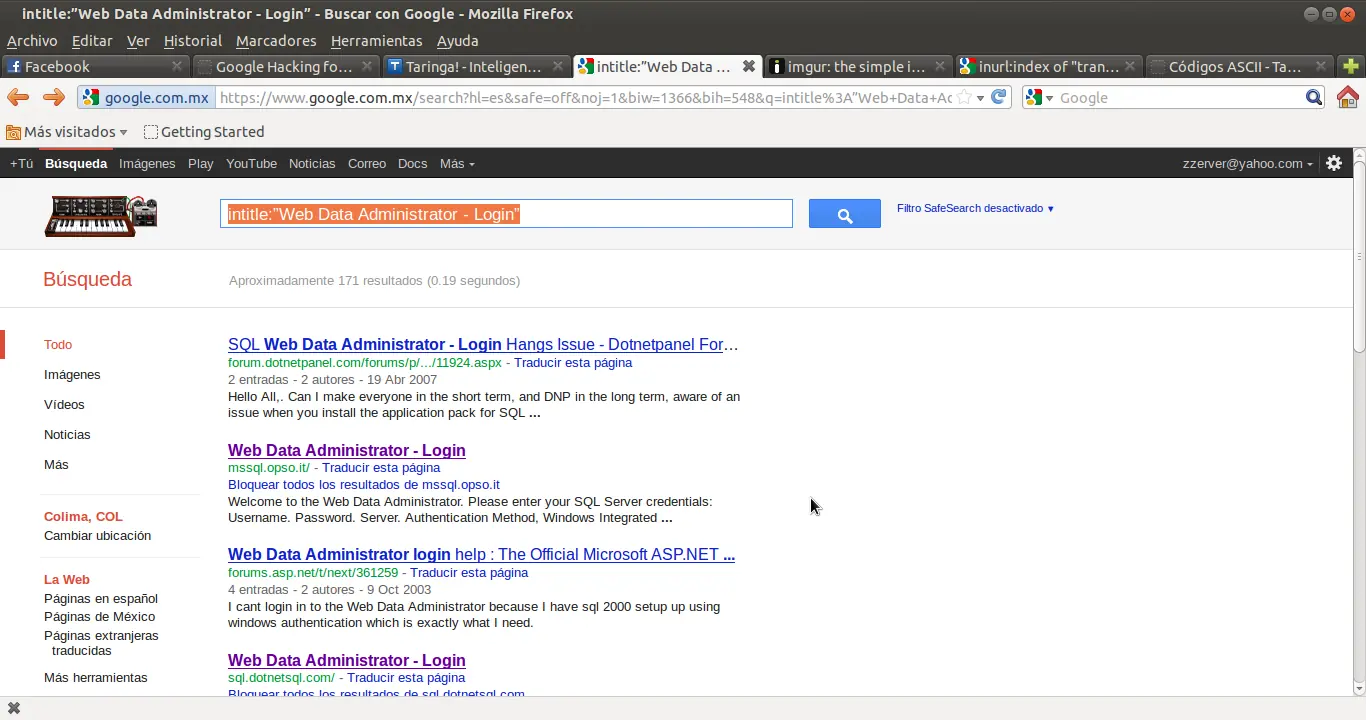
inurl:pls/admin_/gateway.htm
Algunas cadenas copiadas de la red
allinurl: admin mdb
Inurl:backup filetype:mdb
“ClearQuest Web Logon”
inurl:/admin/login.asp
inurl:login.asp
filetype:fp5 fp5 -”cvs log”
filetype:fp3 fp3
filetype:fp7 fp7
“Select a database to view” intitle:
”filemaker pro”
“Welcome to YourCo Financial”
“(C) Copyright IBM” “Welcome to Websphere”
inurl:names.nsf?opendatabase
inurl:”/catalog.nsf” intitle:catalog
intitle:”messaging login”
“© Copyright IBM”
intitle:”Web Data Administrator - Login”
intitle:”Gateway Configuration Menu”
inurl:/pls/sample/admin_/help/
inurl:1810 “Oracle Enterprise Oracle Enterprise Manager Manager”
inurl:admin_/globalsettings.htm
intitle:”oracle http server index” “Copyright* Oracle Corporation.”
inurl:pls/admin_/gateway.htm
inurl:orasso.wwsso_app_admin.ls_login
“phpMyAdmin” “running on”
inurl:”main.php”
“Welcome to phpMyAdmin”
“ Create new database”
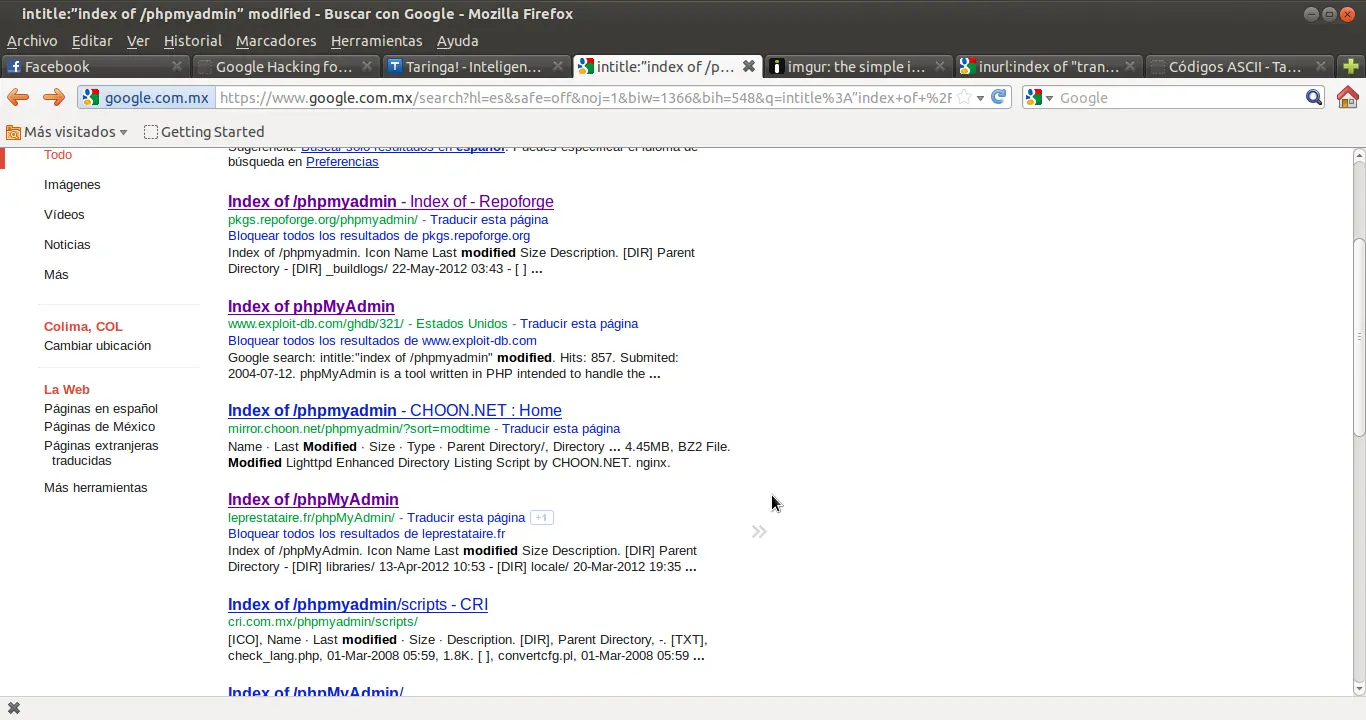
intitle:”index of /phpmyadmin” modified
intitle:”Apache Tomcat” “Error Report”
Nos vamos a la pagina 10 aprox, y bingo! Tomcat revela mucha informacion de gran utilidad
Felicidades! haz pasado a la segunda seccion, como te pudiste dar cuenta, utilizando la maquina de busqueda de google, consiste basicamente en conbinar lo que sabes, de lo que buscas, utilizando los directivos que google ofrece para identificar lo que buscas.
Pero que tal si queremos mas? La solucion es usar "scripting"; No se tu, pero ami me aburren los trucos que todos sabemos como lo son google roll", "doodles", "Huevos de pascua ocultos", etc, etc y etc; YO LO QUE QUIERO es explotar google!, dicho lo anterior dependiendo que plataformas usas (yo estoy en Linux ahorita) te invito a instalarte 3 programas para comenzar, curl, NC (netcat), wget y lynks , los ahi para windows tambien!, Buscalos en google y instalalos, ya que los tengas regresas con la siguiente parte:
Pero que tal si queremos mas? La solucion es usar "scripting"; No se tu, pero ami me aburren los trucos que todos sabemos como lo son google roll", "doodles", "Huevos de pascua ocultos", etc, etc y etc; YO LO QUE QUIERO es explotar google!, dicho lo anterior dependiendo que plataformas usas (yo estoy en Linux ahorita) te invito a instalarte 3 programas para comenzar, curl, NC (netcat), wget y lynks , los ahi para windows tambien!, Buscalos en google y instalalos, ya que los tengas regresas con la siguiente parte:
Bien, ahora abres una terminal (en el caso de windows abres el ms-prompt o cmd), ejecutas este comando:.
wget -U dzupd_navegador_powa "http://taringa.net" -O-
Explicacion: Estamos bajando lo que nos mando taringa en su index principal y como pusimos -U dzupd_navegador_powa cuando apache escriba en sus logs, dira que estamos usando un navegador llamado "dzupd_navegador_powa" y al ultimo le decimos que volque todo en pantalla con -O- pero si terminaramos con -O unnombre.txt se volcaria a un archivo, una vez explicado eso, regresemos a google...
Quizas para calentar motores nos gustaria saber cuantos resultados arrojaria nuestra busqueda, concidera este comando:
alex@alex-MB40II5:~$ lynx -dump "http://www.google.com/search?q=taringa" | grep Results | awk -F "of about" '{print $2}' | awk '{print $1}'
41,800,000
alex@alex-MB40II5:~$
Claramente se nota que google nos esta diciendo que van a ser aprox. 41,800,000 resultados con la palabra taringa.
en este momento concluyo este mini pues estoy agotado, pero como es de esperarse este tipo de documentos no le interezan a la mayoria de las personas, esta pendiente y si vez que este modesto post vale la pena continuarlo comentalo, y si deseas dar puntos adelante, en el siguiente capitulo, osea este mismo documento explorare las mas locas ideas como son transversacion de dominios y etc, saludos y hasta la proxima ocacion.