ABM en 5 Capas - en Visual Basic .Net en modo Desconectado con SQL Server
Unite:
Hoy vamos a aprender a hacer un ABM (Altas, Bajas y Modificaciones) sencillo en modo Desconectado, en 5 capas o Layers, una capa de interface de usuario (UI), una de negocio dividida en la parte estatica (BLL_Static), que son los atributos y en la parte dinamica (BLL_Dynamic), que son los metodos, y una ultima capa de datos, tambien dividida en 2 en una parte (DAL_Services), toda la conexion a la base de datos y la configurarion del comando y en la otra parte (DAL), la forma en la que se guardan los datos, es decir, la implementacion misma del Alta, Baja y Modificacion) con una Base de datos en mi caso de SQL Server

--------------------------BARRA--------------------------
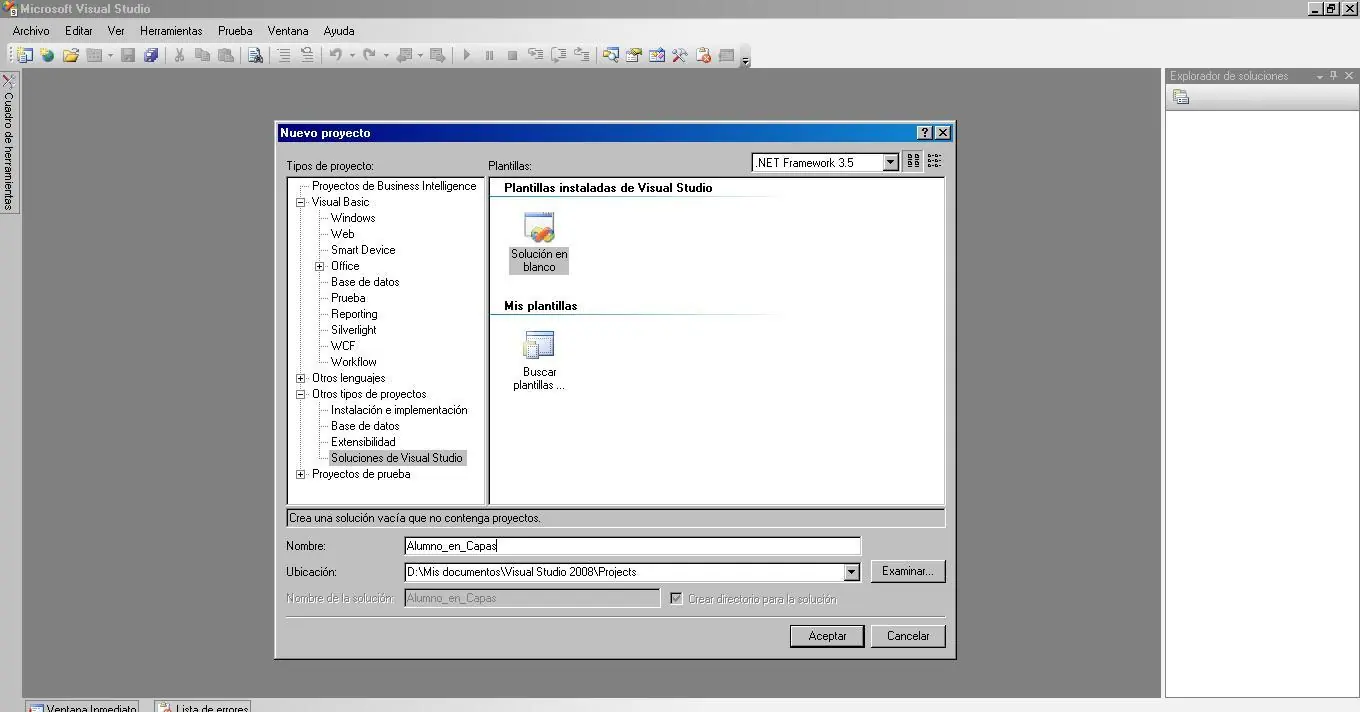
Primero que nada, creamos un proyecto del tipo Solucion y le asignamos un nombre.
--------------------------BARRA--------------------------
--------------------------BARRA--------------------------
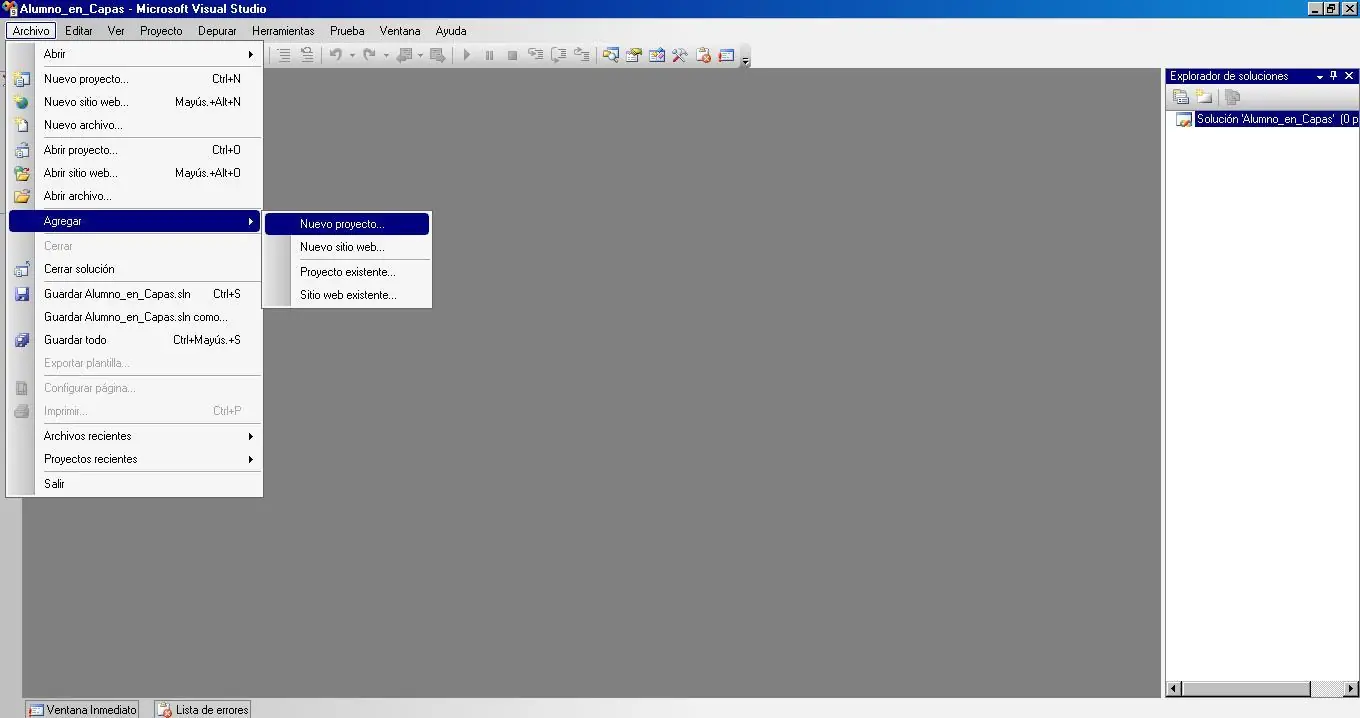
A esa solucion, le agregamos un proyecto nuevo, de esta forma:
--------------------------BARRA--------------------------
--------------------------BARRA--------------------------
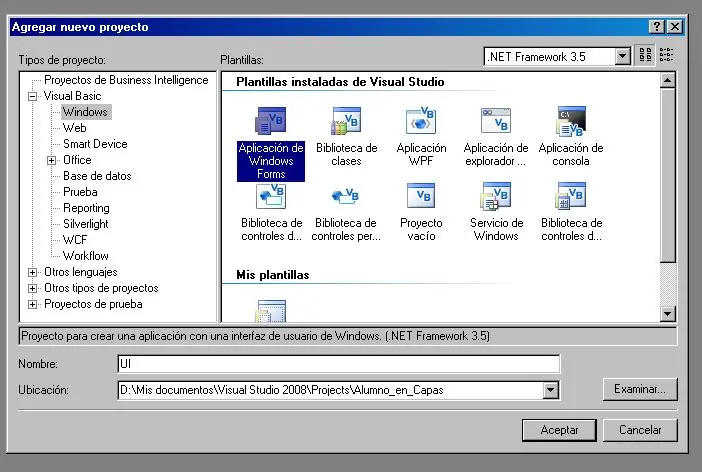
El primer proyecto que le vamos a agregar a nuestra solucion, tiene que ser del tipo Aplicacion de Windows Forms (Tiene que ser el primero para que nos quede como proyecto predeterminado) como vemos en la foto:
--------------------------BARRA--------------------------
--------------------------BARRA--------------------------
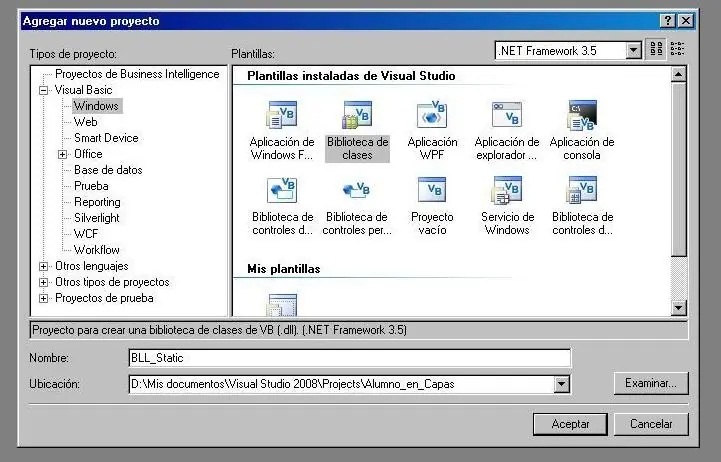
Lo siguiente que tenemos que hacer es agregarle otro proyecto del tipo Biblioteca de Clases llamandolo BLL_Static en mi caso como vemos a continuacion:
--------------------------BARRA--------------------------
--------------------------BARRA--------------------------
Asi como agregamos este proyecto agregamos 3 proyectos mas del mismo tipo, con los siguientes nombres:
BLL_Dynamic,
DAL,
DAL_Services
Si todo salio bien, nos deberia quedar asi:
--------------------------BARRA--------------------------
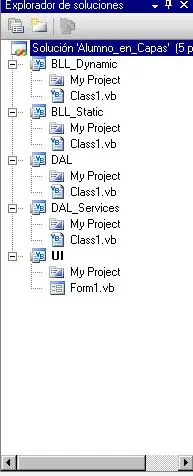
--------------------------BARRA--------------------------
Una vez tenemos todos los proyectos agregados y todo listo tenemos que agregar las referencias. y lo vamos a hacer de esta forma:
A la capa UI le agregamos referencias hacia las capas BLL_Static y BLL_Dynamic haciendo click derecho en el proyecto UI y click en la opcion Agregar referencia como lo vemos a continuacion:
UI BLL_Static
UI BLL_Dynamic
--------------------------BARRA--------------------------
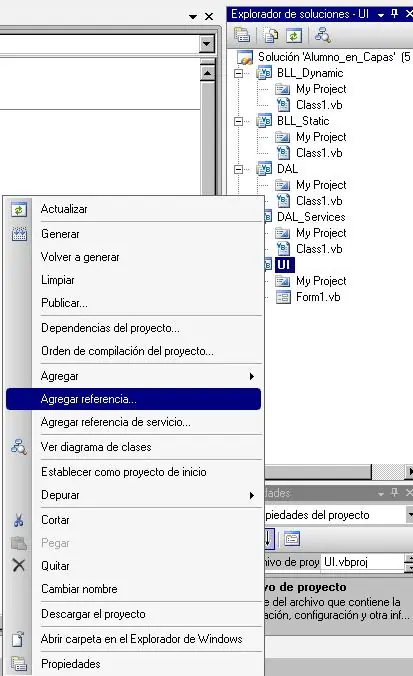
--------------------------BARRA--------------------------
Luego Seleccionamos los proyectos antes mencionados de a uno por vez de esta forma:
--------------------------BARRA--------------------------
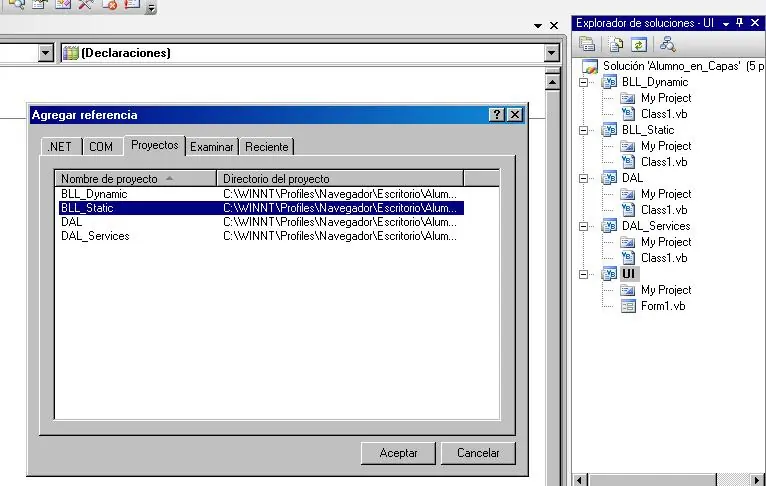
--------------------------BARRA--------------------------
Una vez agregadas, de la misma forma agregamos 3 referencias mas:
BLL_Dynamic DAL
DAL BLL_Static
DAL DAL_Services
Una vez agregadas todas las referencias de los proyectos, lo que tenemos que hacer es meternos con las clases, empecemos con las de la capa de Interfaz de Usuario UI:
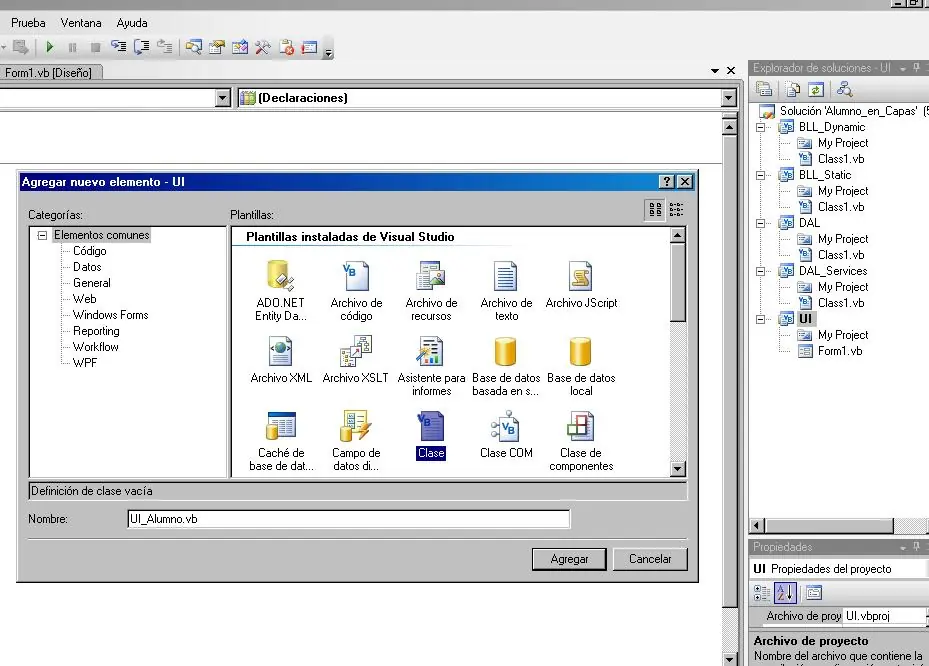
En esta capa necesitamos crear una clase que en mi caso la llamé UI_Alumno, esto lo hacemos haciendo boton derecho en el proyecto UI, seleccionando la opcion Agregar Nuevo elemento como vemos a continuacion:
--------------------------BARRA--------------------------
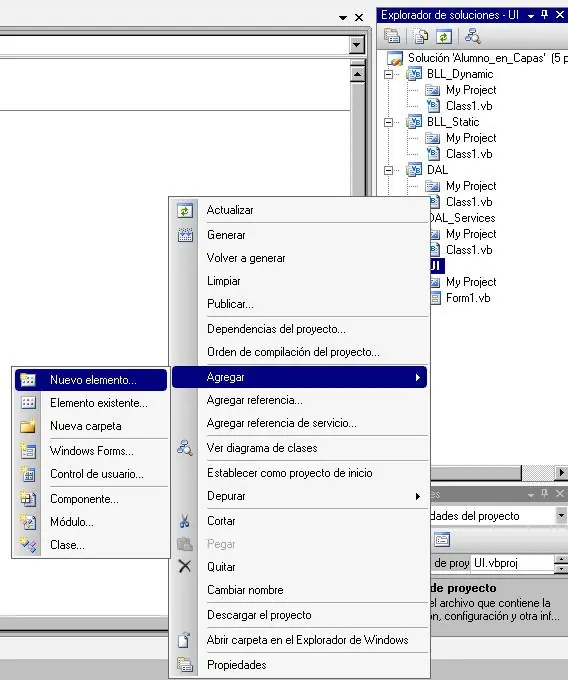
--------------------------BARRA--------------------------
Y luego asi:
--------------------------BARRA--------------------------
--------------------------BARRA--------------------------
Con esa clase sola en este proyecto (UI) me alcanza para el ejemplo que estoy haciendo, pasemos a la Capa: DAL que es en la que por ahi se nos puede complicar un poco porque es la unica que agrega una Interfaz, lo veremos en las siguientes imagenes:
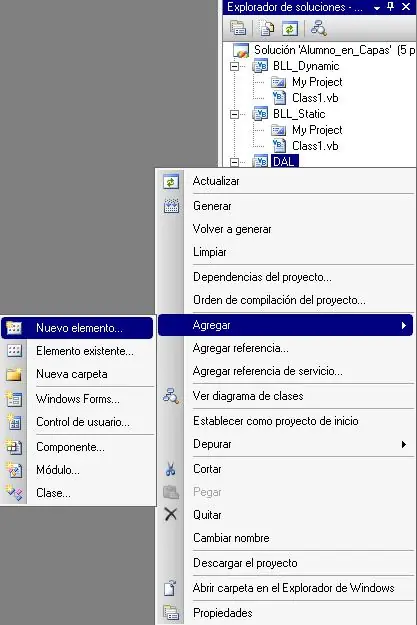
De la misma manera que agregamos en el proyecto anterior una clase agregamos un nuevo elemento en nuestra capa DAL:
--------------------------BARRA--------------------------
--------------------------BARRA--------------------------
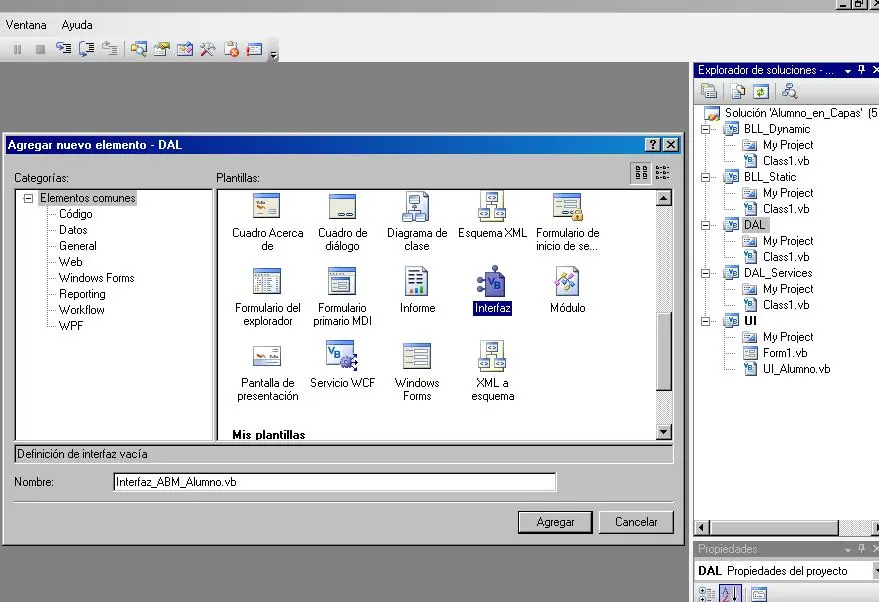
pero esta vez seleccionamos un elemento del tipo Interfaz y lo llamamos Interfaz_ABM_Alumno, de esta forma:
--------------------------BARRA--------------------------
--------------------------BARRA--------------------------
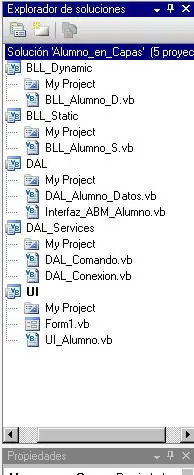
Ya sabemos como agregar clases e interfaces, ahora tendriamos agregar las clases que hagan falta para que me quede conformada as la arquitectura:
--------------------------BARRA--------------------------
Capa: BLL_Dynamic:
Clases:
BLL_Alumno_D.vb
--------------------------BARRA--------------------------
Capa: BLL_Static:
Clases:
BLL_Alumno_S.vb
--------------------------BARRA--------------------------
Capa: DAL:
Clases:
DAL_Alumno_Datos.vb
Interfaces:
Interfaz_ABM_Alumno.vb
--------------------------BARRA--------------------------
Capa: DAL_Services:
Clases:
DAL_Comando.vb
DAL_Conexion.vb
--------------------------BARRA--------------------------
Capa: UI:
Clases:
Form1.vb
UI_Alumno.vb
--------------------------BARRA--------------------------
Para que nos quede mas visible, lo vemos en una imagen:
Ya esta todo listo para empezar a programar, (o sino pegar el código que les pase )
)
Unite:
Hoy vamos a aprender a hacer un ABM (Altas, Bajas y Modificaciones) sencillo en modo Desconectado, en 5 capas o Layers, una capa de interface de usuario (UI), una de negocio dividida en la parte estatica (BLL_Static), que son los atributos y en la parte dinamica (BLL_Dynamic), que son los metodos, y una ultima capa de datos, tambien dividida en 2 en una parte (DAL_Services), toda la conexion a la base de datos y la configurarion del comando y en la otra parte (DAL), la forma en la que se guardan los datos, es decir, la implementacion misma del Alta, Baja y Modificacion) con una Base de datos en mi caso de SQL Server
--------------------------BARRA--------------------------
Primero que nada, creamos un proyecto del tipo Solucion y le asignamos un nombre.
--------------------------BARRA--------------------------
--------------------------BARRA--------------------------
A esa solucion, le agregamos un proyecto nuevo, de esta forma:
--------------------------BARRA--------------------------
--------------------------BARRA--------------------------
El primer proyecto que le vamos a agregar a nuestra solucion, tiene que ser del tipo Aplicacion de Windows Forms (Tiene que ser el primero para que nos quede como proyecto predeterminado) como vemos en la foto:
--------------------------BARRA--------------------------
--------------------------BARRA--------------------------
Lo siguiente que tenemos que hacer es agregarle otro proyecto del tipo Biblioteca de Clases llamandolo BLL_Static en mi caso como vemos a continuacion:
--------------------------BARRA--------------------------
--------------------------BARRA--------------------------
Asi como agregamos este proyecto agregamos 3 proyectos mas del mismo tipo, con los siguientes nombres:
BLL_Dynamic,
DAL,
DAL_Services
Si todo salio bien, nos deberia quedar asi:
--------------------------BARRA--------------------------
--------------------------BARRA--------------------------
Una vez tenemos todos los proyectos agregados y todo listo tenemos que agregar las referencias. y lo vamos a hacer de esta forma:
A la capa UI le agregamos referencias hacia las capas BLL_Static y BLL_Dynamic haciendo click derecho en el proyecto UI y click en la opcion Agregar referencia como lo vemos a continuacion:
UI
BLL_Static
UI
BLL_Dynamic
--------------------------BARRA--------------------------
--------------------------BARRA--------------------------
Luego Seleccionamos los proyectos antes mencionados de a uno por vez de esta forma:
--------------------------BARRA--------------------------
--------------------------BARRA--------------------------
Una vez agregadas, de la misma forma agregamos 3 referencias mas:
BLL_Dynamic
DAL
DAL
BLL_Static
DAL
DAL_Services
Una vez agregadas todas las referencias de los proyectos, lo que tenemos que hacer es meternos con las clases, empecemos con las de la capa de Interfaz de Usuario UI:
En esta capa necesitamos crear una clase que en mi caso la llamé UI_Alumno, esto lo hacemos haciendo boton derecho en el proyecto UI, seleccionando la opcion Agregar
Nuevo elemento como vemos a continuacion:
--------------------------BARRA--------------------------
--------------------------BARRA--------------------------
Y luego asi:
--------------------------BARRA--------------------------
--------------------------BARRA--------------------------
Con esa clase sola en este proyecto (UI) me alcanza para el ejemplo que estoy haciendo, pasemos a la Capa: DAL que es en la que por ahi se nos puede complicar un poco porque es la unica que agrega una Interfaz, lo veremos en las siguientes imagenes:
De la misma manera que agregamos en el proyecto anterior una clase agregamos un nuevo elemento en nuestra capa DAL:
--------------------------BARRA--------------------------
--------------------------BARRA--------------------------
pero esta vez seleccionamos un elemento del tipo Interfaz y lo llamamos Interfaz_ABM_Alumno, de esta forma:
--------------------------BARRA--------------------------
--------------------------BARRA--------------------------
Ya sabemos como agregar clases e interfaces, ahora tendriamos agregar las clases que hagan falta para que me quede conformada as la arquitectura:
--------------------------BARRA--------------------------
Capa: BLL_Dynamic:
Clases:
BLL_Alumno_D.vb
--------------------------BARRA--------------------------
Capa: BLL_Static:
Clases:
BLL_Alumno_S.vb
--------------------------BARRA--------------------------
Capa: DAL:
Clases:
DAL_Alumno_Datos.vb
Interfaces:
Interfaz_ABM_Alumno.vb
--------------------------BARRA--------------------------
Capa: DAL_Services:
Clases:
DAL_Comando.vb
DAL_Conexion.vb
--------------------------BARRA--------------------------
Capa: UI:
Clases:
Form1.vb
UI_Alumno.vb
--------------------------BARRA--------------------------
Para que nos quede mas visible, lo vemos en una imagen:
Ya esta todo listo para empezar a programar, (o sino pegar el código que les pase
)
--------------------------BARRA--------------------------
angusacdc dijo:
Capa: BLL_Dynamic
Clase: BLL_Alumno_D[color=#000000][color=#000000][color=#000000]Public Class BLL_Alumno_D
Implements DAL.Interfaz_ABM_Alumno
Sub New()
Me.PersonaDatos = New DAL.DAL_Alumno_Datos
End Sub
Private _PersonaDatos As DAL.DAL_Alumno_Datos
Public Property PersonaDatos() As DAL.DAL_Alumno_Datos
Get
Return _PersonaDatos
End Get
Set(ByVal value As DAL.DAL_Alumno_Datos)
_PersonaDatos = value
End Set
End Property
Public Sub Alta(ByVal Obj As Object) Implements DAL.Interfaz_ABM_Alumno.Alta
Me.PersonaDatos.Alta(Obj)
End Sub
Public Sub Baja(ByVal Obj As Object) Implements DAL.Interfaz_ABM_Alumno.Baja
Me.PersonaDatos.Baja(Obj)
End Sub
Public Sub Modificacion(ByVal Obj As Object) Implements DAL.Interfaz_ABM_Alumno.Modificacion
Me.PersonaDatos.Modificacion(Obj)
End Sub
Public Function Seleccion(ByVal Obj As Object) As System.Collections.Generic.List(Of Object) Implements DAL.Interfaz_ABM_Alumno.Seleccion
Return Me.PersonaDatos.Seleccion(Obj)
End Function
End Class[/color][/color][/color]
--------------------------BARRA--------------------------
Capa: BLL_Static
Clase: BLL_Alumno_S[color=#000000][color=#000000][color=#000000]Public Class BLL_Alumno_S
Sub New()
End Sub
Sub New(ByVal leg As Integer, ByVal nom As String, ByVal ape As String, ByVal f_nac As Date)
Me.Legajo = leg
Me.Nombre = nom
Me.Apellido = ape
Me.Fecha_Nacimiento = f_nac
End Sub
Private _leg As String
Public Property Legajo() As String
Get
Return _leg
End Get
Set(ByVal value As String)
_leg = value
End Set
End Property
Private _Nom As String
Public Property Nombre() As String
Get
Return _Nom
End Get
Set(ByVal value As String)
_Nom = value
End Set
End Property
Private _Ape As String
Public Property Apellido() As String
Get
Return _Ape
End Get
Set(ByVal value As String)
_Ape = value
End Set
End Property
Private _FechaNac As Date
Public Property Fecha_Nacimiento() As Date
Get
Return _FechaNac
End Get
Set(ByVal value As Date)
_FechaNac = value
End Set
End Property
End Class[/color][/color][/color]
--------------------------BARRA--------------------------
Capa: DAL
Clase: DAL_Alumno_Datos[color=#000000][color=#000000][color=#000000]Public Class DAL_Alumno_Datos
Implements Interfaz_ABM_Alumno
Public Sub Alta(ByVal Obj As Object) Implements Interfaz_ABM_Alumno.Alta
Dim DT As DataTable = DAL_Services.DAL_Comando.DataTable("select * from Alumno")
Dim DR As DataRow = DT.NewRow
Dim c As Integer = 0
Try
c = DAL_Services.DAL_Comando.DataTable("select MAX(Alumno.Legajo) from Alumno").Rows(0).Item(0) + 1
Catch ex As Exception
c += 1
End Try
DR.Item(0) = c
DR.Item(1) = DirectCast(Obj, BLL_Static.BLL_Alumno_S).Nombre
DR.Item(2) = DirectCast(Obj, BLL_Static.BLL_Alumno_S).Apellido
DR.Item(3) = DirectCast(Obj, BLL_Static.BLL_Alumno_S).Fecha_Nacimiento
DT.Rows.Add(DR)
DAL_Services.DAL_Comando.ActualizarTabla("select * from Alumno", DT)
End Sub
Public Sub Baja(ByVal Obj As Object) Implements Interfaz_ABM_Alumno.Baja
Dim DT As DataTable = DAL_Services.DAL_Comando.DataTable("select * from Alumno where Alumno.Legajo = " & DirectCast(Obj, BLL_Static.BLL_Alumno_S).Legajo)
DT.Rows(0).Delete()
DAL_Services.DAL_Comando.ActualizarTabla("select * from Alumno", DT)
End Sub
Public Sub Modificacion(ByVal Obj As Object) Implements Interfaz_ABM_Alumno.Modificacion
Dim DT As DataTable = DAL_Services.DAL_Comando.DataTable("select * from Alumno where Alumno.Legajo = " & DirectCast(Obj, BLL_Static.BLL_Alumno_S).Legajo)
DT.Rows(0).Item(1) = DirectCast(Obj, BLL_Static.BLL_Alumno_S).Nombre
DT.Rows(0).Item(2) = DirectCast(Obj, BLL_Static.BLL_Alumno_S).Apellido
DT.Rows(0).Item(3) = DirectCast(Obj, BLL_Static.BLL_Alumno_S).Fecha_Nacimiento
DAL_Services.DAL_Comando.ActualizarTabla("select * from Alumno", DT)
End Sub
Public Function Seleccion(ByVal Obj As Object) As System.Collections.Generic.List(Of Object) Implements Interfaz_ABM_Alumno.Seleccion
Dim DT As DataTable = DAL_Services.DAL_Comando.DataTable("select * from Alumno")
Dim listaAlumnos As New List(Of Object)
For Each DR As DataRow In DT.Rows
listaAlumnos.Add(New BLL_Static.BLL_Alumno_S(DR.Item(0), DR.Item(1), DR.Item(2), DR.Item(3)))
Next
Return listaAlumnos
End Function
End Class[/color][/color][/color]
Interface: Interfaz_ABM_Alumno[color=#000000][color=#000000][color=#000000]Public Interface Interfaz_ABM_Alumno
Sub Alta(ByVal Obj As Object)
Sub Baja(ByVal Obj As Object)
Sub Modificacion(ByVal Obj As Object)
Function Seleccion(ByVal Obj As Object) As List(Of Object)
End Interface[/color][/color][/color]
--------------------------BARRA--------------------------
[color=#000000][color=#000000][color=#000000]Imports System.Data.SqlClient


Public Class DAL_Comando


    Private Shared command As SqlCommand


    Shared Function Comando(ByVal SelectCommand As String, ByVal conexion As SqlConnection) As SqlCommand

        command = New SqlCommand(SelectCommand)

        command.CommandText = SelectCommand

        command.CommandType = CommandType.Text

        command.Connection = conexion

        Return command

    End Function


    Shared Function DataTable(ByVal SelectCommand As String) As DataTable

        Dim DA As New SqlDataAdapter(Comando(SelectCommand, DAL_Conexion.conectar))

        Dim DT As New DataTable

        DA.Fill(DT)

        Return DT

    End Function


    Shared Function StructureTable(ByVal SelectCommand As String) As DataTable

        Dim DA As New SqlDataAdapter(Comando(SelectCommand, DAL_Conexion.conectar))

        Dim DT As New DataTable

        DA.FillSchema(DT, SchemaType.Mapped)

        Return DT

    End Function


    Shared Sub ActualizarTabla(ByVal SelectCommand As String, ByVal DT As DataTable)

        Dim DA As New SqlDataAdapter(Comando(SelectCommand, DAL_Conexion.conectar))

        Dim CB As New SqlCommandBuilder(DA)

        DA.InsertCommand = CB.GetInsertCommand

        DA.DeleteCommand = CB.GetDeleteCommand

        DA.UpdateCommand = CB.GetUpdateCommand

        DA.Update(DT)

    End Sub


End Class[/color][/color][/color]
Clase: DAL_Conexion[color=#000000][color=#000000][color=#000000]Imports System.Data.SqlClient
Public Class DAL_Conexion
Shared Conne As SqlConnection
Shared Function Conectar() As SqlConnection
Conne = New SqlConnection("Data Source=.;Initial Catalog=Alumno;Integrated Security=True")
Return Conne
End Function
End Class[/color][/color][/color]
--------------------------BARRA--------------------------
Capa: UI
Clase: Form1[color=#000000][color=#000000][color=#000000]Public Class Form1
' Creo un objeto del tipo
Dim UI_Alumno As New UI_Alumno
#Region "ABM"
Private Sub ALTA(ByVal sender As System.Object, ByVal e As System.EventArgs) Handles Button1.Click
Try
UI_Alumno.Alumno_BLL_Static.Nombre = TextBox2.Text
UI_Alumno.Alumno_BLL_Static.Apellido = TextBox3.Text
UI_Alumno.Alumno_BLL_Static.Fecha_Nacimiento = TextBox4.Text
UI_Alumno.Alumno_BLL_Dynamic.Alta(UI_Alumno.Alumno_BLL_Static)
listar()
Catch ex As Exception
MsgBox("Ingrese datos")
End Try
End Sub
Private Sub BAJA(ByVal sender As System.Object, ByVal e As System.EventArgs) Handles Button2.Click
UI_Alumno.Alumno_BLL_Static.Legajo = Label5.Text
UI_Alumno.Alumno_BLL_Dynamic.Baja(UI_Alumno.Alumno_BLL_Static)
listar()
End Sub
Private Sub MODIFICACION(ByVal sender As System.Object, ByVal e As System.EventArgs) Handles Button3.Click
UI_Alumno.Alumno_BLL_Static.Legajo = Label5.Text
UI_Alumno.Alumno_BLL_Static.Nombre = TextBox2.Text
UI_Alumno.Alumno_BLL_Static.Apellido = TextBox3.Text
UI_Alumno.Alumno_BLL_Static.Fecha_Nacimiento = TextBox4.Text
UI_Alumno.Alumno_BLL_Dynamic.Modificacion(UI_Alumno.Alumno_BLL_Static)
listar()
End Sub
#End Region
#Region "Listar, Textboxs, Datagrid, Form"
Sub listar()
Try
DataGridView1.DataSource = UI_Alumno.Alumno_BLL_Dynamic.Seleccion(UI_Alumno.Alumno_BLL_Static)
textboxs()
Catch ex As Exception
End Try
End Sub
Sub textboxs()
Try
Label5.Text = DataGridView1.SelectedCells(0).Value
TextBox2.Text = DataGridView1.SelectedCells(1).Value
TextBox3.Text = DataGridView1.SelectedCells(2).Value
TextBox4.Text = DataGridView1.SelectedCells(3).Value
Catch ex As Exception
Label5.Text = ""
TextBox2.Text = ""
TextBox3.Text = ""
TextBox4.Text = ""
End Try
End Sub
Private Sub Form1_Load(ByVal sender As Object, ByVal e As System.EventArgs) Handles Me.Load
DataGridView1.SelectionMode = DataGridViewSelectionMode.FullRowSelect
DataGridView1.EditMode = DataGridViewEditMode.EditProgrammatically
listar()
End Sub
Private Sub DataGridView1_Click(ByVal sender As Object, ByVal e As System.EventArgs) Handles DataGridView1.Click
textboxs()
End Sub
#End Region
End Class[/color][/color][/color]
Clase: UI_Alumno[color=#000000][color=#000000][color=#000000]Public Class UI_Alumno
Sub New()
Me.Alumno_BLL_Static = New BLL_Static.BLL_Alumno_S
Me.Alumno_BLL_Dynamic = New BLL_Dynamic.BLL_Alumno_D
End Sub
Private _Alumno_S As BLL_Static.BLL_Alumno_S
Public Property Alumno_BLL_Static() As BLL_Static.BLL_Alumno_S
Get
Return _Alumno_S
End Get
Set(ByVal value As BLL_Static.BLL_Alumno_S)
_Alumno_S = value
End Set
End Property
Private _Alumno_D As BLL_Dynamic.BLL_Alumno_D
Public Property Alumno_BLL_Dynamic() As BLL_Dynamic.BLL_Alumno_D
Get
Return _Alumno_D
End Get
Set(ByVal value As BLL_Dynamic.BLL_Alumno_D)
_Alumno_D = value
End Set
End Property
End Class
[/color][/color][/color]
--------------------------BARRA--------------------------
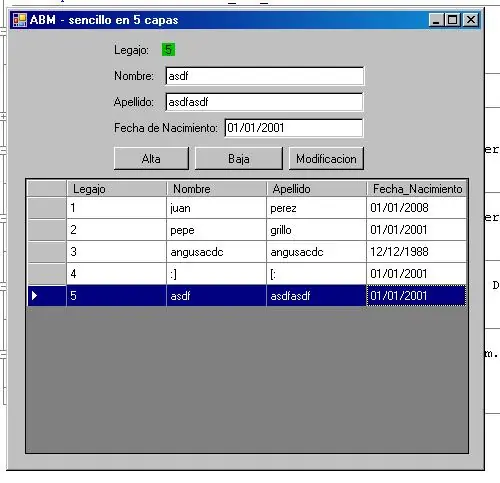
Miren que lindo el ABM que me hice
--------------------------BARRA--------------------------
--------------------------BARRA--------------------------

--------------------------BARRA--------------------------
YAPA: Mi ABM es el Mejor
Solo para entendidos
Solo para entendidos
--------------------------BARRA--------------------------
Si estas estudiando Ingenieria,
Unite a :
--------------------------BARRA--------------------------
Si te gusto el post seguime
Espero les haya servido!
Saludos
Espero les haya servido!
Saludos
--------------------------BARRA--------------------------
 .......