El bloqueador infrarrojo (IR Jammer) es un proyecto que garantiza una diversión segura y no destructiva ya que permite dejar inoperativos temporalmente todos los controles remotos infrarrojos. El microcontrolador de este diseño tiene como objetivo abarcar las 6 frecuencias infrarrojas mas populares, haciendo universal el uso de este dispositivo, corrompiendo los datos enviados desde los controles remotos infrarrojos que utilicen cualquiera de las 6 frecuencias.
Presionando una sola vez el pulsador S1, el dispositivo envía un flujo de pulsos infrarrojos a través de los 4 LEDs IR, 2 LEDs IR de haz ancho y 2 LEDs IR de haz angosto, durante 30 segundos. Cada vez que se presiona el pulsador se añaden 30 segundos más al temporizador.
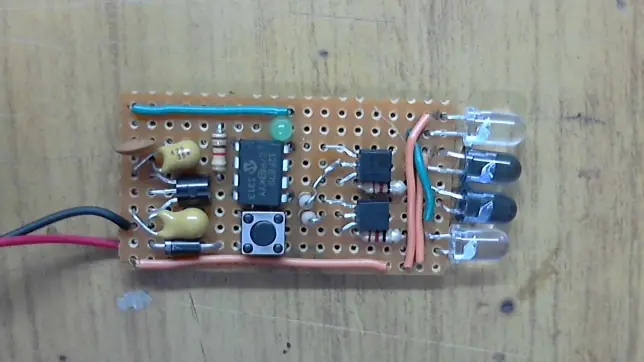
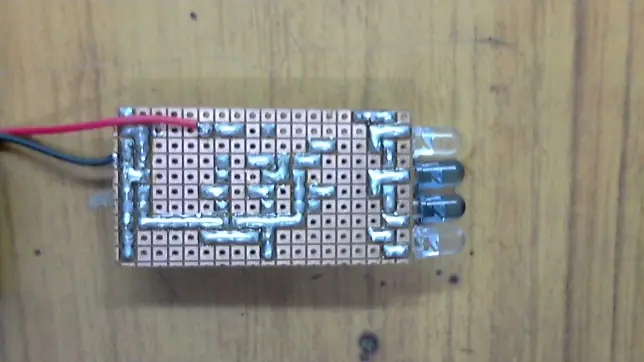
La placa, dada sus reducidas dimensiones puede ser montada directamente sobre su fuente de alimentación, en este caso una batería de 9V, ya que sus dimensiones son casi las mismas.
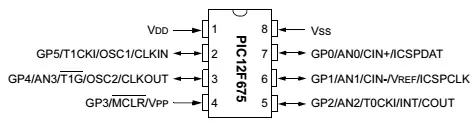
El corazón del bloqueador infrarrojo es el microcontrolador PIC12F675, el cual fué programado para reproducir las 6 frecuencias infrarrojas más utilizadas actualmente: 30kHz, 33kHz, 36kHz, 38kHz, 40kHz y 56kHz. Cuando se presiona el pulsador, los dos transistores envían datos infrarrojos a través de 4 LEDs infrarrojos. Utilizando 2 LEDs IR de haz ancho y 2 LEDs IR de haz angosto, permite obtener una buena cobertura y facilidad de uso. El LED verde se utiliza para indicar el encendido del bloqueador destellando 3 veces y también para indicar que la unidad se encuentra operando emitiendo un destello rápido cada pocos segundos.
Luego de encendida la unidad, el LED verde destellará 3 veces indicando que el bloqueador se encuentra listo para operar, entrando luego en modo de espera. Cambiará de estado cuando se produzca una interrupción en el pin 6 del microcontrolador, este cambio de estado sucede al presionar el pulsador S1, esto permite prolongar la vida útil de la batería cuando la unidad no se encuentra en funcionamiento. Cada vez que se presiona el pulsador S1, se suman 30 segundos adicionales de operación.
Datasheet PIC12F675 (descarga desde el post original)
El diagrama esquemático del bloqueador se observa en la siguiente imagen:
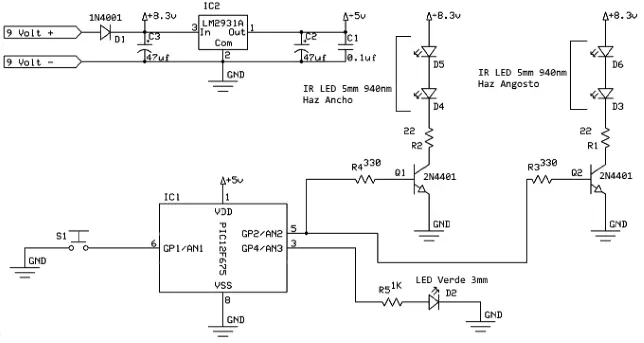
Lista de Componentes
1 Microcontrolador PIC12F675
1 Diodo Rectificador 1N4001
2 Capacitores de Tantalio 47uF 35V
1 Capacior Cerámico 100nF 50V
1 Regulador de Tensión LM2931A
1 Pulsador N.A. o Push-Button N.A.
2 Transistores 2N4401
2 Resistencias 330Ω 0.25W
2 Resistencias 22Ω 0.25W
1 Resistencia 1KΩ 0.25W
1 LED Verde Difuso 3mm
2 LEDs IR 5mm 940nm Haz Ancho [de apariencia blanco]
2 LEDs IR 5mm 940nm Haz Angosto [de apariencia azulino]
1 Batería 9V
1 Portabatería 9V con interruptor [ opcional ]
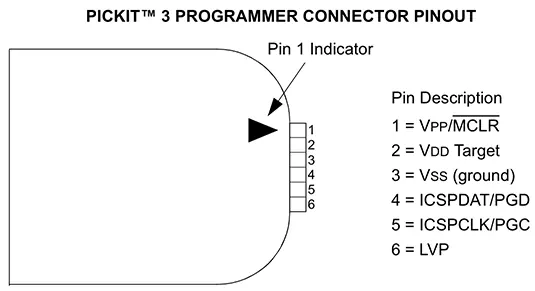
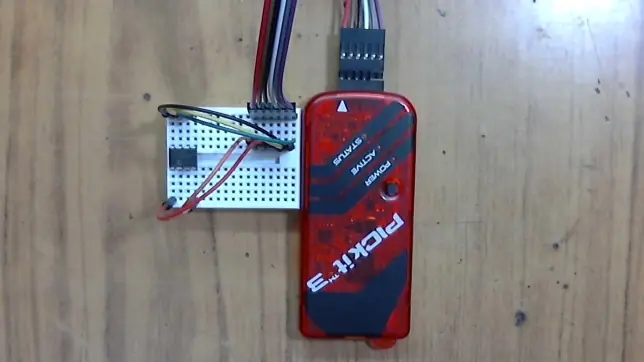
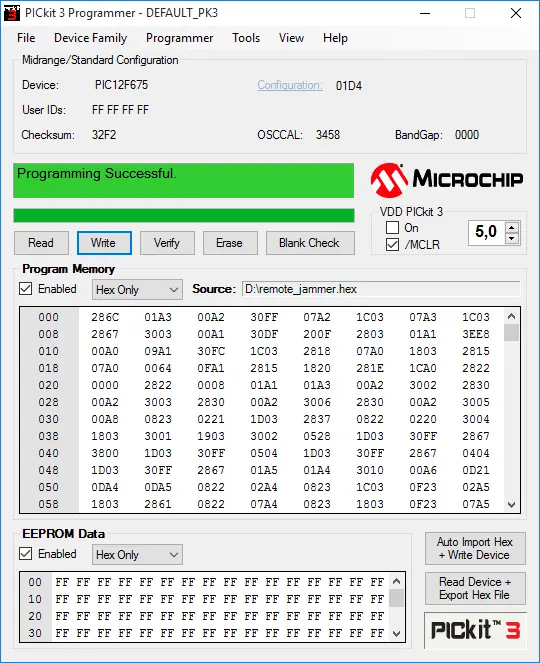
El código fuente del firmware del microcontrolador está escrito en el lenguaje PICBasic. Puede ser compilado sin ningún inconveniente utilizando la última versión del compilador PICBasic Pro Trial Version 3.0.7.1 y cargar el firmware en el PIC12F675 utilizando el programador PICKit 3 v3.01.
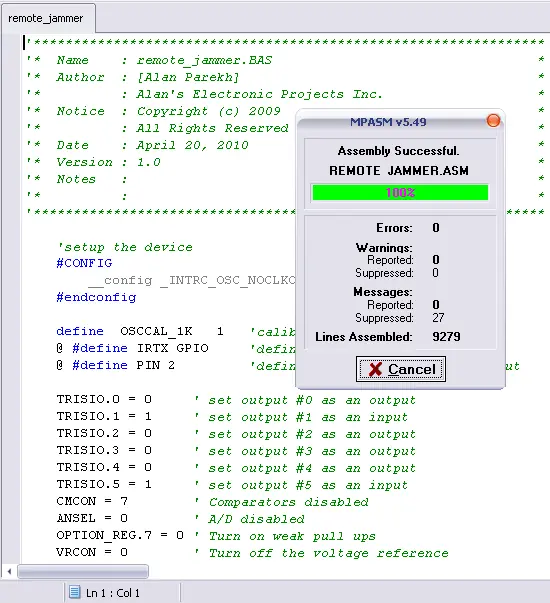
PICBasic Pro Trial Version 3.0.7.1 [incluye MPASM v8.90, Microcode Studio 5 (MCSX) para PBP v3, PBP 3.0.7.1]
Tamaño: 123.1MB
SHA1 Hash: C449786CFE50B26EB6818F9C35E10C718C36F6AD
Descarga (desde el post original)
PICKit 3 v3.01
Tamaño: 8.4MB
SHA1 Hash: 34600B01B759F65DF993E1FA6408B4B3B3BA4AC9
Descarga (desde el post original)
Además también se encuentra disponible para descargar el firmware ya compilado, listo para cargar en el microcontrolador.
IR Remote Jammer v1.0 HEX
Tamaño: 1KB
SHA1 Hash: 59C4A7B28F56F52AC352439DBD7F154A4DE4D08F
Descarga (desde el post original)
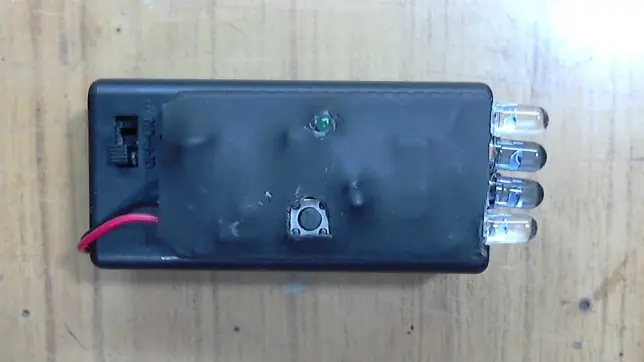
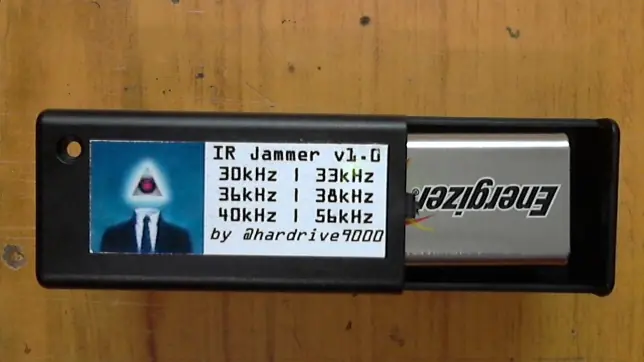
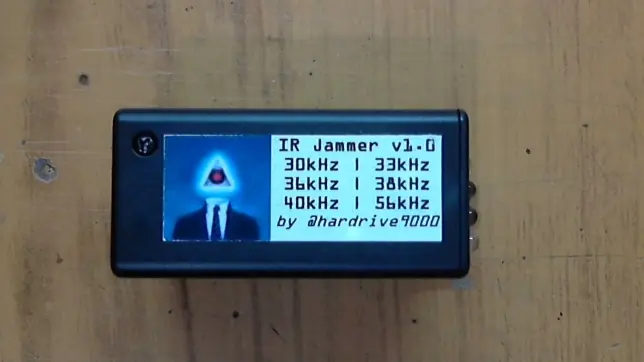
Presionando una sola vez el pulsador S1, el dispositivo envía un flujo de pulsos infrarrojos a través de los 4 LEDs IR, 2 LEDs IR de haz ancho y 2 LEDs IR de haz angosto, durante 30 segundos. Cada vez que se presiona el pulsador se añaden 30 segundos más al temporizador.
La placa, dada sus reducidas dimensiones puede ser montada directamente sobre su fuente de alimentación, en este caso una batería de 9V, ya que sus dimensiones son casi las mismas.
El corazón del bloqueador infrarrojo es el microcontrolador PIC12F675, el cual fué programado para reproducir las 6 frecuencias infrarrojas más utilizadas actualmente: 30kHz, 33kHz, 36kHz, 38kHz, 40kHz y 56kHz. Cuando se presiona el pulsador, los dos transistores envían datos infrarrojos a través de 4 LEDs infrarrojos. Utilizando 2 LEDs IR de haz ancho y 2 LEDs IR de haz angosto, permite obtener una buena cobertura y facilidad de uso. El LED verde se utiliza para indicar el encendido del bloqueador destellando 3 veces y también para indicar que la unidad se encuentra operando emitiendo un destello rápido cada pocos segundos.
Luego de encendida la unidad, el LED verde destellará 3 veces indicando que el bloqueador se encuentra listo para operar, entrando luego en modo de espera. Cambiará de estado cuando se produzca una interrupción en el pin 6 del microcontrolador, este cambio de estado sucede al presionar el pulsador S1, esto permite prolongar la vida útil de la batería cuando la unidad no se encuentra en funcionamiento. Cada vez que se presiona el pulsador S1, se suman 30 segundos adicionales de operación.
Datasheet PIC12F675 (descarga desde el post original)
El diagrama esquemático del bloqueador se observa en la siguiente imagen:
Lista de Componentes
1 Microcontrolador PIC12F675
1 Diodo Rectificador 1N4001
2 Capacitores de Tantalio 47uF 35V
1 Capacior Cerámico 100nF 50V
1 Regulador de Tensión LM2931A
1 Pulsador N.A. o Push-Button N.A.
2 Transistores 2N4401
2 Resistencias 330Ω 0.25W
2 Resistencias 22Ω 0.25W
1 Resistencia 1KΩ 0.25W
1 LED Verde Difuso 3mm
2 LEDs IR 5mm 940nm Haz Ancho [de apariencia blanco]
2 LEDs IR 5mm 940nm Haz Angosto [de apariencia azulino]
1 Batería 9V
1 Portabatería 9V con interruptor [ opcional ]
El código fuente del firmware del microcontrolador está escrito en el lenguaje PICBasic. Puede ser compilado sin ningún inconveniente utilizando la última versión del compilador PICBasic Pro Trial Version 3.0.7.1 y cargar el firmware en el PIC12F675 utilizando el programador PICKit 3 v3.01.
[color=#000000]

'****************************************************************

'*  Name    : remote_jammer.BAS                                 *

'*  Author  : [Alan Parekh]                                     *

'*          : Alan's Electronic Projects Inc.                   *

'*  Notice  : Copyright (c) 2009                                *

'*          : All Rights Reserved                               *

'*  Date    : April 20, 2010                                    *

'*  Version : 1.0                                               *

'*  Notes   :                                                   *

'*          :                                                   *

'****************************************************************


    'setup the device

    #CONFIG

        __config _INTRC_OSC_NOCLKOUT & _WDT_OFF & _MCLRE_OFF

    #ENDCONFIG


    Define  OSCCAL_1K   1   'calibrate internal oscillator


[email protected]

[email protected]


[email protected]

[email protected]

 IR out


    TRISIO.0 = 0     ' set output #0 as an output

    TRISIO.1 = 1     ' set output #1 as an input

    TRISIO.2 = 0     ' set output #2 as an output

    TRISIO.3 = 0     ' set output #3 as an output

    TRISIO.4 = 0     ' set output #4 as an output

    TRISIO.5 = 1     ' set output #5 as an input

    CMCON = 7        ' Comparators disabled

    ANSEL = 0        ' A/D disabled

    OPTION_REG.7 = 0 ' Turn on weak pull ups

    VRCON = 0        ' Turn off the voltage reference

    IOCB.1 = 1       ' Enable pin change interrupt on GPIO 1

    IOCB.5 = 1       ' Enable pin change interrupt on GPIO 5


    boardButton var GPIO.1        'push button on circuit board

    irLed var GPIO.2              'IR LED output

    indicatorLED var GPIO.4       'Indicator LED output

    forceOn var GPIO.5            'Ground to force on system, it will run till the pin is released


    runCounter var word     'keeps track of how long we need to run for

    runCounter = 0          'set it to 0 by default

    buttonActive con 0      'active button state

    buttonNonActive con 1   'non-active button state


    buttonDebounceCycles con 1  'number of cycles to ignore the button (debounce)

    buttonDebounceCyclesCounter var byte  'keeps track of the debounce progress

    buttonDebounceCyclesCounter = 0       'set the default to 0


    lastKnownButtonState var bit            'keeps track of the last known push button state

    LastKnownButtonState = buttonNonActive  'defaults the push button state


    lastKnownForceOnSwitchState var bit             'keeps track of the last known force on switch state

    LastKnownForceOnSwitchState = buttonNonActive   'defaults the force on switch state


    flashCounter var word   'keeps track of the indication LED flashing off time

    flashcounter = 0        'set the default to 0

    flashDelay con 40       'used to set how many cycles the indication LED should be off before it flashes once


    carrierCycles VAR BYTE    'number of carrier cycles

    carrierCycles = 145      ' min 1, max 255


    runCounterIncrement con 635 'this is the number of cycles to add when the button is pressed (about 30 seconds)


    gosub startup       'run the startup routine, then run the main program


    ''''''''''''''''''''''''

    'IR carrier generator routines.

    'These routines are written in ASM to allow accurate control of the actual time delays

    ''''''''''''''''''''''''


' Generate "Cycles" number of ~30kHz pulses

' 33uS total (actual is 33uS)

ASM

_Pulse30

   bsf IRTX,PIN     ; 1uS, LED=on

   nop              ; 1uS

   nop              ; 1uS

   nop              ; 1uS

   nop              ; 1uS

   nop              ; 1uS

   nop              ; 1uS

   nop              ; 1uS

   bcf IRTX,PIN     ; 1uS, LED=off

   nop              ; 1uS

   nop              ; 1uS

   nop              ; 1uS

   nop              ; 1uS

   nop              ; 1uS

   nop              ; 1uS

   nop              ; 1uS

   nop              ; 1uS

   nop              ; 1uS

   nop              ; 1uS

   nop              ; 1uS

   nop              ; 1uS

   nop              ; 1uS

   nop              ; 1uS

   nop              ; 1uS

   nop              ; 1uS

   nop              ; 1uS

   nop              ; 1uS

   nop              ; 1uS

   nop              ; 1uS

   decfsz _carrierCycles,f ; 1uS

   goto _Pulse30    ; 2uS

   return           ; Return to caller

ENDASM


' Generate "Cycles" number of ~33kHz pulses

' 30.3uS total

ASM

_Pulse33

   bsf IRTX,PIN     ; 1uS, LED=on

   nop              ; 1uS

   nop              ; 1uS

   nop              ; 1uS

   nop              ; 1uS

   nop              ; 1uS

   nop              ; 1uS

   nop              ; 1uS

   bcf IRTX,PIN     ; 1uS, LED=off

   nop              ; 1uS

   nop              ; 1uS

   nop              ; 1uS

   nop              ; 1uS

   nop              ; 1uS

   nop              ; 1uS

   nop              ; 1uS

   nop              ; 1uS

   nop              ; 1uS

   nop              ; 1uS

   nop              ; 1uS

   nop              ; 1uS

   nop              ; 1uS

   nop              ; 1uS

   nop              ; 1uS

   nop              ; 1uS

   nop              ; 1uS

   decfsz _carrierCycles,f ; 1uS

   goto _Pulse33    ; 2uS

   return           ; Return to caller

ENDASM


' Generate "Cycles" number of ~36kHz pulses

' 27.8uS total

ASM

_Pulse36

   bsf IRTX,PIN     ; 1uS, LED=on

   nop              ; 1uS

   nop              ; 1uS

   nop              ; 1uS

   nop              ; 1uS

   nop              ; 1uS

   nop              ; 1uS

   nop              ; 1uS

   bcf IRTX,PIN     ; 1uS, LED=off

   nop              ; 1uS

   nop              ; 1uS

   nop              ; 1uS

   nop              ; 1uS

   nop              ; 1uS

   nop              ; 1uS

   nop              ; 1uS

   nop              ; 1uS

   nop              ; 1uS

   nop              ; 1uS

   nop              ; 1uS

   nop              ; 1uS

   nop              ; 1uS

   nop              ; 1uS

   nop              ; 1uS

   decfsz _carrierCycles,f ; 1uS

   goto _Pulse36    ; 2uS

   return           ; Return to caller

ENDASM


' Generate "Cycles" number of ~38kHz pulses

' 26.3uS total

ASM

_Pulse38

   bsf IRTX,PIN     ; 1uS, LED=on

   nop              ; 1uS

   nop              ; 1uS

   nop              ; 1uS

   nop              ; 1uS

   nop              ; 1uS

   nop              ; 1uS

   nop              ; 1uS

   bcf IRTX,PIN     ; 1uS, LED=off

   nop              ; 1uS

   nop              ; 1uS

   nop              ; 1uS

   nop              ; 1uS

   nop              ; 1uS

   nop              ; 1uS

   nop              ; 1uS

   nop              ; 1uS

   nop              ; 1uS

   nop              ; 1uS

   nop              ; 1uS

   nop              ; 1uS

   nop              ; 1uS

   nop              ; 1uS

   decfsz _carrierCycles,f ; 1uS

   goto _Pulse38    ; 2uS

   return           ; Return to caller

ENDASM


' Generate "Cycles" number of 40kHz pulses

' 25uS total

ASM

_Pulse40

   bsf IRTX,PIN     ; 1uS, LED=on

   nop              ; 1uS

   nop              ; 1uS

   nop              ; 1uS

   nop              ; 1uS

   nop              ; 1uS

   nop              ; 1uS

   nop              ; 1uS

   bcf IRTX,PIN     ; 1uS, LED=off

   nop              ; 1uS

   nop              ; 1uS

   nop              ; 1uS

   nop              ; 1uS

   nop              ; 1uS

   nop              ; 1uS

   nop              ; 1uS

   nop              ; 1uS

   nop              ; 1uS

   nop              ; 1uS

   nop              ; 1uS

   nop              ; 1uS

   decfsz _carrierCycles,f ; 1uS

   goto _Pulse40    ; 2uS

   return           ; Return to caller

ENDASM


' Generate "Cycles" number of ~56kHz pulses

' 17.9uS total

ASM

_Pulse56

   bsf IRTX,PIN     ; 1uS, LED=on

   nop              ; 1uS

   nop              ; 1uS

   nop              ; 1uS

   nop              ; 1uS

   nop              ; 1uS

   nop              ; 1uS

   nop              ; 1uS

   bcf IRTX,PIN     ; 1uS, LED=off

   nop              ; 1uS

   nop              ; 1uS

   nop              ; 1uS

   nop              ; 1uS

   nop              ; 1uS

   decfsz _carrierCycles,f ; 1uS

   goto _Pulse56    ; 2uS

   return           ; Return to caller

ENDASM


'Low power routine, allows the device to sleep (very low power mode) until a button is pressed.

'When a button is pressed the main routine is run

LowPowerSleep:


    INTCON.0 = 0    ' Reset pin change interrupt flag

    INTCON.3 = 1    ' enable global interrupts


[email protected]

'sleep until a pin interrupt wakes it up


[email protected]

'small pause to allow chip to wake up fully


[email protected]

'small pause to allow chip to wake up fully


    INTCON.0 = 0    ' Reset pin change interrupt flag

    INTCON.3 = 0    ' disable global interrupts

    goto main       'jump into the main program


Main:


    'check to see if the force on just got turned on, if so give a flash to indicate activation

    if (ForceOn = buttonActive and LastKnownForceOnSwitchState = buttonNonActive) then

        'turn on the indicator LED to show that the system activated

        high IndicatorLED

        flashCounter = 0 'reset the counter so the next flash will be in about 2 seconds

        LastKnownForceOnSwitchState = buttonActive


    endif


    'check to see if the user pressed the on-board button, if so add 30 seconds of run time

    if (boardButton = buttonActive and LastKnownButtonState = buttonNonActive and buttonDebounceCyclesCounter = 0) then


        'turn on the indicator LED to show that the system activated

        high IndicatorLED

        flashCounter = 0 'reset the counter so the next flash will be in about 2 seconds


        'don't allow the counter to roll over

        if (runcounter + runCounterIncrement  [ 65000) then runCounter = runCounter + runCounterIncrement ' add 30 seconds worth of loops endif buttonDebounceCyclesCounter = buttonDebounceCycles 'set the debounce counter LastKnownButtonState = buttonActive 'set the fact that the button was pressed endif 'run through all 6 IR frequincies with a short pause between the blasts CALL Pulse30 low IRLED pause 1 CALL Pulse33 low IRLED pause 1 CALL Pulse36 low IRLED pause 1 CALL Pulse38 low IRLED pause 1 CALL Pulse40 low IRLED pause 1 CALL Pulse56 low IRLED pauseus 800 'smaller pause since there is some overhead below 'manage the run counter if (runCounter ] 0) then

        runCounter = runCounter - 1 ' we just finnished a loop decrement the counter if we are using it to time out

    endif


    'manage the button Debounce Cycles Counter

    if (buttonDebounceCyclesCounter ] 0) then

        buttonDebounceCyclesCounter = buttonDebounceCyclesCounter - 1

    endif


    'update the current state of the board button

    if (boardButton = buttonNonActive) then

        LastKnownButtonState = buttonNonActive

    endif


    'update the current state of the optional force on switch

    if (ForceOn = buttonNonActive) then

        LastKnownForceOnSwitchState = buttonNonActive

    endif


    'if the run counter is out and the force on input is not activated enter low power sleep mode

    if (runCounter = 0 and  ForceOn = buttonNonActive) then

        low IndicatorLED   'turn off the indication LED

        low IRLED          'turn off the IR LED

        goto lowpowersleep 'enter low power mode

    endif


    'update the indication LED flash rate counter

    flashCounter = flashCounter + 1


    'flash a short burst about every 2 seconds

    if ((flashCounter//flashDelay) = 0) then

        high IndicatorLED

    else

        low IndicatorLED

    endif


    GOTO Main


'Flash the LED once

FlashLED:


    high IndicatorLED   'turn on the indicator LED

    pause 300           '300mS pause

    low indicatorLED    'turn off the indicator LED

    pause 300           '300mS pause


    return


'This will run once at startup (power up)

Startup:


    low IRLED 'turn the IR LED off at startup


    'startup flash pattern

    gosub flashLED

    gosub flashLED

    gosub flashLED


    'if the force on switch is active or the board button is pressed when the system starts up jump right into the main rotine

    if (ForceOn = buttonActive or boardButton = buttonActive) then

        goto main

    endif


    'no buttons are active just go to sleep (low power mode) and wait for the user to activate the system

    goto lowpowersleep


End

[/color]
PICBasic Pro Trial Version 3.0.7.1 [incluye MPASM v8.90, Microcode Studio 5 (MCSX) para PBP v3, PBP 3.0.7.1]
Tamaño: 123.1MB
SHA1 Hash: C449786CFE50B26EB6818F9C35E10C718C36F6AD
Descarga (desde el post original)
PICKit 3 v3.01
Tamaño: 8.4MB
SHA1 Hash: 34600B01B759F65DF993E1FA6408B4B3B3BA4AC9
Descarga (desde el post original)
Además también se encuentra disponible para descargar el firmware ya compilado, listo para cargar en el microcontrolador.
IR Remote Jammer v1.0 HEX
Tamaño: 1KB
SHA1 Hash: 59C4A7B28F56F52AC352439DBD7F154A4DE4D08F
Descarga (desde el post original)
(click para ampliar)
(click para ampliar)
(click para ampliar)
(click para ampliar)
(click para ampliar)
(click para ampliar)