 Te invito a la comunidad "PROGRAMME" - Click en el Gif -
El post les ayudara a aprender a programar con el lenguaje Small Basic,un lenguaje sencillo que te abrirá las puertas al VBy de este al VB.Net
Si criticas,critica con argumentos y respetuosamente... Todas son aceptadas...
Si tienes dudas,a la comunidad,lee el protocolo y publica tu tema,te espera un staff ansioso de ayudar
Si te gusta la programación,sígueme,publico casi siempre post sobre programación/informática... Aquí están mis otros post de sobre programación
Te invito a la comunidad "PROGRAMME" - Click en el Gif -
El post les ayudara a aprender a programar con el lenguaje Small Basic,un lenguaje sencillo que te abrirá las puertas al VBy de este al VB.Net
Si criticas,critica con argumentos y respetuosamente... Todas son aceptadas...
Si tienes dudas,a la comunidad,lee el protocolo y publica tu tema,te espera un staff ansioso de ayudar
Si te gusta la programación,sígueme,publico casi siempre post sobre programación/informática... Aquí están mis otros post de sobre programación
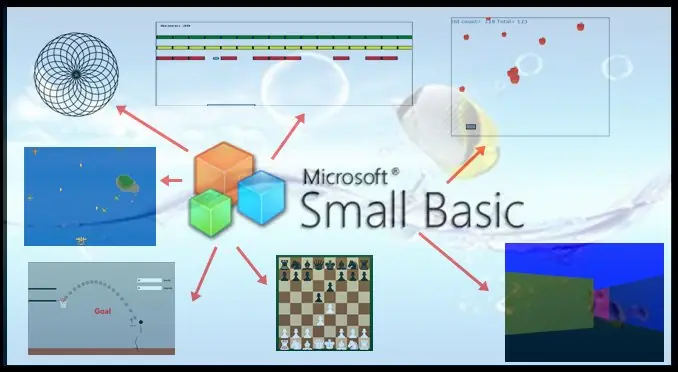










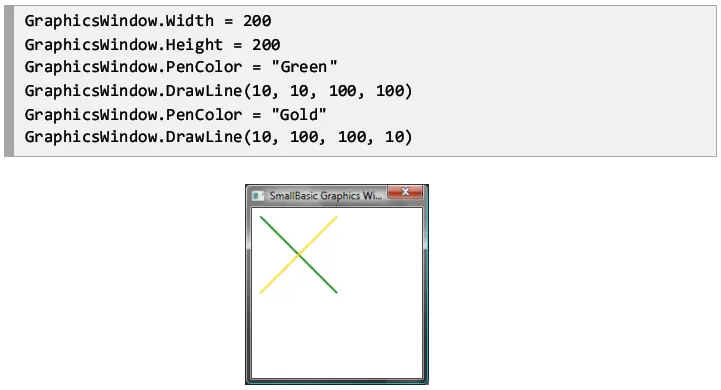
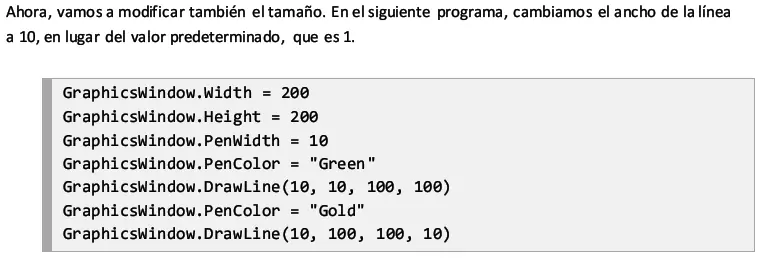
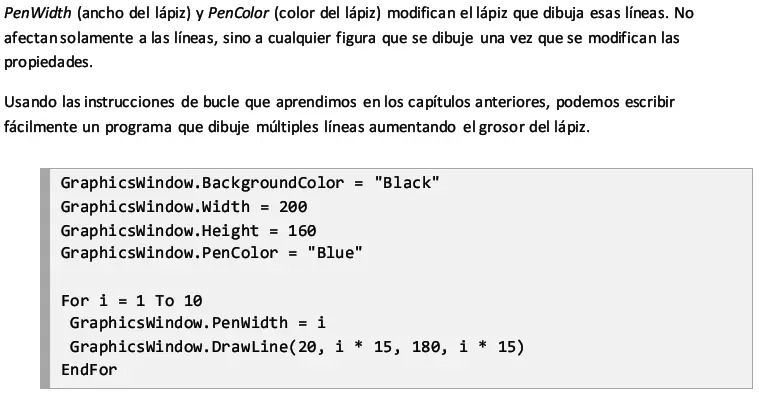




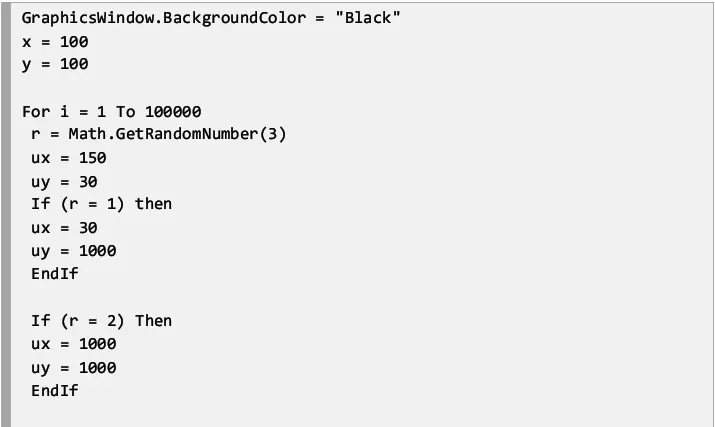

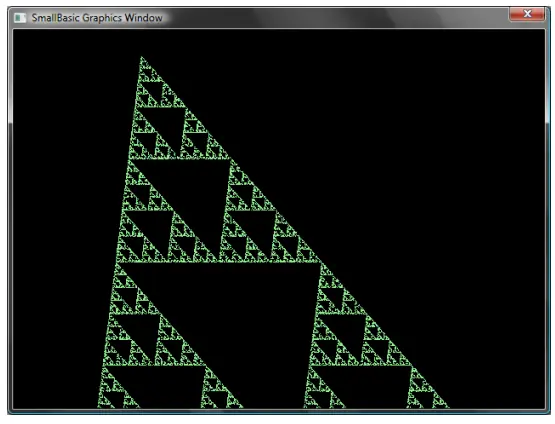

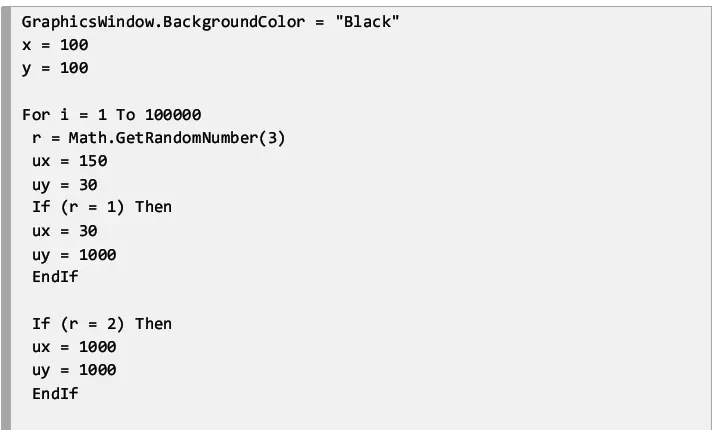
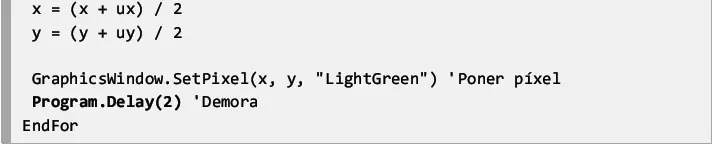










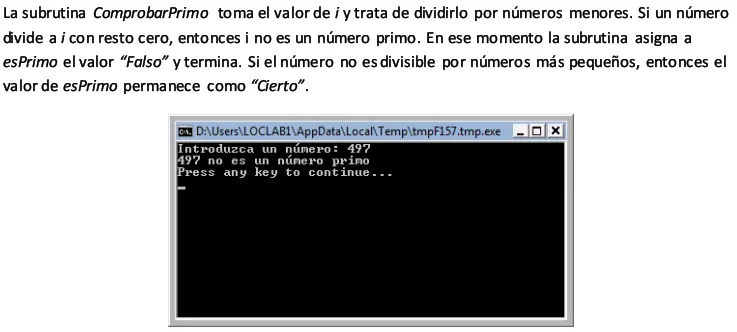


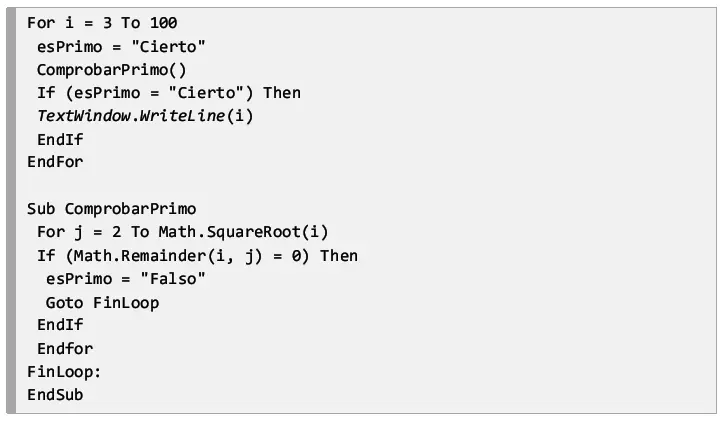
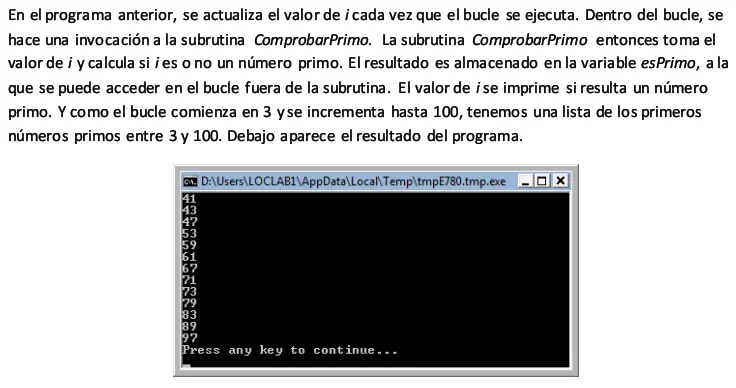
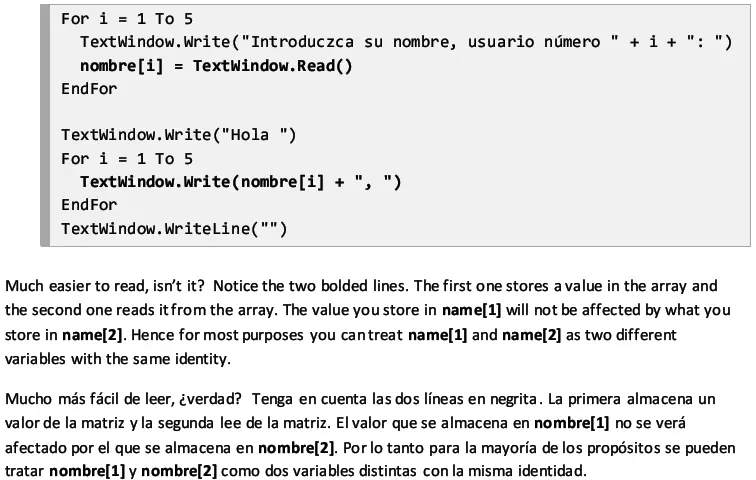
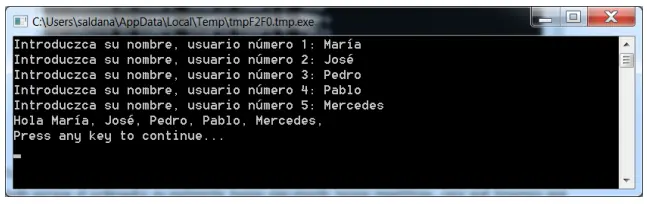
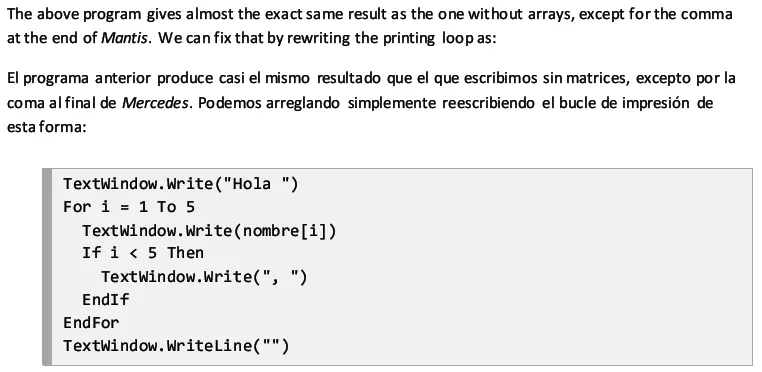
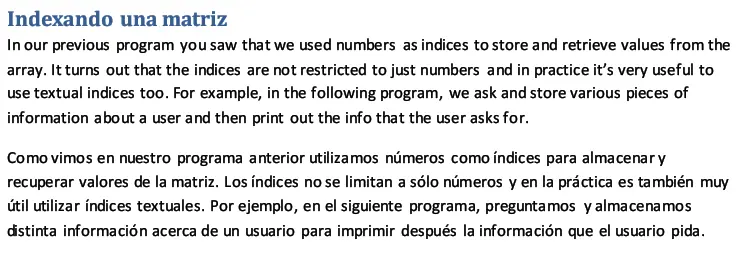






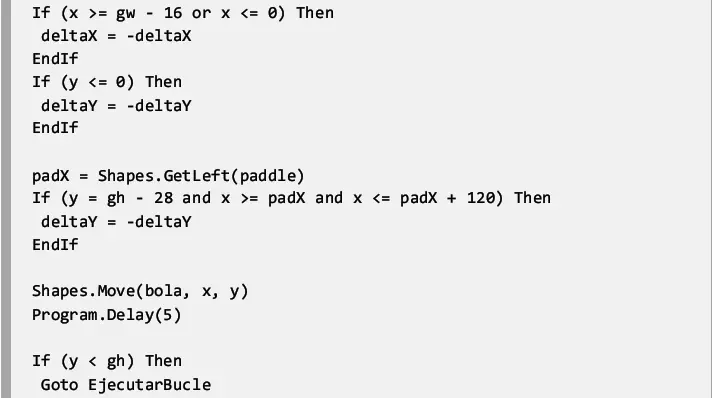
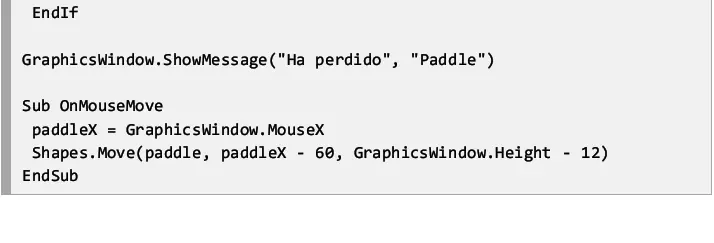
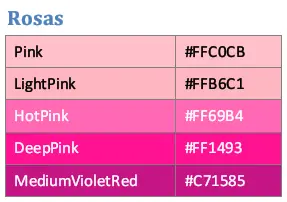
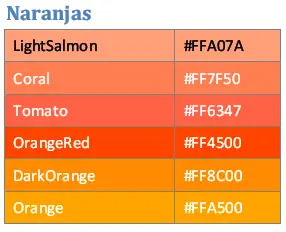
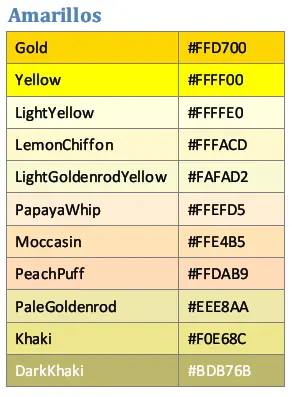
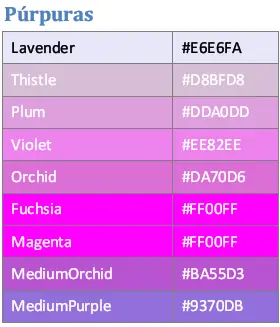
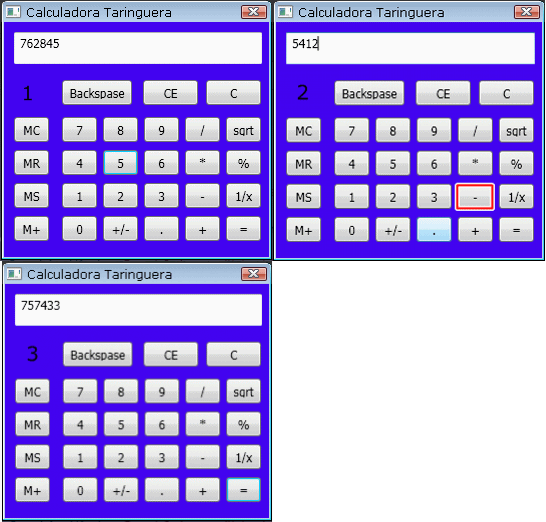
 Small Basic no es simplemente dibujar lineas,el juego de la tortuga,etc... Se pueden crear muchísimas cosas,por ejemplo,esta calculadora que hice hace unos días con Small Basic... Yo le llamo "L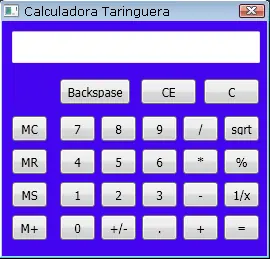
[color=#000000][color=#000000]p = 0


GraphicsWindow.canresize = 0

GraphicsWindow.Width = 265

GraphicsWindow.Height = 235

GraphicsWindow.Title = "Calculadora Taringuera"


GraphicsWindow.BackgroundColor = GraphicsWindow.GetColorFromRGB(1610, 260, 240)

GraphicsWindow.FontBold = "False"

GraphicsWindow.BrushColor = "black"


m = Shapes.AddText("M")

Shapes.Move(m, 22, 62)

Shapes.HideShape(m)


t = Controls.AddTextBox(10, 10)

Controls.Setsize(t, 248, 32)

Controls.SetTextBoxText(t, "")


GraphicsWindow.BrushColor = "black"

keyMC = Controls.AddButton("MC", 10, 95)

Controls.SetSize(keyMC, 35, 25)

keyMR = Controls.AddButton("MR", 10, 128)

Controls.SetSize(keyMR, 35, 25)

keyMS = Controls.AddButton("MS", 10, 161)

Controls.SetSize(keyMS, 35, 25)

keyMP = Controls.AddButton("M+", 10, 194)

Controls.SetSize(keyMP, 35, 25)

keyC = Controls.AddButton("C", 202, 58)

Controls.SetSize(keyC, 55, 25, )

keyCE = Controls.AddButton("CE", 139, 58)

Controls.SetSize(keyCE, 55, 25)

keyBackspase = Controls.AddButton("Backspase", 58, 58)

Controls.SetSize(keyBackspase, 70, 25)

keydelenie = Controls.AddButton("/", 181, 95)

Controls.SetSize(keydelenie, 35, 25)

keyumnogenie = Controls.AddButton("*", 181, 128)

Controls.SetSize(keyumnogenie, 35, 25)

keyminus = Controls.AddButton("-", 181, 161)

Controls.SetSize(keyminus, 35, 25)

keyplus = Controls.AddButton("+", 181, 194)

Controls.SetSize(keyplus, 35, 25)

keyravno = Controls.AddButton("=", 222, 194)

Controls.SetSize(keyravno, 35, 25)


GraphicsWindow.BrushColor = "black"

key7 = Controls.AddButton("7", 58, 95)

Controls.SetSize(key7, 35, 25)

key8 = Controls.AddButton("8", 99, 95)

Controls.SetSize(key8, 35, 25)

key9 = Controls.AddButton("9", 140, 95)

Controls.SetSize(key9, 35, 25)

key4 = Controls.AddButton("4", 58, 128)

Controls.SetSize(key4, 35, 25)

key5 = Controls.AddButton("5", 99, 128)

Controls.SetSize(key5, 35, 25)

key6 = Controls.AddButton("6", 140, 128)

Controls.SetSize(key6, 35, 25)

key1 = Controls.AddButton("1", 58, 161)

Controls.SetSize(key1, 35, 25)

key2 = Controls.AddButton("2", 99, 161)

Controls.SetSize(key2, 35, 25)

key3 = Controls.AddButton("3", 140, 161)

Controls.SetSize(key3, 35, 25)

key0 = Controls.AddButton("0", 58, 194)

Controls.SetSize(key0, 35, 25)

keyplusminus = Controls.AddButton("+/-", 99, 194)

Controls.SetSize(keyplusminus, 35, 25)

keytochka = Controls.AddButton(".", 140, 194)

Controls.SetSize(keytochka, 35, 25)

keysqrt = Controls.AddButton("sgrt", 222, 95)

Controls.SetSize(keysqrt, 35, 25)

keyprocent = Controls.AddButton("%", 222, 128)

Controls.SetSize(keyprocent, 35, 25)

keynax = Controls.AddButton("1/x", 222, 161)

Controls.SetSize(keynax, 35, 25)


Controls.ButtonClicked = click


Sub click

  Sound.playclick()

  If Controls.LastClickedButton = key0 Then

    Controls.SetTextBoxText(t, Text.Append(Controls.GetTextBoxText(t), "0"))

  ElseIf Controls.LastClickedButton = key1 Then

    Controls.SetTextBoxText(t, Text.Append(Controls.GetTextBoxText(t), "1"))

  ElseIf Controls.LastClickedButton = key2 Then

    Controls.SetTextBoxText(t, Text.Append(Controls.GetTextBoxText(t), "2"))

  ElseIf Controls.LastClickedButton = key3 Then

    Controls.SetTextBoxText(t, Text.Append(Controls.GetTextBoxText(t), "3"))

  ElseIf Controls.LastClickedButton = key4 Then

    Controls.SetTextBoxText(t, Text.Append(Controls.GetTextBoxText(t), "4"))

  ElseIf Controls.LastClickedButton = key5 Then

    Controls.SetTextBoxText(t, Text.Append(Controls.GetTextBoxText(t), "5"))

  ElseIf Controls.LastClickedButton = key6 Then

    Controls.SetTextBoxText(t, Text.Append(Controls.GetTextBoxText(t), "6"))

  ElseIf Controls.LastClickedButton = key7 Then

    Controls.SetTextBoxText(t, Text.Append(Controls.GetTextBoxText(t), "7"))

  ElseIf Controls.LastClickedButton = key8 Then

    Controls.SetTextBoxText(t, Text.Append(Controls.GetTextBoxText(t), "8"))

  ElseIf Controls.LastClickedButton = key9 Then

    Controls.SetTextBoxText(t, Text.Append(Controls.GetTextBoxText(t), "9"))

  ElseIf Controls.LastClickedButton = keytochka Then

    Controls.SetTextBoxText(t, Text.Append(Controls.GetTextBoxText(t), "."))

  ElseIf Controls.LastClickedButton = keyplusminus Then

    If p = 0 Then

      Controls.SetTextBoxText(t, Text.Append("-", Controls.GetTextBoxText(t)))

      p = 1

    Else

      Controls.SetTextBoxText(t, Math.Abs(Controls.GetTextBoxText(t)))

      p = 0

    EndIf

  ElseIf Controls.LastClickedButton = keyplus Then

    a = Controls.GetTextBoxText(t)

    Controls.SetTextBoxText(t, "")

    знак = "+"

  ElseIf Controls.LastClickedButton = keyminus Then

    a = Controls.GetTextBoxText(t)

    Controls.SetTextBoxText(t, "")

    знак = "-"

  ElseIf Controls.LastClickedButton = keyumnogenie Then

    a = Controls.GetTextBoxText(t)

    Controls.SetTextBoxText(t, "")

    знак = "*"

  ElseIf Controls.LastClickedButton = keydelenie Then

    a = Controls.GetTextBoxText(t)

    Controls.SetTextBoxText(t, "")

    знак = "/"

  ElseIf Controls.LastClickedButton = keysqrt Then

    Controls.SetTextBoxText(t, Math.SquareRoot(Controls.GetTextBoxText(t)))

  ElseIf Controls.LastClickedButton = keynax Then

    Controls.SetTextBoxText(t, 1/Controls.GetTextBoxText(t))

  ElseIf Controls.LastClickedButton = keyC Then

    a = ""

    b = ""

    Controls.SetTextBoxText(t, "")

  ElseIf Controls.LastClickedButton = keyCE Then

    Controls.SetTextBoxText(t, "")

  ElseIf Controls.LastClickedButton = keyBackspase Then

    Controls.SetTextBoxText(t, Text.GetSubText(Controls.GetTextBoxText(t), 1, Text.GetLength(Controls.GetTextBoxText(t))-1))

  ElseIf Controls.LastClickedButton = keyMP Or Controls.LastClickedButton = keyMS Then

    c = Controls.GetTextBoxText(t)

    Shapes.ShowShape(m)

  ElseIf Controls.LastClickedButton = keyMC Then

    c = ""

    Shapes.HideShape(m)

  ElseIf Controls.LastClickedButton = keyMR Then

    Controls.SetTextBoxText(t, c)

  ElseIf Controls.LastClickedButton = keyprocent Then

    Controls.SetTextBoxText(t, (a * Controls.GetTextBoxText(t))/100)

  ElseIf Controls.LastClickedButton = keyravno Then

    b = Controls.GetTextBoxText(t)

    If знак = "+" Then

      Controls.SetTextBoxText(t, a + b)

    ElseIf знак = "-" Then

      Controls.SetTextBoxText(t, a - b)

    ElseIf знак = "*" Then

      Controls.SetTextBoxText(t, a * b)

    ElseIf знак = "/" Then

      If b = 0 Then

        Controls.SetTextBoxText(t, "Divide by zero is impossible!")

      Else

        Controls.SetTextBoxText(t, a / b)

      EndIf

    EndIf

  EndIf

EndSub

[/color][/color][/color]
Para que vean que esta funciona
 Aqui os dejo una lista con programas creados a partir de este lenguaje... Para que puedan verlos,editarlo y aprender de estos
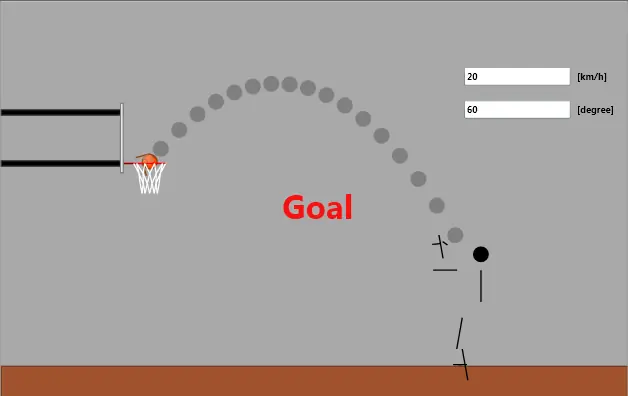
Basketball y la ciencia
[color=#000000][color=#000000][color=#000000]title = "Basketball 0.3"

GraphicsWindow.Title = title

width = 950

height = 600

GraphicsWindow.Width = width

GraphicsWindow.Height = height

FLOORY = 550  ' floor y

ENDX = 105    ' end x

size = 24

DrawRoom()

Ball_Add()

Goal_Add()

Man_Add()

AddControls()

x = 0

y = FLOORY - size

Ball_Move()

angle = 0 ' [degree]

delta = 8

nGoal = 0

While "True"

  If x <= 0 Then

    x = 0

    For i = 1 To 80

      x = x + delta

      Ball_Move()

      angle = angle + delta / ((size / 2) * (Math.Pi / 180))

      Ball_Rotate()

      Program.Delay(i * 2)

    EndFor

  EndIf

  Man_Hold()

  WaitButton()

  DrawRoom()

  Man_Throw()

EndWhile


Sub AddControls

  GraphicsWindow.BrushColor = "Black"

  oVelocity = Controls.AddTextBox(700, 100)

  Controls.SetTextBoxText(oVelocity, 15)

  oAngle = Controls.AddTextBox(700, 150)

  Controls.SetTextBoxText(oAngle, 45)

  oThrow = Controls.AddButton("Throw", 700, 200)

  Controls.HideControl(oThrow)

  ' unit for textbox

  oUnit = Shapes.AddText("[km/h]")

  Shapes.Move(oUnit, 870, 104)

  oUnit = Shapes.AddText("[degree]")

  Shapes.Move(oUnit, 870, 154)

EndSub


Sub DrawRoom

  ' wall

  GraphicsWindow.BrushColor = "DarkGray"

  GraphicsWindow.FillRectangle(0, 0, width, FLOORY)

  ' floor

  GraphicsWindow.BrushColor = "Sienna"

  GraphicsWindow.FillRectangle(0, FLOORY, width, height - FLOORY)

  GraphicsWindow.PenColor = "#773D22" ' Sienna L: 40->30

  GraphicsWindow.DrawRectangle(0, FLOORY, width, height - FLOORY)

  ' end line

  GraphicsWindow.PenColor = "White"

  GraphicsWindow.DrawRectangle(ENDX - 5, FLOORY, 5, 0)

  ' free throw line

  GraphicsWindow.PenColor = "White"

  GraphicsWindow.DrawRectangle(ENDX + 120 + 455, FLOORY, 5, 0)

  ' free throw circle

  GraphicsWindow.PenColor = "White"

  GraphicsWindow.DrawRectangle(ENDX + 580 + 180, FLOORY, 5, 0)

  ' 3 point line

  GraphicsWindow.PenColor = "White"

  GraphicsWindow.DrawRectangle(ENDX + 120 + 670, FLOORY, 5, 0)

EndSub


Sub WaitButton

  Controls.ShowControl(oThrow)

  notClicked = "True"

  Controls.ButtonClicked = OnButtonClicked

  While notClicked

    Program.Delay(200)

  EndWhile

  Controls.HideControl(oThrow)

EndSub


Sub OnButtonClicked

  notClicked = "False"

EndSub


Sub Ball_Add

  ' Ball | Add ball

  ' param size - ball size

  ' return oBall

  ball["num"] = ball["num"] + 1

  oBall = "Ball" + ball["num"]

  ball[oBall + ".size"] = size

  ball[oBall + ".angle"] = 0

  rad = angle / 180 * Math.Pi  ' radian

  GraphicsWindow.BrushColor = "OrangeRed"

  GraphicsWindow.PenColor = "SaddleBrown"

  GraphicsWindow.PenWidth = 2

  ball[oBall + ".oBall"] = Shapes.AddEllipse(size, size)

  GraphicsWindow.PenWidth = 2

  oLineU = Shapes.AddEllipse(size * 0.6, size * 0.4)

  ball[oBall + ".oLineU"] = oLineU

  oLineC = Shapes.AddEllipse(size * 0.6, size * 0.4)

  ball[oBall + ".oLineC"] = oLineC

  GraphicsWindow.PenColor = "SaddleBrown"

  oLineH = Shapes.AddLine(0, 0, size - 2, 0)

  ball[oBall + ".oLineH"] = oLineH

  oLineV = Shapes.AddLine(0, 0, 0, size - 2)

  ball[oBall + ".oLineV"] = oLineV

  GraphicsWindow.PenColor = "White"

  GraphicsWindow.BrushColor = "White"

  oHighlight = Shapes.AddEllipse(size * 0.7 , size * 0.7)

  Shapes.SetOpacity(oHighlight, 30)

  ball[oBall + ".oHighlight"] = oHighlight

  Ball_Move()

EndSub


Sub Ball_Move

  ' Ball | Move ball

  ' param oBall

  ' param x, y - position to move

  ball[oBall + ".x"] = x

  ball[oBall + ".y"] = y

  angle = ball[oBall + ".angle"]

  rad = angle / 180 * Math.Pi  ' radian

  size = ball[oBall + ".size"]

  Shapes.Move(ball[oBall + ".oBall"], x, y)

  xU = x + size * (0.5 + 0.3 * Math.Sin(rad) - 0.3)

  yU = y + size * (0.5 - 0.3 * Math.Cos(rad) - 0.2)

  Shapes.Move(ball[oBall + ".oLineU"], xU, yU)

  xC = x + size * (0.5 - 0.3 * Math.Sin(rad) - 0.3)

  yC = y + size * (0.5 + 0.3 * Math.Cos(rad) - 0.2)

  Shapes.Move(ball[oBall + ".oLineC"], xC, yC)

  Shapes.Move(ball[oBall + ".oLineH"], x + 1, y + size * 0.5)

  Shapes.Move(ball[oBall + ".oLineV"], x + size * 0.5, y)

  Shapes.Move(ball[oBall + ".oHighlight"], x + 1, y + 1)

EndSub


Sub Ball_Rotate

  ' Ball | Rotate ball

  ' param oBall

  ' param angle - rotate angle

  angle = Math.Remainder(angle, 360)

  If angle < 0 Then

    angle = 360 - angle

  EndIf

  ball[oBall + ".angle"] = angle

  rad = angle / 180 * Math.Pi  ' radian

  x = ball[oBall + ".x"]

  y = ball[oBall + ".y"]

  xU = x + size * (0.5 + 0.3 * Math.Sin(rad) - 0.3)

  yU = y + size * (0.5 - 0.3 * Math.Cos(rad) - 0.2)

  Shapes.Move(ball[oBall + ".oLineU"], xU, yU)

  Shapes.Rotate(ball[oBall + ".oLineU"], angle)

  xC = x + size * (0.5 - 0.3 * Math.Sin(rad) - 0.3)

  yC = y + size * (0.5 + 0.3 * Math.Cos(rad) - 0.2)

  Shapes.Move(ball[oBall + ".oLineC"], xC, yC)

  Shapes.Rotate(ball[oBall + ".oLineC"], angle)

  Shapes.Rotate(ball[oBall + ".oLineH"], angle)

  Shapes.Rotate(ball[oBall + ".oLineV"], angle)

EndSub


Sub Goal_Add

  ' Goal | Add goal

  ' pole

  GraphicsWindow.PenColor = "#333333"

  GraphicsWindow.BrushColor = "Black"

  oPole = Shapes.AddRectangle(ENDX + 120 - 24 - 15, 10)

  Shapes.Move(oPole, 0, FLOORY - 305 - 107 + 15 + 10)

  oPole = Shapes.AddRectangle(ENDX + 120 - 24 - 15, 10)

  Shapes.Move(oPole, 0, FLOORY - 305 + 15 - 20)

  ' flange

  GraphicsWindow.PenColor = "DarkRed"

  oFlange = Shapes.AddLine(0, 0, 15, 0)

  r = 24

  x1 = x + ENDX + 120 - r - 15

  y1 = FLOORY - 305

  Shapes.Move(oFlange, x1, y1)

  posFlange = "x1=" + x1 + ";x2=" + (x1 + 15) + ";y=" + y1 + ";"

  ' ring

  GraphicsWindow.PenColor = "Red"

  oRing = Shapes.AddLine(0, 0, r * 2, 0)

  x1 = x + ENDX + 120 - r

  Shapes.Move(oRing, x1, y1)

  posRing = "x1=" + x1 + ";x2=" + (x1 + r * 2) + ";y=" + y1 + ";"

  posGoal = "x=" + (x1 + r) + ";y=" + y1 + ";"

  ' board

  GraphicsWindow.PenColor = "Gray"

  GraphicsWindow.BrushColor = "White"

  oBoard = Shapes.AddRectangle(6, 107)

  x1 = x + ENDX + 120 - r - 15 - 6

  y1 = FLOORY - 305 - 107 + 15

  Shapes.Move(oBoard, x1, y1)

  posBoard = "x=" + (x1 + 6) + ";y1=" + y1 + ";y2=" + (y1 + 107) + ";"

  ' net

  xNet[0] = "0=0;1=5;2=19;3=41;4=69;5=100;6=131;7=159;8=181;9=195;10=200;"

  xNet[1] = "0=30;1=33;2=43;3=59;4=78;5=100;6=122;7=141;8=157;9=167;10=170;"

  xNet[2] = "0=40;1=52;2=60;3=71;4=85;5=100;6=115;7=129;8=140;9=148;10=160;"

  xNet[3] = "0=50;1=52;2=60;3=71;4=85;5=100;6=115;7=129;8=140;9=148;10=150;"

  x0 = x + ENDX + 120 - r

  y0 = FLOORY - 305

  y1 = 0

  y2 = 15

  GraphicsWindow.PenColor = "White"

  For j = 0 To 2

    For i = 0 To 4

      If Math.Remainder(j, 2) = 0 Then

        x1 = xNet[j][i * 2] * r / 100

        x2 = xNet[j + 1][i * 2 + 1] * r / 100

        oNet = Shapes.AddLine(0, 0, x2 - x1, y2 - y1)

        Shapes.Move(oNet, x0 + x1, y0 + y1)

        x1 = xNet[j + 1][i * 2 + 1] * r / 100

        x2 = xNet[j][i * 2 + 2] * r / 100

        oNet = Shapes.AddLine(0, y2 - y1, x2 - x1, 0)

        Shapes.Move(oNet, x0 + x1, y0 + y1)

      Else

        x1 = xNet[j + 1][i * 2] * r / 100

        x2 = xNet[j][i * 2 + 1] * r / 100

        oNet = Shapes.AddLine(0, y2 - y1, x2 - x1, 0)

        Shapes.Move(oNet, x0 + x1, y0 + y1)

        x1 = xNet[j][i * 2 + 1] * r / 100

        x2 = xNet[j + 1][i * 2 + 2] * r / 100

        oNet = Shapes.AddLine(0, 0, x2 - x1, y2 - y1)

        Shapes.Move(oNet, x0 + x1, y0 + y1)

      EndIf

    EndFor

    y1 = y1 + 15

    y2 = y2 + 15

  EndFor

  GraphicsWindow.FontSize = 50

  GraphicsWindow.BrushColor = "Red"

  oBanner = Shapes.AddText("Goal")

  Shapes.Move(oBanner, width / 2 - 25 * 2, height / 2 - 50 / 2)

  Shapes.SetOpacity(oBanner, 0)

  GraphicsWindow.FontSize = 14

EndSub


Sub Goal_BoundOnBoard

  ' param x, y - ball position

  ' param lastx, lasty - ball last position

  ' return bound - "True" if bound (collision detected)

  bound = "False"

  cy = y + size / 2

  If posBoard["y1"] < cy And cy < posBoard["y2"] And x < posBoard["x"] And posBoard["x"] < x + size Then

    bound = "True"

    x = posBoard["x"]

    't = 0

    y0 = y

    x0 = x

    lastvx = vx

    vx = -vx * Math.SquareRoot(1.3 / 1.8)

    da = vy * dt * 100 * 360 / Math.Pi / size

  EndIf

EndSub


Sub Goal_BoundOnFlange

  ' param x, y - ball position

  ' param lastx, lasty - ball last position

  ' return bound - "True" if bound (collision detected)

  bound = "False"

  cx = x + size / 2

  If posFlange["x1"] < cx And cx < posFlange["x2"] And y < posFlange["y"] And posFlange["y"] < y + size Then

    bound = "True"

    y = posFlange["y"] - size

    't = 0

    y0 = y

    x0 = x

    vy = -vy * Math.SquareRoot(1.3 / 1.8)

    da = -vx * dt * 100 * 360 / Math.Pi / size

  EndIf

EndSub


Sub Goal_BoundOnRing

  ' param x, y - ball position

  ' param lastx, lasty - ball last position

  ' return bound - "True" if bound (collision detected)

  bound = "False"

  cx = x + size / 2

  cy = y + size / 2

  bx = posRing["x1"]   ' bound point x

  by = posRing["y"]   ' bound point y

  distance = Math.SquareRoot(Math.Power(cx - bx, 2) + Math.Power(cy - by, 2))

  If distance <= size / 2 Then

    Goal_CalcReflection()

  EndIf

  bx = posRing["x2"]   ' bound point x

  distance = Math.SquareRoot(Math.Power(cx - bx, 2) + Math.Power(cy - by, 2))

  If distance <= size / 2 Then

    Goal_CalcReflection()

  EndIf

EndSub


Sub Goal_CalcReflection

  bound = "True"

  lastcx = lastx + size / 2

  lastcy = lasty + size / 2

  lastdist = Math.SquareRoot(Math.Power(lastcx - bx, 2) + Math.Power(lastcy - by, 2))

  k = (size / 2 - distance) / (lastdist - distance)

  cx = (1 - k) * cx + k * lastcx

  cy = (1 - k) * cy + k * lastcy

  x = cx - size / 2

  y = cy - size / 2

  't = 0

  y0 = y

  x0 = x

  vx = -vx * Math.SquareRoot(1.3 / 1.8)

  vy = -vy * Math.SquareRoot(1.3 / 1.8)

  da = -vx * dt * 100 * 360 / Math.Pi / size

EndSub


Sub Goal_Check

  ' param x, y - ball position

  ' param lastx, lasty - ball last position

  ' return bound - "True" if bound (collision detected)

  cx = x + size / 2

  cy = y + size / 2

  gx = posGoal["x"]   ' center x of goal

  gy = posGoal["y"]   ' center y of goal

  distance = Math.SquareRoot(Math.Power(cx - gx, 2) + Math.Power(cy - gy, 2))

  If goal = "False" And distance < size / 2 And gy < cy Then

    Goal_Show()

    nGoal = nGoal + 1

    goal = "True"

  EndIf

EndSub


Sub Goal_Show

  Sound.PlayBellRing()

  For i = 0 To 100

    Shapes.SetOpacity(oBanner, i)

    Program.Delay(10)

  EndFor

  For i = 100 To 0 Step -1

    Shapes.SetOpacity(oBanner, i)

    Program.Delay(10)

  EndFor

EndSub


Sub Joint_Add

  ' param id

  ' param xj[id] - x beam root

  ' param yj[id] - y beam root

  ' param lj[id] - length beam

  ' param aj[id] - angle beam

  ' return xj[id+1] - x beam front

  ' return yj[id+1] - y beam front

  oLeg[id] = Shapes.AddLine(0, 0, lj[id], 0)

  Joint_Move()

EndSub


Sub Joint_Move

  ' param id

  ' param xj[id] - x beam root

  ' param yj[id] - y beam root

  ' param aj[id] - angle beam

  ' return xj[id+1] - x beam front

  ' return yj[id+1] - y beam front

  Stack.PushValue("local", x)

  Stack.PushValue("local", y)

  x = xj[id] + (lj[id] / 2) * Math.Cos(aj[id] * Math.Pi / 180) - (lj[id] / 2)

  y = yj[id] + (lj[id] / 2) * Math.Sin(aj[id] * Math.Pi / 180)

  Shapes.Move(oLeg[id], x, y)

  Shapes.Rotate(oLeg[id], aj[id])

  xj[id + 1] = xj[id] + lj[id] * Math.Cos(aj[id] * Math.Pi / 180)

  yj[id + 1] = yj[id] + lj[id] * Math.Sin(aj[id] * Math.Pi / 180)

  y = Stack.PopValue("local")

  x = Stack.PopValue("local")

EndSub


Sub Man_Add

  ' Man | Add man

  ' return oMan

  xMan = ENDX + 580 + 12 + 28

  yMan = FLOORY - 48 * 2

  man["num"] = man["num"] + 1

  oMan = "Man" + man["num"]

  man[oMan + ".x"] = xMan

  man[oMan + ".y"] = yMan

  GraphicsWindow.BrushColor = "Black"

  GraphicsWindow.PenColor = "Black"

  oHead = Shapes.AddEllipse(24, 24)

  man[oMan + ".oHead"] = oHead

  Shapes.Move(oHead, xMan - 12, yMan - 84)

  oBody = Shapes.AddLine(0, 0, 0, 48)

  man[oMan + ".oBody"] = oBody

  Shapes.Move(oBody, xMan, yMan - 48)

  GraphicsWindow.PenColor = "Black"

  id = 10 ' for arm

  xj[id] = xMan

  yj[id] = yMan - 48

  al = "1=60;2=90;3=-45;4=-15;"

  ll = "1=36;2=36;3=9;4=12;"

  Man_AddLimb()

  id = 20 ' for leg

  xj[id] = xMan

  yj[id] = yMan

  al = "1=100;2=-20;3=100;4=0;"

  ll = "1=48;2=48;3=21;4=7;"

  Man_AddLimb()

EndSub


Sub Man_AddLimb

  ' param id - limb id

  ' param al[] - angle of joints

  ' param ll[] - length of linterjoint

  Stack.PushValue("local", id)

  For i = 1 To 4

    lj[id] = ll[i]      ' length

    Joint_Add()

    id = id + 1

  EndFor

  id = Stack.PopValue("local")

  Man_MoveLimb()

EndSub


Sub Man_Catch

  ' Man | Catch ball

  ' param oBall

  ' param oMan

  ' param x, y - top left positon of ball

EndSub


Sub Man_Hold

  ' Man | Hold ball

  ' param oBall

  ' param oMan

  x = man[oMan + ".x"] - 48

  y = man[oMan + ".y"] - 48

  Ball_Move()

  id = 10 ' for arm

  al = "1=85;2=120;3=90;4=-20;"

  Man_MoveLimb()

EndSub


Sub Man_MoveLimb

  ' param id - id limb

  ' param al[] - angle of joints

  Stack.PushValue("local", id)

  aj[id] = al[1]                ' angle

  Joint_Move()

  id = id + 1

  For i = 2 To 4

    aj[id] = aj[id - 1] + al[i] ' angle

    Joint_Move()

    id = id + 1

  EndFor

  id = Stack.PopValue("local")

EndSub


Sub Man_Throw

  ' Man | Throw ball

  ' param oBall

  ' param oMan

  size = ball[oBall + ".size"]

  x = man[oMan + ".x"] - 48

  y = FLOORY - 144 - size

  Ball_Move()

  id = 10 ' for arm

  al = "1=120;2=120;3=110;4=-40;"

  Man_MoveLimb()

  Program.Delay(500)

  x = man[oMan + ".x"] - 48

  y = FLOORY - 192 - 12

  Ball_Move()

  id = 10 ' for arm

  al = "1=180;2=80;3=100;4=-40;"

  Man_MoveLimb()

  Program.Delay(1000)

  id = 10 ' for arm

  al[3] = -45

  Man_MoveLimb()

  g = 9.80665 ' acceleration of gravity [m/s^2]

  y0 = y

  x0 = x

  v0_ = Controls.GetTextBoxText(oVelocity)  ' [km/h]

  v0 = v0_ * 1000 / 3600                    ' [m/s]

  angle = Controls.GetTextBoxText(oAngle)   ' [degree]

  v0x = v0 * Math.Cos(angle * Math.Pi / 180)

  v0y = v0 * Math.Sin(angle * Math.Pi / 180)

  a = ball[oBall + ".angle"]

  da = 10   ' [degree]

  dt = 0.01 ' [s]

  vy = v0y

  vx = v0x

  goal = "False"

  For t = 0.1 To 30.0 Step dt     ' [s]

    a = a + da

    angle = a

    Ball_Rotate()

    vy = vy - g * dt / 2          ' velocity [m/s]

    lasty = y

    lastx = x

    y = y - (vy * dt) * 100       ' vertical position [cm]

    x = x - (vx * dt) * 100       ' horizontal position [cm]

    If x < -24 Or 950 < x Then

      y = FLOORY - size

      Goto exit_throw

    EndIf

    If FLOORY - size < y Then       ' bounds on the floor

      y = FLOORY - size

      't = 0

      y0 = y

      x0 = x

      vy = -vy * Math.SquareRoot(1.3 / 1.8)

      If vy < 0.1 Then

        Goto exit_throw

      EndIf

      da = -vx * dt * 100 * 360 / Math.Pi / size

    EndIf

    Goal_BoundOnRing()

    If bound Then

      Goto move_ball

    EndIf

    Goal_BoundOnBoard()

    If bound Then

      Goto move_ball

    EndIf

    Goal_BoundOnFlange()

    If bound Then

      Goto move_ball

    EndIf

    Goal_Check()

move_ball:

    Ball_Move()

    If Math.Remainder(t * 100, 10) = 0 Then

      GraphicsWindow.BrushColor = "Gray"

      GraphicsWindow.FillEllipse(x, y, size, size)

    EndIf

    Program.Delay(10)

  EndFor

exit_throw:

  id = 10 ' for arm

  al = "1=60;2=90;3=-45;4=-15;"

  Man_MoveLimb()

EndSub

[/color][/color]
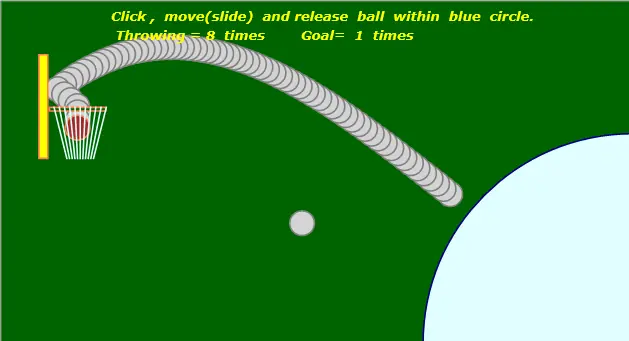
Encesta!
[color=#000000][color=#000000] GUI()

GraphicsWindow.MouseDown=Onmousedown

GraphicsWindow.MouseMove=Onmousemove

GraphicsWindow.Mouseup=Onmouseup


While "true"

  If move="true" Then

    Shoot()            ' ball is throwed

    Goalcheck()        ' if ball goals in or not

    Goalin()           ' ball goes down throgh goal net

  EndIf

  Program.Delay(20)

endwhile


sub Goalin

  If goal="true" Then

    Vx=0

    newx=RX+(RW-BD)/2                 ' ball falling position

    Vy=Vy/3                           ' ball falling speed

    Gravity=Gravity*0.8

    If (PY+BD/2)<Shapes.GetTop(BBall) and Shapes.GetTop(BBall)<(PY+BD) Then

      For i=1 To 11

        Shapes.Rotate(line[i],10)      ' goal net swings

      EndFor

      Program.Delay(50)

    EndIf

    '

    If (PY+BD)<Shapes.GetTop(BBall) then

      staynet()                        ' Net return initial state

      Gravity=7

    EndIf

  endif

EndSub


Sub staynet

  For i=1 To 11

    Shapes.Rotate(line[i],0)           ' goal net stay

  EndFor

EndSub


Sub goalcheck

  If goal="false" and RX<newx And newx<RX+RW-BD and  math.Abs(newY-PY)<BD/2 Then

    Shapes.SetText(smsg," Goal !!!!! ")

    Shapes.Animate(smsg,1000,150,1500)

    goal="true"

    MM=MM+1                            ' count up goals

    resultshow()

  EndIf

endsub


Sub resultshow

  result=" Click , move(slide) and release ball within blue circle. " +Text.GetCharacter(10)+ " Throwing = "+NN +" times Goal= "+MM+" times"

  Shapes.SetText(sresult,result)

EndSub


Sub Shoot

  dn=dn+1

  Shapes.ShowShape(gball[dn])           ' trace ball

  Shapes.Move(gball[dn],newx,newy)

  t3=clock.ElapsedMilliseconds

  newx=newx-vx*PM

  newy=newy-vy +(t3-t2)*(t3-t2)*Gravity/2/1000000

  Shapes.Move(BBall,newx,newy)

  GraphicsWindow.Title="Now Ball X= "+math.Floor(newx)+ " Y= "+math.Floor(newy)+" Vx = "+math.Floor(Vx) + " Vy = "+math.Floor(Vy)

  If (RX-PW<newx and newx<RX+4)   And (PY-PH/2-BD/2<newY And newY<PY) Then ' if ball taches the panel

    PM=-1

  EndIf

  If GH-BD-20<newy Then

    move="false"

    newx=0

    newy=0

    Shapes.Animate(BBall,x0,y0,4000)   ' ball backs initial position

    Program.Delay(4000)

    Shapes.Move(smsg,-100,-50)         ' hide goal message

    GraphicsWindow.Title="Now Ball is "+X0+ " : "+Y0

    For i=1 To dn

      Shapes.HideShape(gball[i])

    EndFor

    dn=0

  EndIf

EndSub


Sub onmousedown

  gx= GraphicsWindow.MouseX

  gy= GraphicsWindow.MouseY

  If math.Abs(gx-x0)<50 And math.Abs(gy-y0)<50 Then

    NN=NN+1

    PM=1

    catch="true"

    goal="false"

    Gravity=9.8

    t1=clock.ElapsedMilliseconds        ' ball caught time

    resultshow()                        ' result

    staynet()                           ' Net return initial state

  EndIf

endsub


Sub onmousemove

  If catch="true" Then

    gx1= GraphicsWindow.MouseX

    gy1= GraphicsWindow.MouseY

    Shapes.Move(BBall,gx1,gy1)

    r=Math.SquareRoot((gx1-x0)*(gx1-x0)+ (gy1-y0)*(gy1-y0))  ' distance from initial position

    If r>410 Then

      onmouseup()                       ' forced throwing

    endif

  EndIf

endsub


Sub onmouseup

  If catch="true" Then

    gx2= GraphicsWindow.MouseX

    gy2= GraphicsWindow.MouseY

    t2=clock.ElapsedMilliseconds        ' Ball release time

    catch="false"

    Vx=(gx-gx2)/(t2-t1)*10              ' Ball speed X

    Vy=(gy-gy2)/(t2-t1)*10              ' Ball speed Y

    newx=shapes.GetLeft(BBall)

    newy=shapes.Gettop(BBall)

    Move="true"

  EndIf

endsub


Sub GUI

  GraphicsWindow.Show()

  GraphicsWindow.Hide()

  GraphicsWindow.Top=20

  GraphicsWindow.Left=20

  '---------------- initial value ----------------------

  GW=1200

  GH=650

  GraphicsWindow.BackgroundColor="Darkgreen"

  GraphicsWindow.Width=GW

  GraphicsWindow.Height=GH

  GraphicsWindow.BrushColor="Lightcyan"

  GraphicsWindow.PenColor="Navy"

  GraphicsWindow.PenWidth=3

  circle= Shapes.AddEllipse(800,800)   ' throwing circle

  Shapes.Move(circle,GW-400,GH-400)

  '---------------- basketball ----------------------

  BD=50

  GraphicsWindow.BrushColor="lightgray"

  GraphicsWindow.penColor="gray"

  For i=1 To 300

    gball[i]=Shapes.AddEllipse(BD,BD)  ' trace ball

    Shapes.Move(gball[i],1200,900)

    Shapes.HideShape(gball[i])

  endfor

  GraphicsWindow.BrushColor="Brown"

  GraphicsWindow.PenColor="Coral"

  X0=GW-BD

  Y0=GH-BD

  BBall= Shapes.AddEllipse(BD,BD)

  Shapes.Move(BBall,X0,Y0)

  '---------------- Message ----------------------

  GraphicsWindow.BrushColor="Yellow"

  GraphicsWindow.FontSize=25

  GraphicsWindow.FontItalic="True"

  smsg=shapes.AddText(" ")

  Shapes.Move(smsg,-100,-50)

  result=" Click , move(slide) and release ball within blue circle. " +Text.GetCharacter(10)+ " Throwing = "+NN +" times Goal= "+MM+" times"

  sresult=shapes.AddText(result)

  Shapes.Move(sresult,200,10)

  '---------------- Goal Net ----------------------

  GraphicsWindow.BrushColor="Yellow"

  PW=20                                  ' Panel Width

  PH=200                                 ' Panel Height

  PY=200                                 ' Panel position Y

  RX=90                                  ' Ring position X

  RW=110                                 ' Ring width

  panel=shapes.AddRectangle(PW,PH)

  GraphicsWindow.BrushColor="Darkgreen"

  Ring=shapes.AddRectangle(RW,10)

  GraphicsWindow.PenColor="lightcyan"

  For i=1 To 11

    line[i]=Shapes.AddLine(0+10*i,0,30+5*i,100)    ' Net

  EndFor

  setgoal()

  GraphicsWindow.Show()

  '--------------------------------------

  catch="false"

  NN=0

  MM=0

EndSub


Sub setgoal

  Shapes.Move(panel,RX-PW,PY-PH/2)

  Shapes.Move(ring,RX,PY)

  For i=1 To 11

    Shapes.Move(line[i],RX,PY)

  EndFor

endsub

[/color][/color]
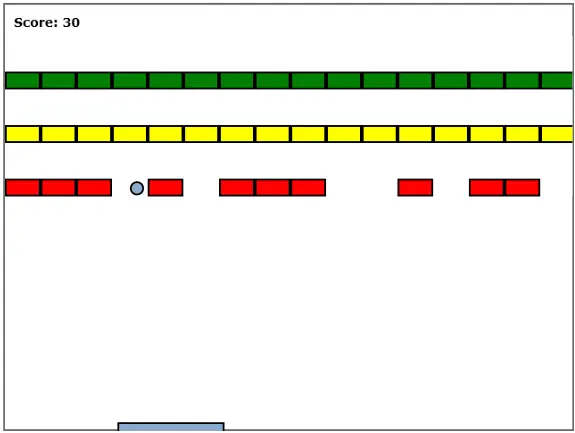
Destruye los cuadrados!
Un lindo reloj