
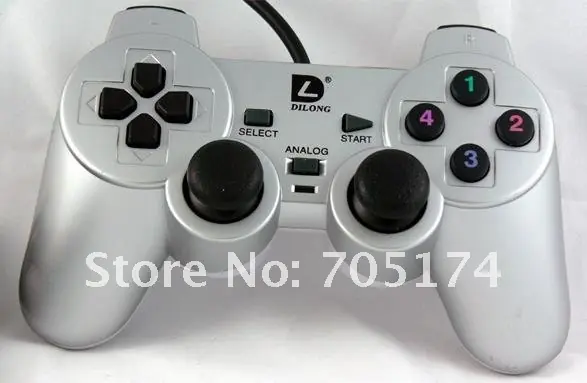
Les voy a explicar cómo jugar el GTA 4 para PC con un joystick que aparece en la foto al estilo del mando PS3.
Mi Joystick
1) Descarga este archivo. http://lcsteam.net/dump/gta4/xbox360emu%203.0.zip
2) Descomprime el 'xinput9_1_0.dll' y el 'xbox360cemu.ini' del archivo en tu carpeta donde instalaste el GTA4. Opcionalmente, descomprime tambien el archivo 'XInputTest.exe' para experimentar con las asignaciones de los botones
3) Edita el 'xbox360cemu.ini' segun tu propio mando, el .ini esta editado por defecto para funcionar con el mando 'Logitech RumblePad 2'
4) Estate seguro de que no hay un -directinput en tu commandline.txt (Si no sabes lo que es el commandline.txt, no lo tienes)
Nota: Para saber como editar las teclas, lee el readme.txt
Si tus teclas estan al reves, edita el xbox360emu.ini y usa el XInputTest.exe para probar tus cambios (no necesitas entrar en GTA4 para probar si has puesto el mando correctamente)
He aquí el archivo de configuración completo de mi DUAL SHOCK 2:

UseAutoPad=0 #use 0 to 1; automatically make other PAD to PAD1 after detecting movement
UseInitBeep=0 #use 0 to 1; default 1; beep on init
#Logitech Cordless Rumblepad 2 / Generic Rumble Controller

Index=0 #controller index in game controllers list; 0 is first; -1 to ignore this pad
Left Analog X=1 #axis index; use - to invert; precede with 's' for a slider eg; s-1; 7 to disable
Left Analog Y=-2 #axis index; use - to invert; precede with 's' for a slider eg; s-1; 7 to disable
Right Analog X=6 #axis index; use - to invert; precede with 's' for a slider eg; s-1; 7 to disable
Right Analog Y=-3 #axis index; use - to invert; precede with 's' for a slider eg; s-1; 7 to disable
Left Analog X Linear=0 #-100 to +100 raise this number to increase sensitivity near center
Left Analog Y Linear=0 #-100 to +100 raise this number to increase sensitivity near center
Right Analog X Linear=0 #-100 to +100 raise this number to increase sensitivity near center
Right Analog Y Linear=0 #-100 to +100 raise this number to increase sensitivity near center
Left Analog X+ Button=0 #button id; 0 to disable
Left Analog X- Button=0 #button id; 0 to disable
Left Analog Y+ Button=0 #button id; 0 to disable
Left Analog Y- Button=0 #button id; 0 to disable
Right Analog X+ Button=0 #button id; 0 to disable
Right Analog X- Button=0 #button id; 0 to disable
Right Analog Y+ Button=0 #button id; 0 to disable
Right Analog Y- Button=0 #button id; 0 to disable
D-pad POV=1 #POV index; 0 to disable
D-pad Up=0 #button id; 0 to disable
D-pad Down=0 #button id; 0 to disable
D-pad Left=0 #button id; 0 to disable
D-pad Right=0 #button id; 0 to disable
A=3 #button id; 0 to disable
B=2 #button id; 0 to disable
X=4 #button id; 0 to disable
Y=1 #button id; 0 to disable
Left Shoulder=7 #button id; 0 to disable
Right Shoulder=8 #button id; 0 to disable
Back=9 #button id; 0 to disable
Start=10 #button id; 0 to disable
Left Thumb=11 #button id; 0 to disable
Right Thumb=12 #button id; 0 to disable
Left Trigger=5 #button id; precede with 'a' for an axis; eg; a-6; for a slider precede with 's' eg; s-1
Right Trigger=6 #button id; precede with 'a' for an axis; eg; a-6; for a slider precede with 's' eg; s-1
UseForceFeedback=1 #use 0 to 1; default 1
ForceLargeGain=10000 #use 0 to 10000; default 10000; effect intensity
ForceLargePeriod=30000 #use 0 to 200000; default 120000; effect frequency; wheel only
ForceLargeFadeTime=10 #use 0 to 100; default 10
ForceLargeFadeIn=0 #use 0 to 1; default 1
ForceLargeFadeOut=0 #use 0 to 1; default 1
ForceLargeStartMag=1000 #use 0 to 10000; default 2000; effect will begin with this value
ForceSmallGain=10000 #use 0 to 10000; default 10000; effect intensity
ForceSmallPeriod=30000 #use 0 to 200000; default 30000; effect frequency; wheel only
ForceSmallFadeTime=10 #use 0 to 100 default 10
ForceSmallFadeIn=0 #use 0 to 1; default 1
ForceSmallFadeOut=0 #use 0 to 1; default 1
ForceSmallStartMag=1000 #use 0 to 10000; default 2000; effect will begin with this value
WheelInertiaGain=10000 #use 0 to 10000; default 2500; effect intensity; wheel only
WheelSpringGain=10000 #use 0 to 10000; default 5000; effect intensity; wheel only
SteeringWheel=0 #use 0 to 1; enable for all wheel effects
#Logitech G25 Racing Wheel / Generic Wheel

Index=-1 #controller index in game controllers list; 0 is first; -1 to ignore this pad
Left Analog X=1 #axis index; use - to invert; precede with 's' for a slider eg; s-1; 7 to disable
Left Analog Y=7 #axis index; use - to invert; precede with 's' for a slider eg; s-1; 7 to disable
Right Analog X=7 #axis index; use - to invert; precede with 's' for a slider eg; s-1; 7 to disable
Right Analog Y=7 #axis index; use - to invert; precede with 's' for a slider eg; s-1; 7 to disable
Left Analog X Linear=30 #-100 to +100 raise this number to increase sensitivity near center
Left Analog Y Linear=0 #-100 to +100 raise this number to increase sensitivity near center
Right Analog X Linear=0 #-100 to +100 raise this number to increase sensitivity near center
Right Analog Y Linear=0 #-100 to +100 raise this number to increase sensitivity near center
Left Analog X+ Button=0 #button id; 0 to disable
Left Analog X- Button=0 #button id; 0 to disable
Left Analog Y+ Button=0 #button id; 0 to disable
Left Analog Y- Button=0 #button id; 0 to disable
Right Analog X+ Button=0 #button id; 0 to disable
Right Analog X- Button=0 #button id; 0 to disable
Right Analog Y+ Button=0 #button id; 0 to disable
Right Analog Y- Button=0 #button id; 0 to disable
D-pad POV=1 #POV index; 0 to disable
D-pad Up=0 #button id; 0 to disable
D-pad Down=0 #button id; 0 to disable
D-pad Left=0 #button id; 0 to disable
D-pad Right=0 #button id; 0 to disable
A=18 #button id; 0 to disable
B=19 #button id; 0 to disable
X=17 #button id; 0 to disable
Y=16 #button id; 0 to disable
Left Shoulder=6 #button id; 0 to disable
Right Shoulder=5 #button id; 0 to disable
Back=8 #button id; 0 to disable
Start=7 #button id; 0 to disable
Left Thumb=3 #button id; 0 to disable
Right Thumb=4 #button id; 0 to disable
Left Trigger=a-6 #button id; precede with 'a' for an axis; eg; a-6; precede with 's' for a slider eg; s-1
Right Trigger=a-2 #button id; precede with 'a' for an axis; eg; a-6; precede with 's' for a slider eg; s-1
UseForceFeedback=1 #use 0 to 1; default 0
ForceLargeGain=8000 #use 0 to 10000; default 10000; effect intensity
ForceLargePeriod=120000 #use 0 to 200000; default 120000; effect frequency; wheel only
ForceLargeFadeTime=10 #use 0 to 100; default 10
ForceLargeFadeIn=0 #use 0 to 1; default 1
ForceLargeFadeOut=1 #use 0 to 1; default 1
ForceLargeStartMag=1000 #use 0 to 10000; default 2000; effect will begin with this value and end with 10000
ForceSmallGain=8000 #use 0 to 10000; default 10000; effect intensity
ForceSmallPeriod=30000 #use 0 to 200000; default 30000; effect frequency; wheel only
ForceSmallFadeTime=10 #use 0 to 100; default 10
ForceSmallFadeIn=0 #use 0 to 1; default 1
ForceSmallFadeOut=1 #use 0 to 1; default 1
ForceSmallStartMag=1000 #use 0 to 10000; default 2000; effect will begin with this value and end with 10000
WheelInertiaGain=2500 #use 0 to 10000; default 2500; effect intensity; wheel only
WheelSpringGain=5000 #use 0 to 10000; default 5000; effect intensity; wheel only
SteeringWheel=1 #use 0 to 1; enable for all wheel effects
COPIA Y PEGA ENCIMA de lo que está escrito en el archivo ''xbox360emu''
Después copia y pega los archivos ''dinput8.dll'' ''xinput9_1_0.dll'' ''xbox360cemu'' en la carpeta C:Archivos de programaRockstar GamesGrand Theft Auto IV y listo. Esto viene explicado en el readme de todos modos.
Espero que les sirva, a mi me fue de mucha utilidad.
Estas son las propiedades de mi PC y me corre de 10. Sin parches ni nada por el estilo
Windows XP professional SP3
Procesador Dual Core 2.80 Ghz
Memoria ram 2 GB
Tarjeta de video HD radeon 2400 XT
Disco duro sata 200 GB