En muchas ocaciones nos hemos topado con este tema, en esta ocacion les traigo algo que los podria sacar de un apuro.
vamos a crear un autonumerador desde vb.net 2010.
al grano!!
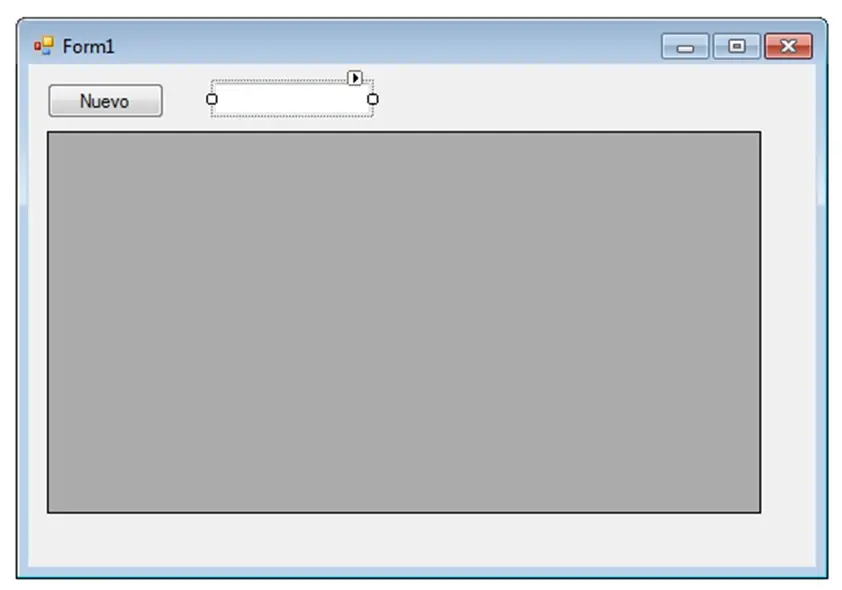
lo que necesitamos:
1---TextBox (donde vamos a generar el nuevo número, tambien siver un ComboBox o Label)
1---DataGridView1
1---Button
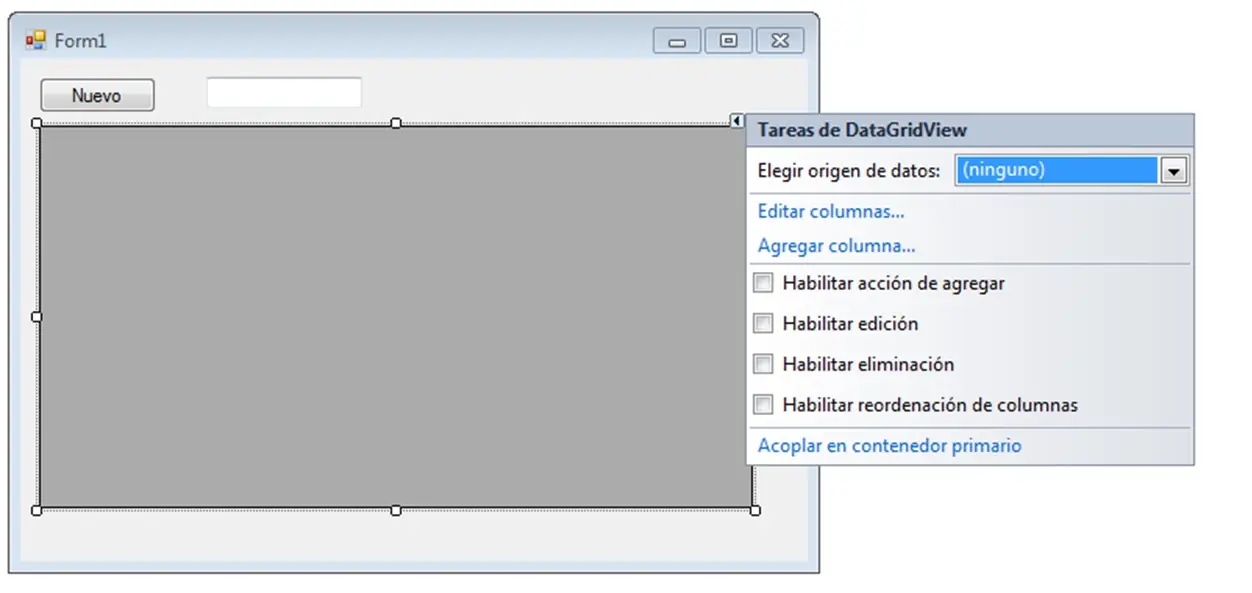
EN EL DATAGRID DESACTIVEN ESTA FUNCIONES
aquí eL código :
Imports System.Data.SqlClient
Public Class Form1
Dim CN As New SqlConnection("Data Source=SERVIDORsigepo Sql2008r2;Initial Catalog=DISTRIBUIDORALM;Persist Security Info=True;User ID=DAVID3;Password=1234"
'CREAMOS UN PROCEDIMIENTO MOSTRAR DONDE SE CARGARÁ LA TABLA SQL AL DATAGRID
'LA TABLA SQL DEBE TENER UN CAMPO DE TIPO "numeric(18, 0)"
'EN MI CASO LA TABLA SE LLAMA "NOTADEVENTA" EL CAMPO "numeric(18, 0)" ES NUMERO
'ES CASUAL QUE SQL DESORDENE LOS REGISTROS AL MOMENTO DE INGRESARLOS
'ES POR ESO QUE SELECCIONAMOS DATOS ORDENADOS MEDIENTE EL "ORDER BY" Y EL CAPOR A ORDENAR
Sub MOSTRAR()
Dim DA As New SqlDataAdapter("SELECT * FROM NOTADEVENTA ORDER BY NUMERO", CN)
Dim DS As New DataSet
DA.Fill(DS, "NOTADEVENTA"
DataGridView1.DataSource = DS.Tables("NOTADEVENTA"
End Sub
'LLAMO ESTE PROCEDIMIENTO AL CARGAR EL FORMULARIO
Private Sub Form1_Load(ByVal sender As System.Object, ByVal e As System.EventArgs) Handles MyBase.Load
MOSTRAR()
End Sub
'GENERO EL NUEVO NUMERO A CONTINUACION
Sub AUTONUMERAR()
MOSTRAR()
Me.DataGridView1.ClearSelection()
Me.DataGridView1.CurrentCell = Me.DataGridView1.Rows(Me.DataGridView1.RowCount - 1).Cells(0)
Me.DataGridView1.Refresh()
Me.TextBox1.Text = Convert.ToString(Me.DataGridView1.Item("NUMERO", Me.DataGridView1.CurrentCell.RowIndex).Value).ToString + 1
End Sub
'CARGA EL PROCEDIMIENTO
Private Sub Button1_Click(ByVal sender As System.Object, ByVal e As System.EventArgs) Handles Button1.Click
AUTONUMERAR()
End Sub
End Class
espero me hayan entendido, cualquier duda consultenme.
vamos a crear un autonumerador desde vb.net 2010.
al grano!!
lo que necesitamos:
1---TextBox (donde vamos a generar el nuevo número, tambien siver un ComboBox o Label)
1---DataGridView1
1---Button
EN EL DATAGRID DESACTIVEN ESTA FUNCIONES
aquí eL código :
Imports System.Data.SqlClient
Public Class Form1
Dim CN As New SqlConnection("Data Source=SERVIDORsigepo Sql2008r2;Initial Catalog=DISTRIBUIDORALM;Persist Security Info=True;User ID=DAVID3;Password=1234"


'CREAMOS UN PROCEDIMIENTO MOSTRAR DONDE SE CARGARÁ LA TABLA SQL AL DATAGRID
'LA TABLA SQL DEBE TENER UN CAMPO DE TIPO "numeric(18, 0)"
'EN MI CASO LA TABLA SE LLAMA "NOTADEVENTA" EL CAMPO "numeric(18, 0)" ES NUMERO
'ES CASUAL QUE SQL DESORDENE LOS REGISTROS AL MOMENTO DE INGRESARLOS
'ES POR ESO QUE SELECCIONAMOS DATOS ORDENADOS MEDIENTE EL "ORDER BY" Y EL CAPOR A ORDENAR
Sub MOSTRAR()
Dim DA As New SqlDataAdapter("SELECT * FROM NOTADEVENTA ORDER BY NUMERO", CN)
Dim DS As New DataSet
DA.Fill(DS, "NOTADEVENTA"
DataGridView1.DataSource = DS.Tables("NOTADEVENTA"
End Sub
'LLAMO ESTE PROCEDIMIENTO AL CARGAR EL FORMULARIO
Private Sub Form1_Load(ByVal sender As System.Object, ByVal e As System.EventArgs) Handles MyBase.Load
MOSTRAR()
End Sub
'GENERO EL NUEVO NUMERO A CONTINUACION
Sub AUTONUMERAR()
MOSTRAR()
Me.DataGridView1.ClearSelection()
Me.DataGridView1.CurrentCell = Me.DataGridView1.Rows(Me.DataGridView1.RowCount - 1).Cells(0)
Me.DataGridView1.Refresh()
Me.TextBox1.Text = Convert.ToString(Me.DataGridView1.Item("NUMERO", Me.DataGridView1.CurrentCell.RowIndex).Value).ToString + 1
End Sub
'CARGA EL PROCEDIMIENTO
Private Sub Button1_Click(ByVal sender As System.Object, ByVal e As System.EventArgs) Handles Button1.Click
AUTONUMERAR()
End Sub
End Class
espero me hayan entendido, cualquier duda consultenme.