jolmanAsael
Usuario (El Salvador)
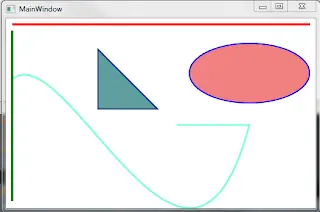
En muchas tecnologías de interfaz de usuario hay una clara distinción entre controles oridnarios y dibujos personalizados. Regularmente las funciones de dibujo se utilizan para crear software especializado para juegos, visualización de datos, simulaciones, etc. WPF esta diseñado con una filosofia completamente diferente. El soporte de dibujo de WPF no solo se puede utilizar para crear gráficos enriquecidos, sino que tambien se puede aprovechar las caracteristicas de animación y plantillas de controles personalizados, es decir el apoyo de dibujo en WPF es tan importante para crear juegos como para crear aplicaciones deslumbrantes de negocio. La manera más fácil para dibujar en 2-D es utilizar formas. Existen clases que representan simples lineas, elipses, rectangulos y poligonos. Técnicamente las formas son conocidas como primitivas de dibujo. En el ejemplo que les muestro se realizan dibujos muy básicos de manera que puedan entender como funciona, aunque se puede combinar estos ingredientes básicos para crear gráficos más complejos. XAML En este caso dibujamos una linea recta y una linea con diversos puntos la cual hace un curvatura. <Window x:Class="Dibujo.MainWindow" xmlns="http://schemas.microsoft.com/winfx/2006/xaml/presentation" xmlns:x="http://schemas.microsoft.com/winfx/2006/xaml" Title="MainWindow" Height="350" Width="525"> <Grid> <Canvas Name="canvasMiHoja"> <Line X1="10" Y1="10" X2="500" Y2="10" Stroke="Red" StrokeThickness="4"/> <Path Stroke="Aquamarine" StrokeThickness="3" Data="M 10,100 C 100, 25 300, 550 400, 175 H 280"/> </Canvas> </Grid> </Window> C# No solo en XAML se puede dibujar sino que no olvidemos que XAML solo es una representación de objeto de .NET, es decir todo lo que hacen XAML se puede utilizar en C# o en el lenguaje que este usando. En tiempo de ejecución vamos dibujar una linea, una elipse y un triangulo el cual va girar 360º grados. using System; using System.Collections.Generic; using System.Linq; using System.Text; using System.Windows; using System.Windows.Controls; using System.Windows.Data; using System.Windows.Documents; using System.Windows.Input; using System.Windows.Media; using System.Windows.Media.Imaging; using System.Windows.Navigation; using System.Windows.Shapes; using System.Windows.Media.Animation; namespace Dibujo { /// <summary> /// Interaction logic for MainWindow.xaml /// </summary> public partial class MainWindow : Window { public MainWindow() { InitializeComponent(); Line linea = new Line(); linea.X1 = 10; linea.Y1 = 20; linea.X2 = 10; linea.Y2 = 300; linea.Stroke = Brushes.Green; linea.StrokeThickness = 4; canvasMiHoja.Children.Add(linea); Ellipse elipse = new Ellipse(); elipse.Fill = Brushes.LightCoral; elipse.Stroke = Brushes.Blue; elipse.StrokeThickness = 2; elipse.Width = 200; elipse.Height = 100; elipse.Margin = new Thickness(300, 40, 0, 0); canvasMiHoja.Children.Add(elipse); PointCollection puntos = new PointCollection(); puntos.Add(new Point(0,0)); puntos.Add(new Point(0,1)); puntos.Add(new Point(1,1)); Polygon poligono = new Polygon(); poligono.Points = puntos; poligono.Fill = Brushes.CadetBlue; poligono.Width = 100; poligono.Height = 100; poligono.Stretch = Stretch.Fill; poligono.Stroke = Brushes.DarkBlue; poligono.StrokeThickness = 2; poligono.Margin = new Thickness(150, 50, 0, 0); RotateTransform rt = new RotateTransform(90,0.5,0.5); poligono.RenderTransform = rt; canvasMiHoja.Children.Add(poligono); DoubleAnimation da = new DoubleAnimation(0, 360, TimeSpan.FromSeconds(20)); rt.BeginAnimation(RotateTransform.AngleProperty, da); } } } Descarga aki la solucion en c#: por: http://vidaencodigo.blogspot.com.es/

Hola mi gente de T!. Otro 2 programita en c++. Lo que pide el ejercicio es que calcule cuanto sera el gasto en chamarras. recuerden que estos ejercicios son de una guia que estoy desarrollando y pues yo los comparto aki.. #include<iostream> #include<conio.h> using namespace std; void main() { cout<<"****************************************************************"<<endl ; cout<<"* Unas chamarra deportivas tienen un precio de $75.00 cada una *"<<endl; cout<<"* si se compran menos de 5, de $70.00 si se compran al menos *"<<endl ; cout<<"* de 5, pero menos de 10, y de $65.00 cada una si se adquieren *"<<endl; cout<<"* 10 o mas. *"<<endl ; cout<<"* *"<<endl ; cout<<"* *"<<endl ; cout<<"****************************************************************"<<endl ; double chamarras,prec,total; cout<<"Ingrese cuantas chamarras llevara el cliente: "; cin >>chamarras ; if(chamarras <5) total =chamarras*75; else if((chamarras >=5)&&(chamarras <10)) { total =chamarras*70; } else { total =chamarras*65; } cout <<"El total a pagar de: $"<<chamarras ; cout<<" es: $"<<total<<endl<<endl; system("pause"; } ******************************************************************************* #include<iostream> #include<conio.h> using namespace std; void main() { cout<<"****************************************************************"<<endl ; cout<<"* Escribir un Porgrama que lea el precio de un articulo del *"<<endl; cout<<"* teclado y calcule su precio neo teniendo en cuenta las *"<<endl ; cout<<"* siguientes hipotesis. *"<<endl; cout<<"* -Precio menor o igual de $30.00: sin descuento *"<<endl ; cout<<"* -Precio mayor de $35.00 y menor de $45.00: descuento del 10% *"<<endl ; cout<<"* -Precio mayor o igual a $45.00: descuento del 20% *"<<endl ; cout<<"****************************************************************"<<endl ; double desc,prec,total; cout<<"Ingrese precio del articulo: $"; cin >>prec ; if(prec <=30) total =prec ; else if((prec >30)&&(prec <45)) { desc=prec *0.10; total =prec -desc ; } else { desc =prec *0.20; total =prec -desc ; } cout <<"El total a pagar de: $"<<prec ; cout<<" es: $"<<total<<endl; system("pause"; } Reuerden comentar.xd
Saludos Comunidad. Les comparto esta aplicación que hice en tres tipos, pero ciempre en C#. -Aplicasion de Consola en C#. -Aplicacion de Windows Form en C# -Aplicacion para windows 8 en C# y XAML. El enunciado es: Juan, Raquel y Asael aportan cantidades de dinero para formar un capital. Juan y Raquel aportan en dólares y Asael en Dolares. Diseñe un programa que determine el capital total en dólares y que porcentaje de dicho capital aporta cada uno. Considere que: 1 dólar = 8.75 colones. -Aplicasion de Consola en C#. Algunas Capturas: . El Codigo para lo anterior seria asi: namespace CalculoPorcentagesCchar { class Program { static void Main(string[] args) { double ju, ra, asa, dol, total, porcra, porcasa, porcju; Console.WriteLine("Ingresa aporte de juan" ); ju = Convert.ToDouble(Console.ReadLine()); Console.WriteLine("Ingresa aporte de raquel" ); ra = Convert.ToDouble(Console.ReadLine()); Console.WriteLine("Ingresa aporte de asael" ); asa = Convert.ToDouble(Console.ReadLine()); dol = asa / 8.75; total = ju + ra + dol; porcra = (ra / total) * 100; porcasa = (dol / total) * 100; porcju = (ju / total) * 100; Console.WriteLine("El capital total es " +Math .Round ( total,2)+ "n" + "El porcentaje de aporte de juan es " +Math .Round ( porcju,2) + " %n" + "El porcentaje de aporte de raquel es " +Math .Round ( porcra,2) + " %n" + "El porcentaje de aporte de daniel es " + Math.Round(porcasa, 2) + " %" ); Console.ReadLine(); } } } Descarga a qui todo el proyecto en Visual studio c# 2012: www .mediafire. com/download/dykfc9ficcxdq8y/CalculoPorcentagesCcharByAsael.rar Solo unan para que el link funcione... Pass: asael Si quieres este misma aplicación para escritorio, visita el siguiente Post. -Aplicasion de Consola en C#. -Aplicacion de Windows Form en C# -Aplicacion para windows 8 en C# y XAML.
Hola amigos aki les comparto este sistemita que te permite tener el contro de una planilla de empleados. Codigo c#: using System; using System.Collections.Generic; using System.ComponentModel; using System.Data; using System.Drawing; using System.Linq; using System.Text; using System.Threading.Tasks; using System.Windows.Forms; using System.Data.SqlClient; namespace DemoRegistroDePersonal { public partial class Form1Loggin : Form { SqlConnection cnn = new SqlConnection(Properties.Settings.Default.strCnn); public Form1Loggin() { InitializeComponent(); } private void btncalcen_Click(object sender, EventArgs e) { this.Close(); } private void btnLoggin_Click(object sender, EventArgs e) { cnn.Open(); SqlCommand sql = new SqlCommand(" select *from Usuarios where nombre = '" + txtUsuario.Text + "'and pass='" + txtPass.Text + "'", cnn); SqlDataReader leer = sql.ExecuteReader(); if ((txtUsuario.Text == "" || (txtPass.Text == "") { MessageBox.Show("Debe llenar todos los campos...", "Faltan datos..."; cnn.Close(); clsB(); } else { if (leer.Read() == true) { MessageBox.Show("Bienvenido " + txtUsuario.Text, "Aviso!"; this.Hide(); Form2Principal frmPrincipal = new Form2Principal(); frmPrincipal.Show(); } else { MessageBox.Show("Error! Imposible conectar a la Base de Datos...", "Error!"; clsB(); cnn.Close(); } } } private void clsB() { txtPass.Clear(); txtUsuario.Clear(); txtUsuario.Focus(); } private void Form1Loggin_Load(object sender, EventArgs e) { } } } Código C#: using System; using System.Collections.Generic; using System.ComponentModel; using System.Data; using System.Drawing; using System.Linq; using System.Text; using System.Threading.Tasks; using System.Windows.Forms; using System.Data.SqlClient;//Para sql namespace DemoRegistroDePersonal { public partial class Form2Principal : Form { SqlConnection cnn = new SqlConnection(Properties.Settings.Default.strCnn); public Form2Principal() { InitializeComponent(); } private void btnSalir_Click(object sender, EventArgs e) { this.DialogResult = DialogResult.Cancel; this.Close(); } private void Form2Principal_Load(object sender, EventArgs e) { cargarInfo(); } public void cargarInfo() { SqlCommand sql = new SqlCommand("Select *from Personal",cnn); cnn.Open(); SqlDataReader leer = sql.ExecuteReader(); dgv.Rows.Clear(); int enter = 0; while (leer .Read()) { enter = dgv.Rows.Add(); dgv.Rows.Cells["Id"].Value = leer.GetString(0); dgv.Rows.Cells["Nombres"].Value = leer.GetString(1); dgv.Rows.Cells["Apellidos"].Value = leer.GetString(2); dgv.Rows.Cells["Direccion"].Value = leer.GetString(3); dgv.Rows.Cells["Telefono"].Value = leer.GetString(4); dgv.Rows.Cells["Email"].Value = leer.GetString(5); dgv.Rows.Cells["Sexo"].Value = leer.GetInt32(6); dgv.Rows.Cells["Pais"].Value = leer.GetInt32(7); dgv.Rows.Cells["Departamento"].Value = leer.GetInt32(8); dgv.Rows.Cells["dui_pasaporte"].Value = leer.GetString(9); } cnn.Close(); } private void btnAgregar_Click(object sender, EventArgs e) { this.Hide(); Form3Agregar frmAgregar = new Form3Agregar(); frmAgregar.Show(); } private void btnEditar_Click(object sender, EventArgs e) { Form4Editar frmEditar = new Form4Editar(); string camposeleccionado=(string )dgv .CurrentRow .Cells ["Id"].Value ; frmEditar.PersonaSeleccionada = camposeleccionado; this.Hide(); frmEditar.MdiParent = this.MdiParent ; frmEditar.Show(); } private void dgv_CellDoubleClick(object sender, DataGridViewCellEventArgs e) { } private void dgv_CellContentDoubleClick(object sender, DataGridViewCellEventArgs e) { this.DialogResult = DialogResult.OK; } private void btnborrrar(object sender, EventArgs e) { DialogResult resp= MessageBox.Show("Seguro que de sea borrar este registro","Aviso",MessageBoxButtons .YesNo ,MessageBoxIcon .Question); if (resp== DialogResult.No) { return; } else { MessageBox.Show("ai lo ases bien"; } } private void salirToolStripMenuItem_Click(object sender, EventArgs e) { DialogResult resp = MessageBox.Show("Seguro que de sea salir", "Aviso!", MessageBoxButtons.YesNo, MessageBoxIcon.Question); if (resp == DialogResult.No) { return; } else { this.Close(); } } private void agregarToolStripMenuItem_Click(object sender, EventArgs e) { this.Hide(); Form3Agregar frmAgregar = new Form3Agregar(); frmAgregar.Show(); } private void editarToolStripMenuItem_Click(object sender, EventArgs e) { Form4Editar frmEditar = new Form4Editar(); string camposeleccionado = (string)dgv.CurrentRow.Cells["Id"].Value; frmEditar.PersonaSeleccionada = camposeleccionado; this.Hide(); frmEditar.MdiParent = this.MdiParent; frmEditar.Show(); } private void borrarToolStripMenuItem_Click(object sender, EventArgs e) { DialogResult resp = MessageBox.Show("Seguro que de sea borrar este registro", "Aviso", MessageBoxButtons.YesNo, MessageBoxIcon.Question); if (resp == DialogResult.No) { return; } else { MessageBox.Show("Registro Eliminado..."; } } private void verLaAyudaToolStripMenuItem_Click(object sender, EventArgs e) { Form5Ayuda frmayuda = new Form5Ayuda(); frmayuda.Show(); } private void acercaToolStripMenuItem1_Click(object sender, EventArgs e) { MessageBox.Show(" Acerca de este soft.nHecho por: Asael M. nEmail: [email protected] nfacebook/jolmanAsael ","Acerca... v 1.0.0"; } // } } Código c#: using System; using System.Collections.Generic; using System.ComponentModel; using System.Data; using System.Drawing; using System.Linq; using System.Text; using System.Threading.Tasks; using System.Windows.Forms; using System.Data.SqlClient; namespace DemoRegistroDePersonal { public partial class Form3Agregar : Form { SqlConnection cnn = new SqlConnection(Properties.Settings.Default.strCnn); public Form3Agregar() { InitializeComponent(); } private void Form3Agregar_Load(object sender, EventArgs e) { // TODO: esta línea de código carga datos en la tabla 'dsReporte.dt_Sexo' Puede moverla o quitarla según sea necesario. this.ta_Sexo.Fill(this.dsReporte.dt_Sexo); cmdSexo.DataSource = dsReporte.dt_Sexo; cmdSexo.DisplayMember = dsReporte.dt_Sexo.Columns[1].ToString(); cmdSexo.ValueMember = dsReporte.dt_Sexo.Columns[0].ToString(); // TODO: esta línea de código carga datos en la tabla 'dsReporte.dt_Departamentos' Puede moverla o quitarla según sea necesario. this.ta_Departamentos.Fill(this.dsReporte.dt_Departamentos); cmbDepa.DataSource = dsReporte.dt_Departamentos; cmbDepa.DisplayMember = dsReporte.dt_Departamentos.Columns[1].ToString(); cmbDepa.ValueMember = dsReporte.dt_Departamentos.Columns[0].ToString(); // TODO: esta línea de código carga datos en la tabla 'dsReporte.dt_Paises' Puede moverla o quitarla según sea necesario. this.ta_Paises.Fill(this.dsReporte.dt_Paises); cmbPaises.DataSource = dsReporte.dt_Paises; cmbPaises.DisplayMember =dsReporte.dt_Paises.Columns[1].ToString(); cmbPaises.ValueMember = dsReporte.dt_Paises.Columns[0].ToString(); } private void btnSalir_Click(object sender, EventArgs e) { this.Close(); } private void btnGuardar_Click(object sender, EventArgs e) { //Validamos los campo que creamos necesarios sean obligatorio llenarlos. if (!validarAlgunosCampos()) return; // SqlCommand sqlcmd = new SqlCommand("Insert into Personal(id, Nombres, Apellidos, Direccion, Telefono,Email,Id_Sexo,id_pais,Id_Departamentos,dui_pasaporte) values(@id,@Nombres,@Apellidos,@Direccion,@Telefono,@Email,@Id_Sexo,@id_pais,@Id_Departamentos,@dui_pasaporte)", cnn); sqlcmd.Parameters.AddWithValue("id", txtid.Text); sqlcmd.Parameters.AddWithValue("Nombres", txtnombres.Text); sqlcmd.Parameters.AddWithValue("Apellidos", txtapellidos.Text); sqlcmd.Parameters.AddWithValue("Direccion", txtdir.Text); sqlcmd.Parameters.AddWithValue("Telefono", txttel.Text); sqlcmd.Parameters.AddWithValue("Email", txtemail.Text); sqlcmd.Parameters.AddWithValue("Id_Sexo",cmdSexo .SelectedValue ); sqlcmd.Parameters.AddWithValue("id_pais", cmbPaises.SelectedValue); sqlcmd.Parameters.AddWithValue("Id_Departamentos", cmbDepa .SelectedValue); sqlcmd.Parameters.AddWithValue("dui_pasaporte", txtdui.Text); cnn.Open(); sqlcmd.ExecuteNonQuery(); MessageBox.Show("Los datos de: "+txtnombres.Text +" "+txtapellidos.Text +" fueron guardados sastifacoriamente...","Aviso::Registro de Personal"; this.Hide(); Form2Principal frmprincipal = new Form2Principal(); frmprincipal.Show(); clsTextbox(); cnn.Close(); } //Limpiamos los texbox public void clsTextbox() { txtid.Clear(); txtnombres.Clear(); txtapellidos.Clear(); txtdir.Clear(); txttel.Clear(); txtemail.Clear(); txtdui.Clear(); } private void btnRegresar_Click(object sender, EventArgs e) { Form2Principal frmprincipal = new Form2Principal(); frmprincipal.Show(); } //Evento: solo acepta numeros en el campo id private void txtid_KeyPress(object sender, KeyPressEventArgs e) { if (char.IsDigit(e.KeyChar)) { e.Handled = false; } else if (char.IsControl(e.KeyChar)) { e.Handled = false; } else { e.Handled = true; } } //valdidamos algunos campos requeridos. private bool validarAlgunosCampos() { bool resultado = true; errorProvider1.Clear(); int cod=0; if (!Int32.TryParse(txtid.Text,out cod )) { errorProvider1.SetError(txtid, "Debe ingresar la codigo"; resultado = false; } if (string.IsNullOrEmpty(txtnombres.Text)) { errorProvider1.SetError(txtnombres ,"Debe Introducir el Nombre" ); resultado = false; } if (string.IsNullOrEmpty(txtapellidos.Text)) { errorProvider1.SetError(txtapellidos, "Debe Introducir el/los Apellidos.."; resultado = false; } if (string.IsNullOrEmpty(txtdir.Text)) { errorProvider1.SetError(txtdir, "Debe Introducir la direcion.."; resultado = false; } if (string.IsNullOrEmpty(txttel.Text)) { errorProvider1.SetError(txttel, "Debe el numero telefonico.."; resultado = false; } if (string.IsNullOrEmpty(txtdui.Text)) { errorProvider1.SetError(txtdui, "Debe el numero de DUI/PASAPORTE..."; resultado = false; } return resultado; } private void btnSalir_Click_1(object sender, EventArgs e) { this.Close(); } private void groupBox1_Enter(object sender, EventArgs e) { } } } Código c#: using System; using System.Collections.Generic; using System.ComponentModel; using System.Data; using System.Drawing; using System.Linq; using System.Text; using System.Threading.Tasks; using System.Windows.Forms; using System.Data.SqlClient; namespace DemoRegistroDePersonal { public partial class Form4Editar : Form { SqlConnection cnn = new SqlConnection(Properties.Settings.Default.strCnn); public string PersonaSeleccionada; public Form4Editar() { InitializeComponent(); } private void Form4Editar_Load(object sender, EventArgs e) { cargarInfo(); } void cargarInfo() { SqlCommand sql = new SqlCommand("select *from Personal where id=" + PersonaSeleccionada, cnn); cnn.Open(); SqlDataReader leer = sql.ExecuteReader(); if (leer.Read()) { txtid.Text = leer.GetString(0); txtnombres.Text = leer.GetString(1); txtapellidos.Text = leer.GetString(2); txtdir.Text = leer.GetString(3); txttel.Text = leer.GetString(4); txtemail.Text = leer.GetString(5); txtsexo.Text = leer.GetInt32 (6).ToString(); txtpais.Text = leer.GetInt32(7).ToString(); txtdepa.Text = leer.GetInt32(8).ToString(); txtdui.Text = leer.GetString(9); } cnn.Close(); } private void btnRegresar_Click(object sender, EventArgs e) { this.Hide(); Form2Principal frmPrincipal = new Form2Principal(); frmPrincipal.Show(); } private void btnGuardar_Click(object sender, EventArgs e) { SqlCommand sqlcomando = new SqlCommand("update Personal set [email protected], [email protected], [email protected], [email protected],[email protected], [email protected], [email protected], [email protected], [email protected]_pasaporte where [email protected]", cnn); sqlcomando.Parameters.AddWithValue("id", PersonaSeleccionada); sqlcomando.Parameters.AddWithValue("Nombres", txtnombres.Text); sqlcomando.Parameters.AddWithValue("Apellidos", txtapellidos.Text); sqlcomando.Parameters.AddWithValue("Direccion", txtdir.Text); sqlcomando.Parameters.AddWithValue("Telefono", txttel.Text); sqlcomando.Parameters.AddWithValue("Email", txtemail.Text); sqlcomando.Parameters.AddWithValue("Sexo", txtsexo.Text); sqlcomando.Parameters.AddWithValue("Pais", txtpais.Text); sqlcomando.Parameters.AddWithValue("Departamento", txtdepa.Text); sqlcomando.Parameters.AddWithValue("dui_pasaporte", txtdui.Text); cnn.Open(); sqlcomando.ExecuteNonQuery(); cnn.Close(); MessageBox.Show("Los Datos han sido actualizados correctamente"; this.Hide(); Form2Principal frmPrincipal = new Form2Principal(); frmPrincipal.Show(); } private void btnSalir_Click(object sender, EventArgs e) { this.Close(); } } } Código c#: using System; using System.Collections.Generic; using System.ComponentModel; using System.Data; using System.Drawing; using System.Linq; using System.Text; using System.Threading.Tasks; using System.Windows.Forms; namespace DemoRegistroDePersonal { public partial class Form5Ayuda : Form { public Form5Ayuda() { InitializeComponent(); } private void btnsalir_Click(object sender, EventArgs e) { this.Close(); } private void label1_Click(object sender, EventArgs e) { } } } Sistema de Registro de personal. Demostración por Asael M. Codigoo La base de datos quedaria asi