Dasgath
Usuario (Argentina)
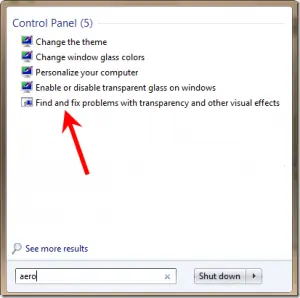
Ya probaron todo pero no les anda. No se maten tocando registros ni reistalando drivers. Link a la solucion: http://answers.microsoft.com/en-us/windows/forum/windows_7-desktop/windows-7-aero-will-not-work-after-4282010-windows/29a96137-52fc-4c31-86d8-2f2094c55ea7 I have resolved the problem, but not using any of the aforementioned methods. I ran system scan (SFC/scannow), which indicated that it could not repair a corrupted file. That file was C:WindowsResourcesThemesAeroAero.mssytles . It indicated that it could not be repaired because the backup was also corrupted. Fortunately I had an uncorrupted copy of the file on my Windows 7 netbook, so I copied the file over to my desktop (the computer with the problem), and went about replacing the corrupted one with the clean file. To do this, I took control of aero.msstyles (takeown), and then got full rights to the file with cacls. After that, I simply replaced the corrupted Aero.msstyles with the one from my netbook, restarted, and no more problems. Thanks anyways, Ray Por lo tanto, copien de alguna maquina con windows 7 (no importa la version, mientras sea una que TENGA aero porsupuesto) el archivo "Aero.mssytles" que se encuentra en "C:/Windows/Resources/Themes/Aero" (puede variar los nombres segun el lenguage del OS) de alguna otra PC/laptop y peguen dicho archivo en la misma ubicacion pero en la PC/laptop a la que no le funciona el aero. Si no funciono al instante van a inicio, escriban "Aero" y selecionen "find and fix problems with transparency...." (varia segun el lenguage del OS), ejecuten el reparador y automaticamente tendria que restablecer el desktop manager de windows (que es muy probable que este desactivado, como muchas de las guias en internet explican). Es muy probable que cuando quieran borrar o sobreescribir "Aero.msstyles" les salte error de ownership. Simplemente click derecho (desde una cuenta administrador) y seleccionen la opcion take ownership del archivo (no se como salta en español, ¿Tomar propiedad o gestion?) y procedan con el resto de la guia.