Bl4ckLulz
Usuario (España)
PHP SCRIPT Saber si el servidor en realidad esta caído o es nuestra pc o conexión de internet. Si no tienes un enlace de cerca para ir a un sitio y ver si un servidor esta caído, te dejo un código PHP que tiene la función de indicar los dicho anteriormente. <html> <head> <style> body { background-color:#FFF; font-family: Verdana; color: #000; } input{ -moz-border-radius: 3px; font-family: Verdana; background-color: #FFF; border: 1px solid #CCC; color: #000; font-size: 25px; margin: 3px; padding: 3px; } #sin_borde { border-width:0; cursor:pointer; display:block; font-family: Verdana; } td { font-size: 25px; font-family: Verdana; } </style> <title>Averigua si un servidor esta caído o eres tu!</title> </head> <body> <center> <?php /** * * * @author Daniel Godoy * @copyright 2011 * @Site www.0x3a.com.ar www.remoteexecution.com.ar www.delincuentedital.com.ar * * This program is free software: you can redistribute it and/or modify * it under the terms of the GNU General Public License as published by * the Free Software Foundation, either version 3 of the License, or * (at your option) any later version. * * This program is distributed in the hope that it will be useful, * but WITHOUT ANY WARRANTY; without even the implied warranty of * MERCHANTABILITY or FITNESS FOR A PARTICULAR PURPOSE. See the * GNU General Public License for more details. * * You should have received a copy of the GNU General Public License * along with this program. If not, see <http://www.gnu.org/licenses/>. * * **/ set_time_limit(0); $url=htmlentities($_POST['url']); if(isset($url)&&($url!= "") { $online = @fsockopen($url, 80); if ($online) { echo '¡Eres tú, <a href="http://'.$url.'" target=_blank>'.$url.'</a> está funcionando ok! <br><a href="'.$_SERVER['PHP_SELF'].'">¿Deseas chequear otro sitio?</a> '; } else { echo '¡No, no eres tú! <a href="http://'.$url.'" target=_blank>'.$url.'</a> está caído. <br><a href="'.$_SERVER['PHP_SELF'].'">¿Deseas chequear otro sitio?</a> '; } }else{ echo ' <form name="pr" action="" method="post"> <table align="center"> <td>¿<input id="boton" type="text" name="url" size="15" maxlength="300" value=""/> ESTA CAIDO..</td> <td></td> <td><input type="submit" name="submit" id="sin_borde" value="O SOY YO?" /></td> </table> '; } ?> </center> </body> </html>
Existen muchas palabras que ni yo se como se pronuncian los nombres de los servicios que nos ofrece el Internet o varios programas. Una pequeña lista no muy larga: Youtube - Yuu tuvf Google - Guugll Gmail - Yi meil Messenger - Mesenyer FireFox - Fairfoxs Windows - Güindous Yahoo - Yajuú Blogger - Bloguer Site - Sait Macintosh - Makintoosh Apple - Áppel Theme - Tem Flickr - Fliquer Podcast - Pod cast GIF - Guif PNG - Pe ene ge Web2.0 - Güeb dos punto cero Adsense - Ad sens Hotmail - Hot meil Mp3 - Eme pe tres Home - Jom Hosting - Joostin MySQL - Mai es kiu el ó Maisecuel (Cuando se pronuncia rapido) del.icio.us - Delisius Facebook - Feisbuk Twitter - Tuirer ó tuiter Noob - Nub. Skype - Escaip ó Scaip. MySpace - Maispeis Java - Yava ó Shava (Algunos dicen Shava) JavaScript - Yava escrip (Algunos dicen Shava) Update - Opdeit Upgrade - Opgreid C - Se, Ce ó Ci C++ - Se más más ó Se plus plus C# - Se Sharp Nota | Quizas la pronunciación no sea adecuada para todos los lenguajes de 'Español' puede variar el entorno de como se pronuncia en cada país.
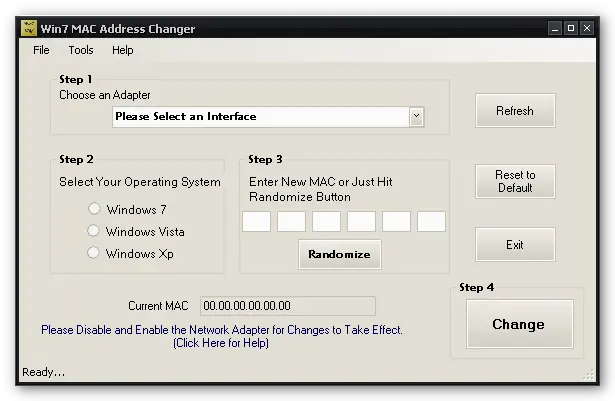
La dirección MAC o MAC Address como comúnmente se le llama, es un identificador de tu tarjeta de red, es decir, es una serie de números y letras que identifican a tu dispositivo con el cual te conectas a una red, como por ejemplo internet. Hay muchas aplicaciones como Wireless Network Watcher que te permiten ver quien está conectado a tu red wi-fi y te muestran la dirección MAC del equipo de esa persona y a través de esta tú puedes bloquear este dispositivo e impedir que se vuelva a conectar tu red. En la mayoría de los casos en que se necesita cambiar una dirección MAC es para saltarse algún tipo de bloqueo como el que les explicaba anteriormente con el fin de conectarse a alguna red. Win 7 MAC Address Changer funciona de manera sencilla, basta con ejecutarlo (no necesita instalación), seleccionar el dispositivo, sistema operativo e introducir la nueva dirección MAC, en caso de que no sepas que datos introducir, el programa te da una dirección MAC de forma aleatoria. Este programa es gratuito y compatible con Windows XP/Vista/7. http://zokali.com/win7-mac-address-changer